Slides · Tested
Claude Sonnet 5.5 vs Opus 5.5 for Slides: Same Brief, Two Decks

Anthropic released Claude Sonnet 5.5 on September 28, 2026 and singled out design: polished documents, slides and spreadsheets, more than 30% faster than Sonnet 5, at the same price. Opus 5.5, a week older, is the larger model. If you make decks for a small business, the practical question is simple: is the faster model good enough, or is the bigger one worth the wait?
On September 29 we gave both models the same brief for a six-slide info-evening deck for Harbor Street Makers, a fictional community workshop, with a set of icons we had made in Ciyo. We ran each once and checked both decks the same way. This is one small test, not a benchmark.
What Anthropic claims
Anthropic's launch thread says Sonnet 5.5 “follows templates to create slides that need minimal editing.” Its model page lists the same price as Sonnet 5, $2 per million input tokens and $10 per million output tokens, and says it usually needs fewer tokens per task.
Posted 2026-09-28. In its Sonnet 5.5 launch thread, Anthropic writes that the model “has a knack for design”, adds polish to user interfaces and follows templates to create slides that need minimal editing. That is the claim we tested below with one real brief.
The test: one brief, two models, the same icons
We ran both models in Claude Code at the same moment, each with its own empty folder, the same prompt and a copy of six white icons made in Ciyo. Neither could use the network or install anything. Each had to return one HTML file with six 1280 × 720 slides and every fact exactly as written, and each reported its own model ID: claude-sonnet-5-5 and claude-opus-5-5.
The brief had two traps a careful designer would catch: an amber accent that is hard to read on the off-white background, and only one “tools” icon for three different classes.

Make a 6-slide deck for Harbor Street Makers, a community workshop, for its autumn classes info evening. Output: one self-contained HTML file. Each slide is a <section class="slide"> exactly 1280x720 px, stacked vertically with no gap. Embed the icons as data URIs or reference them by relative path "icons/<name>.png". No external fonts, scripts or network requests. Slides: 1. Title: "Autumn Classes 2026" and "Harbor Street Makers - info evening". 2. Woodworking Basics: Tuesdays 18:30-20:30, 6 weeks, from 6 October, EUR 120. 3. Bike Repair: Thursdays 18:00-20:00, 4 weeks, from 8 October, EUR 80. 4. Upholstery: Saturdays 10:00-13:00, 5 weeks, from 10 October, EUR 150. 5. Where and how to sign up: 14 Harbor Street, Unit 3. harborstreetmakers.org/autumn. Sign-up closes 2 October. 6. Questions: Tools are provided. Beginners are welcome. Ask at hello@harborstreetmakers.org. Brand: navy #1F3A5F, warm off-white #F6F1E7, amber accent #D98E04. Icons (white on transparent, 512x512 PNG): calendar.png, tools.png, people.png, pin.png, tag.png, question.png. Use them where they help. Every fact above must appear exactly as written. Text must stay readable and inside its slide.Both decks were correct
We rendered both decks in a headless browser and checked them with the same script. Both had six slides of exactly 1280 × 720, all 23 facts from the brief word for word, no text outside its slide and no network requests. On correctness, there was nothing to choose.
| Check | Sonnet 5.5 | Opus 5.5 |
|---|---|---|
| Time to finish | 67 s | 309 s |
| Tool calls | 9 | 14 |
| Facts present, exactly | 23 of 23 | 23 of 23 |
| Text outside a slide | None | None |
| Lowest text contrast | 4.28:1 (large text, passes) | 2.39:1 on a small label (fails) |
| Smallest text | 20 px | 16 px |
| File | 358 KB, icons embedded | 13 KB, icons linked |
Sonnet 5.5: one template, applied everywhere
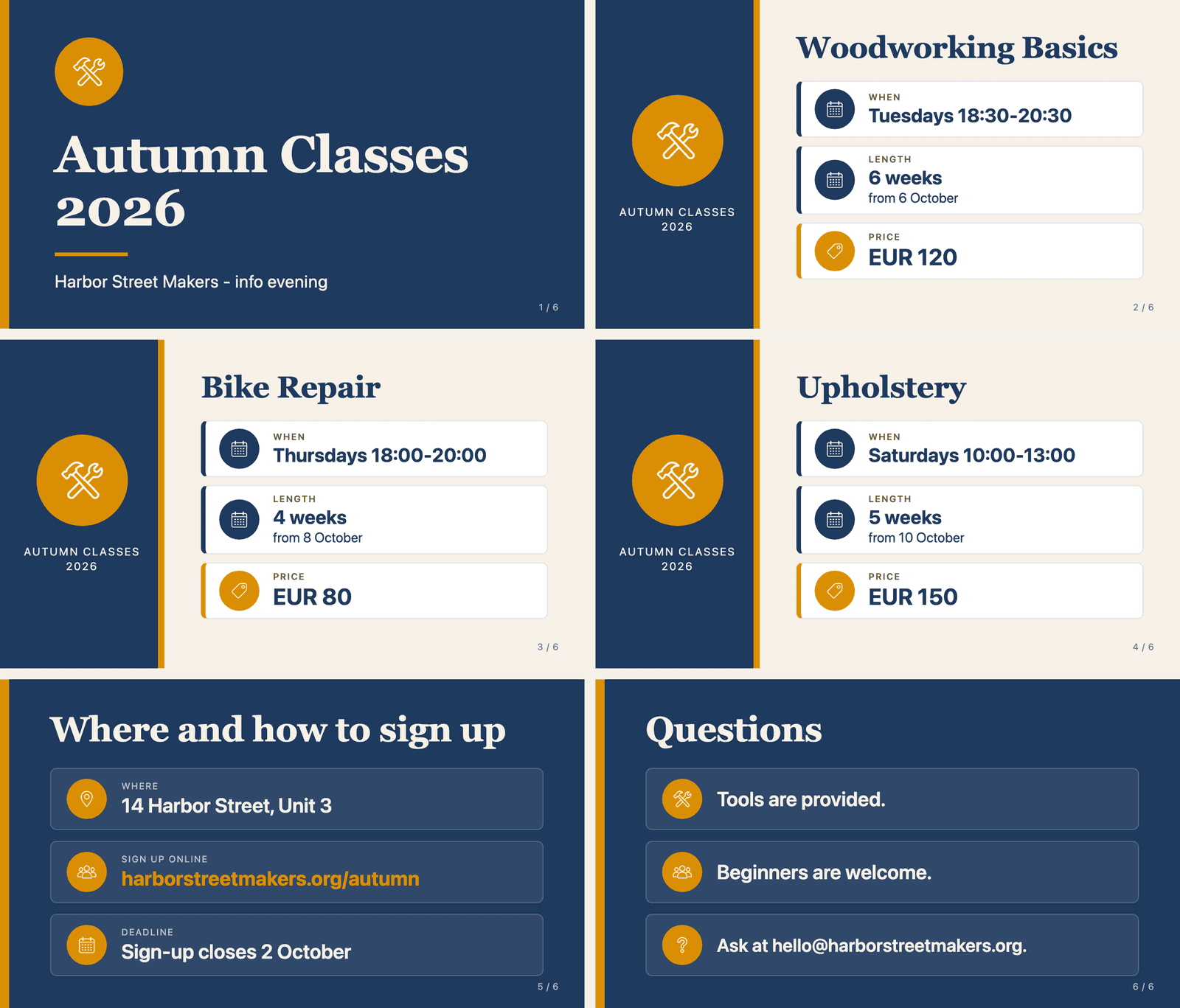
Sonnet 5.5 finished in 67 seconds. It chose one layout for the three class slides, serif titles and labelled rows (When, Length, Price), and kept to it. The deck is consistent and easy to scan, which is what “follows templates” looks like in practice.
It also repeated itself where a designer would not. The calendar icon marks both the day and the length of each course, and every class slide repeats “Autumn Classes 2026” in its side panel. The sign-up deadline, the most urgent fact, gets no emphasis. It told us it had not re-checked slides 3 to 6 after a late fix.
Opus 5.5: more design decisions, one mistake
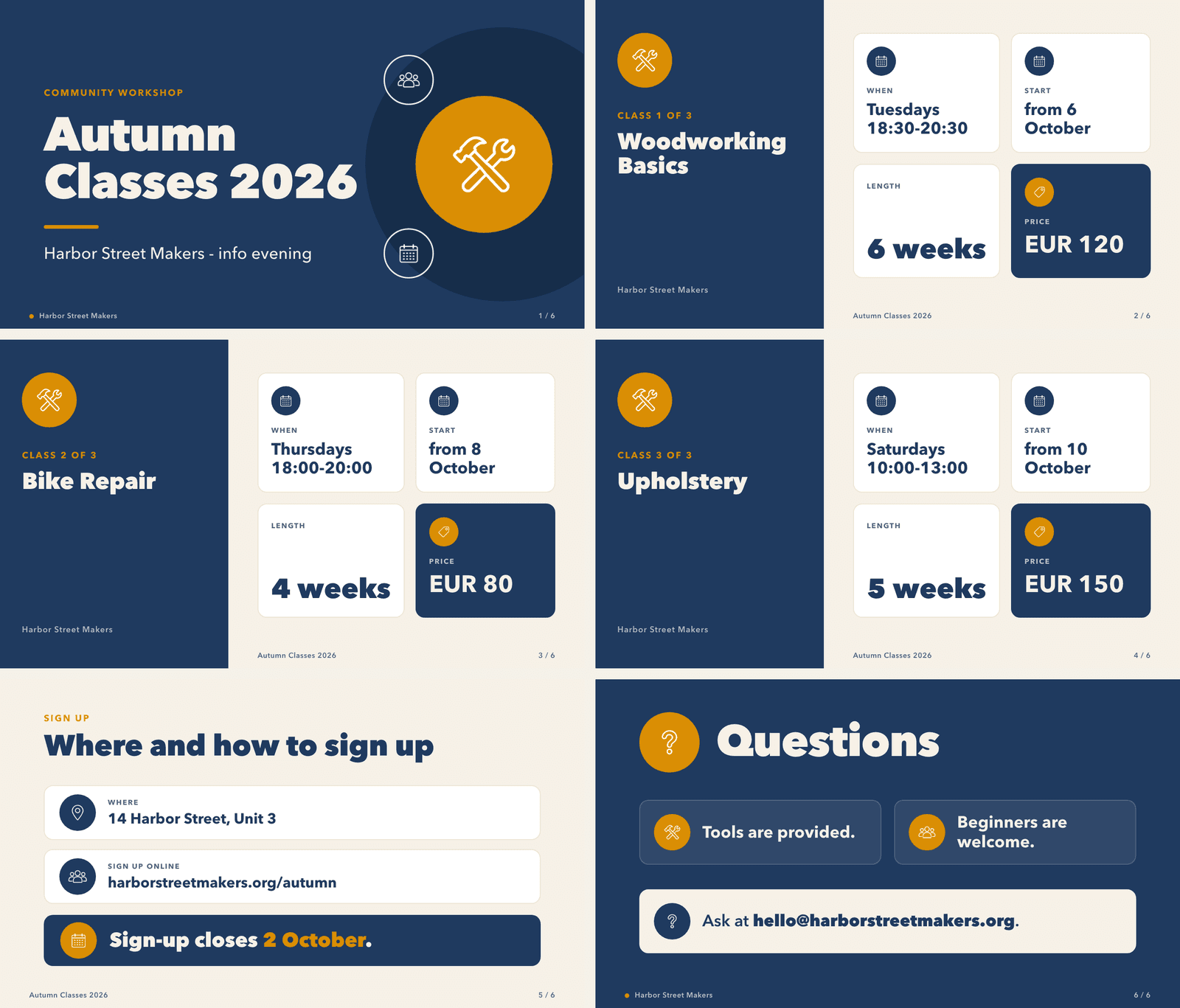
Opus 5.5 took 309 seconds, about 4.6 times longer. It made more choices: a bolder title slide, “Class 1 of 3” labels, a grid of cards on each class slide, and the deadline date picked out in amber. It checked its own render of all six slides before it answered.
It also made the one error a contrast check catches: a small “Sign up” label in amber on the off-white background, at 2.39:1, well below the 4.5:1 that small text needs. It used the people icon for the website link, and both decks reused the tools icon on all three class slides.
Which one to use
For a deck that follows a clear template, Sonnet 5.5 did the job in about a minute with no errors of fact or layout. Opus 5.5 took five minutes and made a more designed deck, with one contrast mistake. Neither deck needed its facts fixed; both needed a designer's eye on icons and emphasis.
Whichever you use, run the same three checks we did: every fact against the brief, every text against its background, every icon against what it stands for. And give the model assets that already match, such as an icon set made once in Ciyo, rather than asking it to invent them.
Sonnet 5.5 and Opus 5.5 for slides
Is Claude Sonnet 5.5 good at making slides?
In our single test on September 29, 2026 it made a correct, consistent six-slide deck in 67 seconds, with every fact exactly as written. It reused one icon for two meanings and did not emphasise the deadline.
Is Opus 5.5 better than Sonnet 5.5 for design?
It made more design decisions and a more varied deck, but took about 4.6 times as long and put one small label at a contrast of 2.39:1. For template work, Sonnet 5.5 was enough in our test.
Did either model get a fact wrong?
No. Both decks contained all 23 facts from the brief word for word.
Where did Ciyo come in?
We made the six icons in Ciyo and cleaned them for dark slides with the Ciyo Agent. The decks were made in Claude Code.
Make your deck's pictures in Ciyo
Create matching icons and slide images on one board, then hand them to the model that builds your slides.