Slides · Tested
Make One Matching Icon Set for a Whole Slide Deck With AI
Icons tie a deck together when they look like one family: the same line weight, the same corners, the same size on the slide. Mixing icons from three free sites is how most decks end up looking assembled. Making your own set with AI solves the style problem and creates a file problem.
On September 29, 2026 we made six icons for Harbor Street Makers, a fictional community workshop, in Ciyo. The icons matched well. The SVG that came with them would have put white patches on every dark slide. Here is how we found that, and how we fixed it.
Write the set's rules, not six separate requests
Ask for every icon in one message, on one sheet, with the rules that make them a family: one colour, one stroke weight, rounded ends, the same visual size and a fixed grid. Six separate requests give you six separate styles.
The Ciyo Agent drew the sheet with GPT Image 2.5 Flare and traced it to SVG with Ciyo's Vector tool. Together they cost 4 credits. The agent noted that the navy came out a little darker than asked, close to #10326B instead of #1F3A5F, and that the icons were traced as filled outline shapes rather than editable lines.
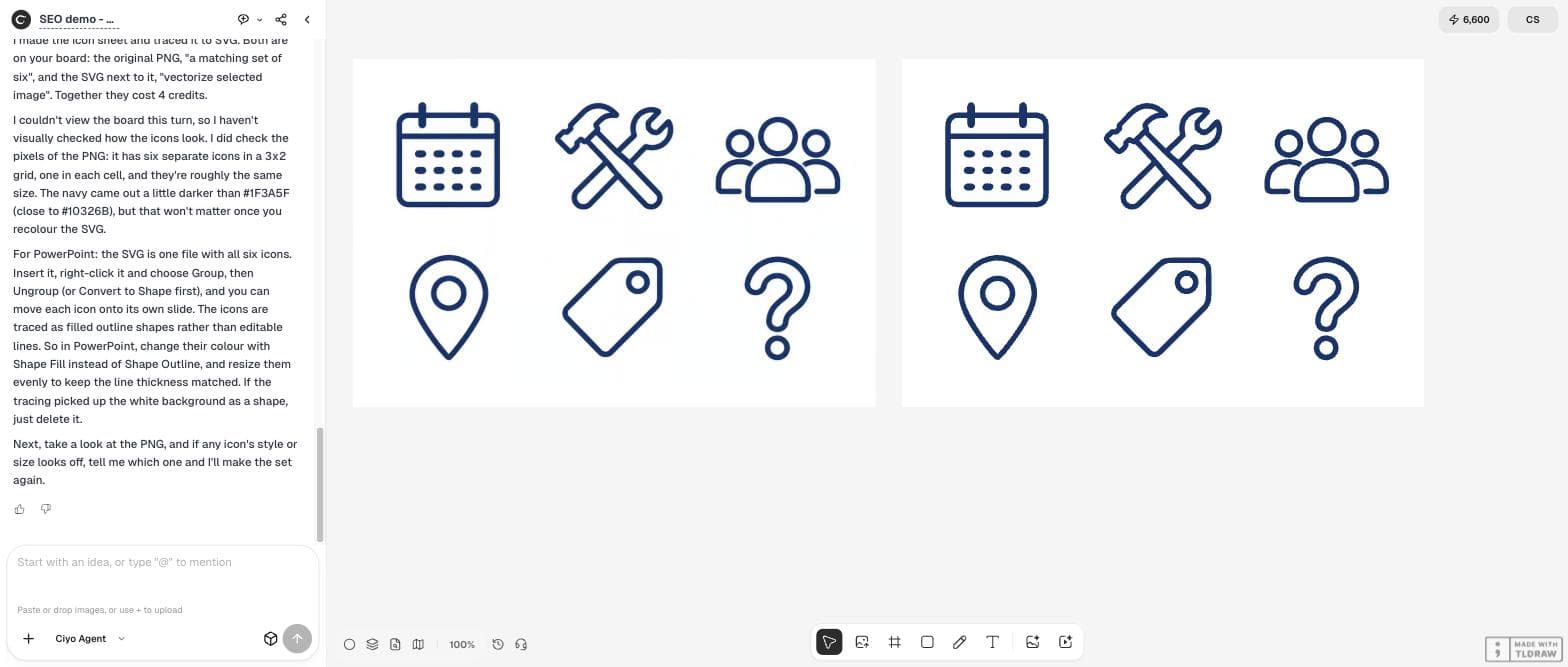
I run Harbor Street Makers, a community workshop, and I am building a 10-slide deck for our autumn classes. Please make one matching icon set for the whole deck: six icons for calendar, hand tools, group of people, location pin, price tag and question mark. Style: simple line icons, one colour (navy #1F3A5F) on white, the same stroke thickness, rounded line ends, the same visual size, each centred in its own square cell, arranged in a 3x2 grid with generous spacing, no text or letters. Then turn the icons into SVG so I can recolour and resize them in PowerPoint.Check the set before you check each icon
The set passed the most important test: the line weight. We measured the stroke in the PNG at 12.8 to 14.0 pixels across all six icons, within about 5% of each other. Rounded ends and single colour held too.
Size was less even. Most icons are about 250 pixels tall, but the people icon is 204, and the question mark and tag carry about half the ink of the calendar. On a slide that reads as “lighter” icons. Fix it by placing each icon in the same square box and nudging the lighter ones up by a few percent, not by asking for a new set.
| Icon | Width × height | Stroke | Ink |
|---|---|---|---|
| Calendar | 247 × 250 | 14.0 px | 20,163 px |
| Tools | 282 × 255 | 12.8 px | 19,405 px |
| People | 298 × 204 | 13.4 px | 17,812 px |
| Pin | 188 × 251 | 13.4 px | 11,132 px |
| Tag | 239 × 238 | 12.8 px | 10,726 px |
| Question | 157 × 248 | 13.4 px | 10,033 px |
The hidden problem in the traced SVG
We opened the SVG. It had 45 filled shapes and no lines: 26 navy, 17 white and 2 light blue. On a white slide you would never notice. On a navy title slide, every white shape shows as a white patch, and the light-blue ones are leftovers from the tracer's edge smoothing.
This is common with traced icons, and it is the first thing to check before you buy into a set: open the SVG in any editor and look at the fill colours.
Fix it without turning the icons into blobs
We asked the agent to remove the white and light-blue shapes and set everything to #1F3A5F. It did not do exactly that, and it was right. It explained that the tracer had drawn each icon as a solid navy block with white shapes laid on top to make the outlines, so deleting the white shapes would have made solid blobs, with about 2.4 times as much navy area.
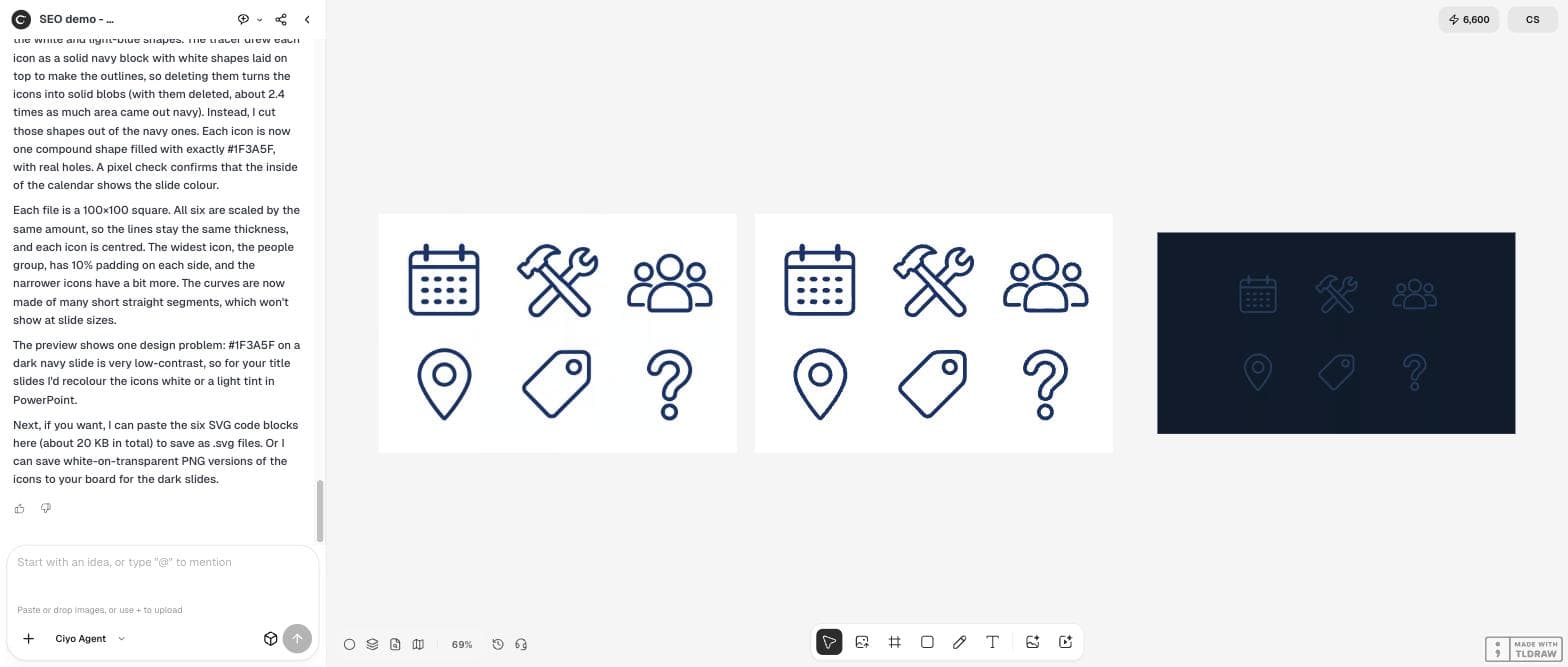
Instead it cut the white shapes out of the navy ones. Each icon became one compound shape in exactly #1F3A5F, with real holes. It then rendered the six icons on a dark slide and pointed out a design problem we had not asked about: navy icons on a navy slide have very little contrast.
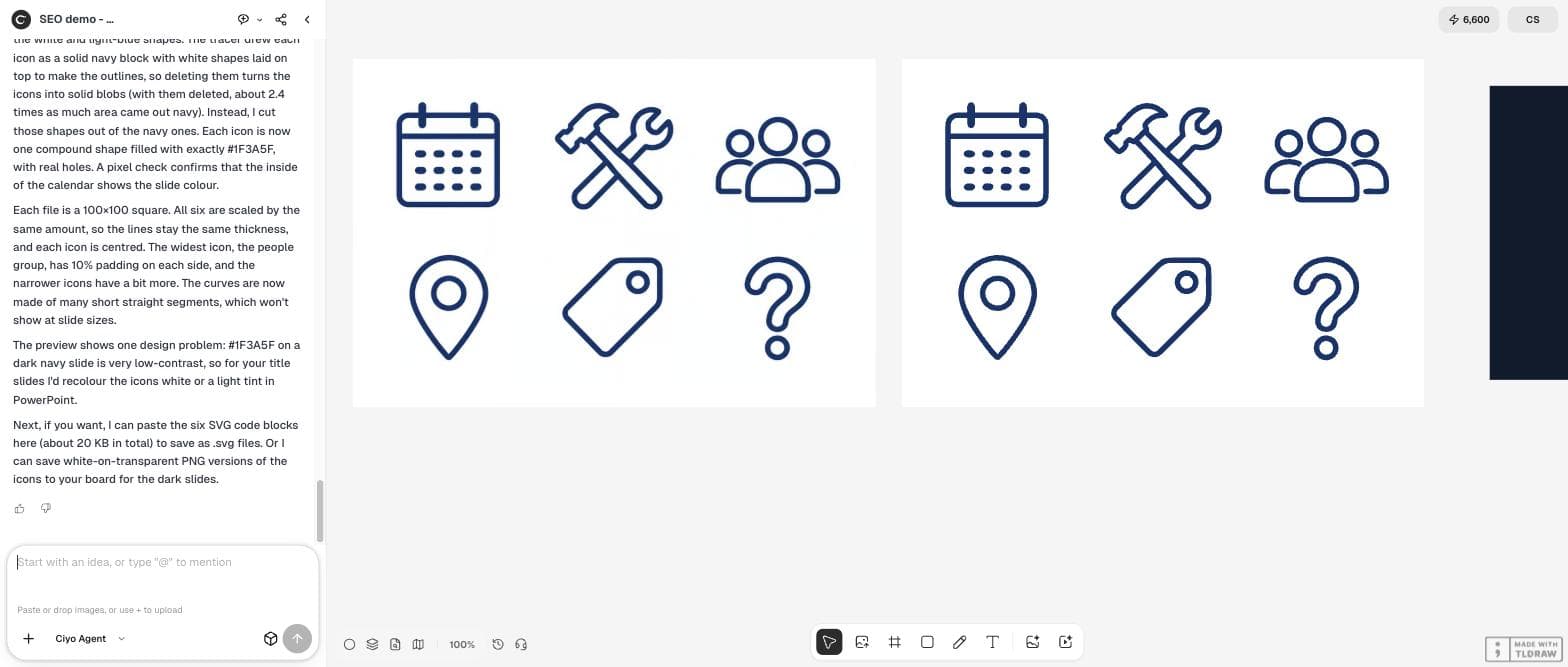
I checked the SVG: it has 45 filled paths and no strokes. 26 are navy (#0F326C), 17 are white and 2 are light blue, so on our dark title slides the white shapes will show as white patches. Please make the icons slide-ready: remove every white and light-blue shape so the insides are truly empty, set every remaining shape to exactly #1F3A5F, and save six separate SVG files (calendar, tools, people, pin, tag, question), each cropped to a square with the same padding so they line up. Also show them once on a dark navy slide background so I can check them.Get the files out: SVG code and white PNGs
One limit showed up here. The agent cannot place SVG files on the Ciyo board, which accepts PNG, JPG, WEBP, GIF, MP4 and MOV. So we asked it to paste the six cleaned SVGs as code, which you save as .svg files, and to put white PNG versions on the board for the dark slides.
We checked the six SVGs: each is one shape in #1F3A5F with the even-odd fill rule, on a 100 × 100 grid with at least 10% padding, 1 to 3 KB each. The insides are empty (7–14% of each square is ink), so they work on any background. The white PNGs are 512 × 512 with transparent backgrounds.

Yes to both, please: paste the six cleaned SVG code blocks here so I can save them as .svg files, and save white-on-transparent PNG versions (512x512 each) to the board for the dark title slides.Or lock a free library
If a free icon library already has every icon you need, use it, and use only that one. The reason to generate your own set is a subject no library has, such as your product, your shop or your service. The rule is the same either way: fix the style once and never mix.
Posted 2026-09-26. A developer lists 20 free icon libraries and advises choosing one that matches your visual direction (stroke weight, corner radius, grid, filled or outline) so a coding agent does not mix “4 different icon styles”. It is advice for app builders, not about Ciyo; the same rule applies to a generated set.
Use them in PowerPoint
Insert each SVG with Insert, then Pictures. Change its colour with Graphics Fill, because the icons are filled shapes, not lines. Keep every icon at the same size so the line weight stays equal from slide to slide.
AI icon sets for slides
Can AI make icons that match each other?
Yes, if you ask for the whole set on one sheet with explicit rules. In our test on September 29, 2026 the stroke weight of six icons stayed within about 5%; the icon sizes varied more.
Why does my SVG icon show a white box or white patches on a dark slide?
Traced icons often use white shapes on top of solid ones to draw the outlines. Ours had 17 white shapes. Cut them out of the coloured shapes, or ask the Ciyo Agent to do it, so the holes are really empty.
Can I change the icon colour in PowerPoint?
Yes. Insert the SVG and use Graphics Fill. Because the icons are filled shapes, the outline setting does not change them.
What did it cost?
4 credits for the icon sheet and the SVG trace. The clean-up, the code and the white PNGs cost no credits in our test.
Make your deck's icons in Ciyo
Describe the set once, trace it to SVG and let the Ciyo Agent clean the files for light and dark slides.