Video finishing · Troubleshooting
Fix AI Product Video Text with a Static Packshot End Card

A short product clip can have useful motion and an unreadable ending. A static packshot end card can give the viewer a stable product view and exact words, provided the earlier motion is still truthful.
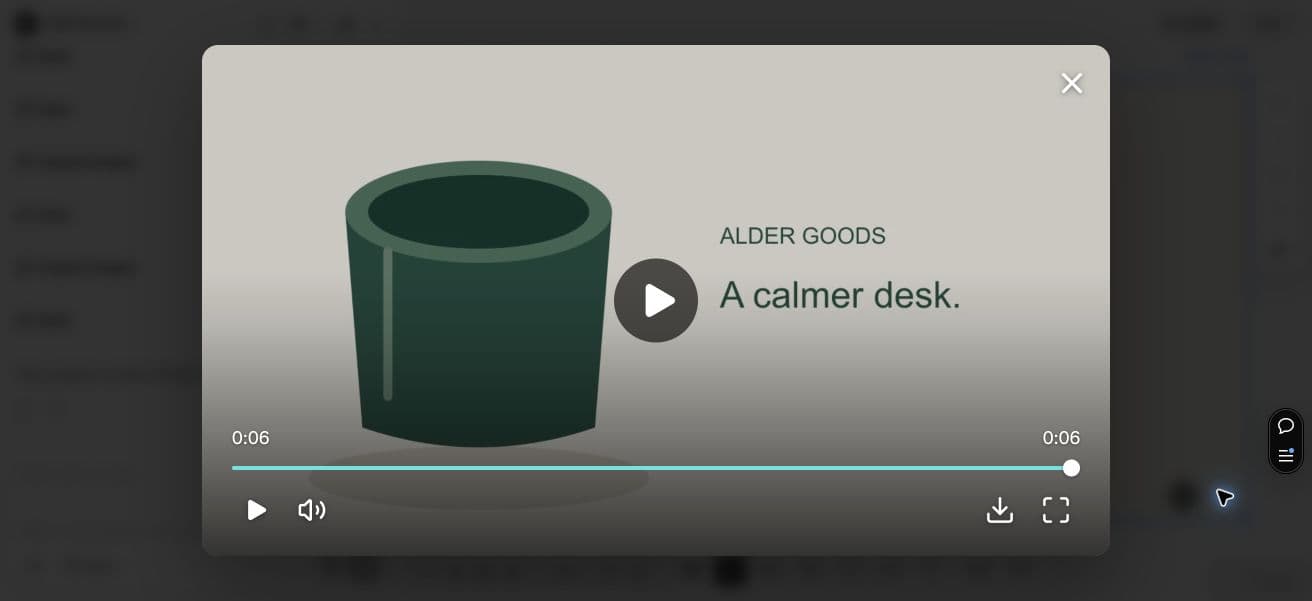
The original Ciyo agent request failed without a saved MP4. We assembled the delivered silent video outside Ciyo with FFmpeg, using our own SVG still and end card. We then imported the final MP4 into Ciyo and played it to 0:06. Its verified file is 1280×720, 24 fps, four seconds of gentle motion plus two seconds static, with no audio. This is an external assembly and import demonstration, not a Ciyo Film export.
Quick answer: replace the ending only if the earlier clip is usable
Reject motion that changes material product facts. If the useful portion is accurate, trim it before the bad ending and append the approved still with separate, checked text. Inspect the transition and final encoded video.
An end card does not repair distorted labels in earlier frames. It also cannot make a false shape, capacity or product action acceptable. Sometimes the right choice is a still-led video or a new source rather than saving the clip.
1. Identify the usable portion
Watch the source at normal speed, then inspect the product-critical frames. Look for changing labels, logos, openings, controls and proportions. Mark where an unacceptable change begins, not merely where the camera movement stops.
A November 3 X reply by commercial video freelancer @virtualAIads discusses small-label difficulties and finishing in an editor. We adapt the broad finishing idea here; the post does not demonstrate Ciyo use, measured accuracy or an independent tool comparison. Some parent posts were unavailable.
Original reply dated November 3, 2026. Commercial freelancer context; tiny observed engagement, with some parents unavailable. It informs the finishing question, not a claim that the author used or endorsed Ciyo.
2. Prepare the approved still and exact copy
Use the original authorized packshot, not a frame that already contains distorted lettering. Put the short brand or message in separate editable text so you can proofread it. Keep any existing packaging claims consistent with the actual item.
Alder Goods uses an original code-drawn pot and the line “A calmer desk.” This illustration represents no real sale item. Our static card is a reproducible layout example, not proof that a model preserved a photographed label.
3. Assemble motion and a stable ending
The example requests a 6-second 1280×720 MP4: 4 seconds of subtle motion on the source still, then a 2-second static card. These are illustrative creative choices, not a platform limit or a proven optimal viewing duration.
Ask the agent to identify the verified assembly route and provide a downloadable MP4. A composition plan or a canvas preview is not the saved final movie. If native assembly or export cannot complete, finish in a suitable video editor and name that handoff.
Use the approved source still and usable clip only. Trim before any material product distortion. Append a static packshot with separately rendered exact words: Alder Goods / A calmer desk. For this demonstration, make 4 seconds of subtle still-image motion plus a 2-second static card, 1280×720, no audio. Keep editable text source and provide the final MP4. Inspect start, transition and last frame. This is motion graphics, not a failed model-video repair test. Do not publish.



4. Inspect the cut and the card
Play across the join. The product should not jump to a confusing scale or a different identity. Check whether a direct cut or restrained transition suits the footage; an elaborate effect can make the final words harder to read.
Read the card at final phone size and normal speed. Two seconds may be enough for our short line but not for longer copy or accessibility needs. Shorten the message or hold the card longer after an actual viewing check.
5. Check the exported MP4, not only the preview
Open the downloaded file and verify its duration, dimensions and playback. Check the last frame, unwanted black frames and any clipping of text. If the real source has audio, listen across the cut and ending; our silent example does not test an audio fade.
Retain the approved still, source text and final file together. For a solo merchant, a simple still-led ending may be easier to maintain. An agency should document which moving frames were accepted and which were removed.
To inspect the delivered file in Ciyo, download the final MP4 below, open your project, choose Upload then Upload Video, and select it. Open its preview and play through the cut to the last frame. This imports the externally assembled file; it does not repeat a native Film export.
When to replace the whole clip
If the product changes throughout the motion, a tidy ending is insufficient. Use a faithful still-based sequence or capture suitable new footage. Do not hide a misleading claim behind a later correct image.
This finishing method is useful when the problem is bounded and the source material is trustworthy. It makes no promise of conversion gains, universal model accuracy or a fully repaired video.
Practical questions
Does the end card fix text in earlier frames?
No. It replaces or follows an ending. Remove unacceptable earlier frames or replace the clip if material product facts are wrong.
Was the example a failed AI-video generation?
No. It is a code-assembled motion-graphics stand-in using original fictional artwork. We did not deliberately generate a failure to demonstrate the edit.
Must the end card last two seconds?
No. Two seconds is an illustrative choice for a short line. Check readability at normal speed and hold it longer when needed.
What about audio?
Our example is silent. For a real clip, inspect the cut, level and ending in the exported file; do not assume the visual assembly fixed the sound.
Finish with a faithful product view
Bring a usable clip, an approved still and short verified copy. Review the final encoded video before distribution.