Ciyo · GPT-6
GPT-6 Astra API Guide for Creative Apps
The documented API model ID for GPT-6 Astra is gpt-6-astra. OpenAI’s model guidance says to build with it through the Responses API, and the model page lists Responses, Chat Completions, and Batch support. For a product that turns briefs into images, layouts, or copy, the interesting parts are reasoning control, the built-in image tool, and the price bands.
This guide reflects the OpenAI developer documentation on September 7, 2026. It is written for people building creative tools, so it spends more time on the image generation tool and cost per asset than on general agent architecture. Recheck the linked pages before shipping; parameters and prices are dated snapshots.
Check access before you write code
API access is separate from a ChatGPT subscription. A Plus or Pro plan does not create API credit, and an API key does not unlock GPT-6 Pro in Chat. Confirm that gpt-6-astra appears for the organization and project that will pay for the requests, then make one small text request before adding files, tools, or a large context.
Rate limits scale with usage tier. The model page lists 500 requests and 500,000 tokens per minute at Tier 1, rising to 15,000 requests and 40,000,000 tokens per minute at Tier 5. A batch job that generates variants for a whole catalogue should be sized against those numbers, or moved to the Batch endpoint where latency does not matter.
The first request
Set model to gpt-6-astra in a Responses API request and pass your prompt as input. The guidance recommends the Responses API because Chat Completions does not support tool calling with this model. Reasoning is set with reasoning.effort in Responses, or reasoning_effort in Chat Completions if you must stay there.
Astra supports low, medium, high, xhigh, and max effort. It does not support none or minimal, so a configuration copied from a GPT-5.6 request that used either should start at low and be compared. Remove temperature, top_p, top_logprobs, and logprobs; the model guidance lists them as parameters to drop when moving to Astra.
| Field | Value | Why |
|---|---|---|
| model | gpt-6-astra | The single documented snapshot |
| input | Your brief as text, optionally with images | Text and image input are supported |
| reasoning.effort | low, medium, high, xhigh, or max | none and minimal are not supported |
| tools | [{ type: "image_generation" }] when needed | Adds the renderer to the turn |
| temperature, top_p, logprobs | Omit | Listed as parameters to remove |
Pick an effort level per creative task
OpenAI’s reasoning guide pairs low effort with drafting and execution-oriented work, medium with research and working on spreadsheets and slides, high with hard reasoning and deep planning, and xhigh or max with long runs where quality matters more than latency. For a creative app that maps well: low for alt text and caption variants, medium for a campaign brief, high for a multi-asset plan with conflicting constraints.
Effort is also a cost control. Reasoning tokens are hidden from the response but are billed as output tokens at $50 per million and occupy space in the context window. The usage object reports them under output_tokens_details.reasoning_tokens. Log that field per request; it explains why two requests with similar visible answers can cost very different amounts.
Call the image generation tool
Add tools: [{ type: "image_generation" }] to the request and describe the picture in the input. Astra plans the image and calls the tool; the response contains an output item of type image_generation_call whose result field holds the base64-encoded image. The tool accepts size, quality (low, medium, or high), format, compression, background, an action of auto, generate, or edit, and partial_images from 1 to 3 for streaming previews.
The pixels are rendered by GPT Image 2, not by Astra, and are billed at the image model’s rates: $30 per million image output tokens, $8 per million image input tokens, and $5 per million text input tokens at standard pricing. For a follow-up edit, pass previous_response_id or include the earlier image_generation_call in the input so the renderer keeps the original as a reference.
Async tools and mid-turn steering
Astra introduces asynchronous function calls. Mark a function with async: true and the model continues working while your code runs the tool, then return the result with the original call_id when it is ready. For a creative app this suits slow steps such as rendering a video preview or fetching a large asset library.
Mid-turn steering lets you send an update over a WebSocket while a task runs; the Responses API preserves completed work and applies the correction. A configuration_update input item changes reasoning effort mid-conversation without rewriting the prompt, so the cached prefix survives. Both features are documented as new with Astra and require your application to implement them.
Know the four price bands
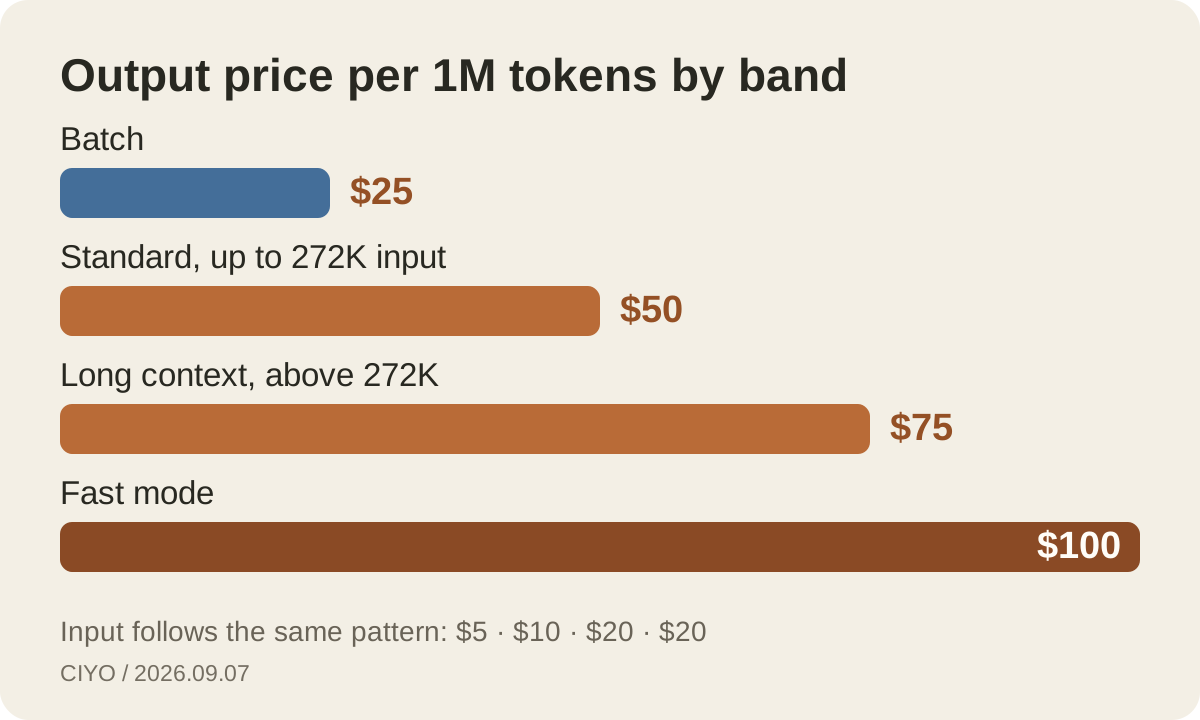
Standard processing costs $10 per million input tokens, $1 for cached input, $12.50 for cache writes, and $50 for output. A request whose input exceeds 272,000 tokens is billed at the long-context band: $20 input, $2 cached, $25 cache writes, and $75 output. Fast mode, which OpenAI describes as up to twice the speed, doubles the standard rates to $20 input and $100 output.
The Batch endpoint halves standard prices to $5 input, $0.50 cached, $6.25 cache writes, and $25 output for short-context requests. Overnight generation of copy variants, alt text for an image library, or briefs for tomorrow’s review are natural Batch candidates. Fast mode is unavailable for EU data residency, where the guidance says to use Standard.
| Band | Input | Cached input | Output |
|---|---|---|---|
| Standard, up to 272K input | $10 | $1 | $50 |
| Long context, above 272K input | $20 | $2 | $75 |
| Fast mode | $20 | $2 | $100 |
| Batch | $5 | $0.50 | $25 |
Cache the parts that repeat
Most creative requests reuse a brand section: tone, banned claims, colour rules, and product facts. Put that block at the front of the input so the cached prefix matches across requests. Astra replaces the older prompt_cache_retention parameter with prompt_cache_options.ttl, and the guidance uses a 30m value for a half-hour cache window.
A cached token costs $1 instead of $10, so a 15,000-token brand section costs $0.015 per reuse instead of $0.15. Cache writes are billed at $12.50 per million, which is why the block should be stable text rather than a prompt that changes on every request. Report cached tokens separately in your own analytics; they are the cheapest way to raise consistency.
Cost per approved asset
A brief request with 20,000 uncached input tokens and 4,000 output tokens costs $0.40 at standard rates. Add 10,000 reasoning tokens and the output line rises by $0.50. Add one high-quality image and the renderer’s own tokens are billed on top. Cost per approved asset, not cost per call, is the number that tells you whether a workflow is viable.
Track four lines per asset: Astra input, Astra output including reasoning, image tokens, and the number of attempts before approval. A cheaper effort level that needs three attempts can cost more than a higher level that needs one. This is the same accounting Ciyo applies to its own credits, where each generation shows its price before you run it.
What the API does not give you
There is no direct image output from Astra; every picture comes through the image tool or another renderer. There is no none effort, no temperature control, and no automatic fallback if you send an unsupported parameter. GPT-6 Pro, the ChatGPT option, is not a separate API model; the API lists one gpt-6-astra snapshot.
Safety checks can also stop a task. OpenAI’s launch post notes that in the API a paused task stops rather than asking you to review it, so a production app should handle an interrupted response gracefully. Keep the failure path visible to users, and keep a log of the request that produced it.
Continue reading
Questions about the Astra API
Does a ChatGPT Plus plan include API access to Astra?
No. ChatGPT plans and API billing are separate. Plus includes Astra in ChatGPT Work and Codex as it rolls out; API use of gpt-6-astra is billed per token to your organization.
Can I use Chat Completions instead of Responses?
The model page lists Chat Completions support for text requests, but OpenAI’s guidance says Chat Completions does not support tool calling with Astra and recommends the Responses API. The image generation tool and async functions are Responses features.
Are reasoning tokens free?
No. Reasoning tokens are billed as output tokens at the output rate of the band you are in, and they occupy context. The usage object reports them under output_tokens_details.reasoning_tokens.
Prototype the rendering step without an API key
Generate with GPT Image 2 on Ciyo’s canvas, keep the outputs you approve, and use the same brief when you wire the Astra API into your own product.