GPT Image 2.5 Flare · Composition
GPT Image 2.5 Flare: Make Room for the Headline

An attractive AI image can still be awkward to use in a campaign. If the subject fills the frame, the headline has to cover it or shrink into a corner. Ask for the layout your message needs before generating the picture.
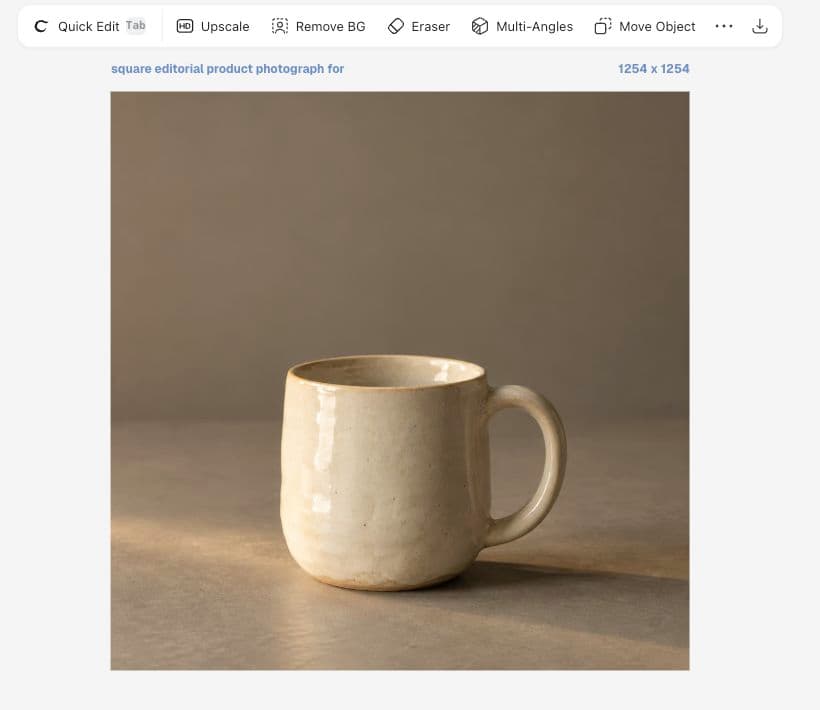
This guide demonstrates one Flare run in Ciyo: an ivory mug for fictional Still ceramics workshops, with a quiet upper third reserved for copy. It is a composition walkthrough, not a speed benchmark or a model ranking.
Confirm the image model
OpenAI introduced GPT Image 2.5 Flare on September 8, 2026, describing improvements to quality, editing and generation speed. Those are vendor claims. Our practical question is narrower: does this output leave useful room for the campaign message?
Ciyo's Image Generator offered Flare in the live session. Its model picker is separate from the GPT-6 Astra agent selector. Confirm the image-model name before starting; a planning conversation and an image-generation job are different steps.
Describe the empty area as part of the image
Negative space is the relatively quiet area around a subject. For Still's square image, the mug belongs in the lower half and the upper third should remain low detail. That is more actionable than ‘minimal photography,’ which could still put the mug in the middle.
Specify what must be absent too. Extra flowers, pottery tools or lettering could occupy the headline area. Keep this concept to one mug and a surface; add complexity only when it serves the message.
Square editorial product photograph for fictional Still ceramics workshop. Exactly one handmade ivory ceramic mug in the lower half of a warm gray tabletop. Soft amber side light, realistic glaze and gentle shadows. Keep the upper third empty and low detail for separate editable text. No logos, no letters, no additional props.Generate one image and inspect it
Open Image Generator, choose Flare and review the current settings and credit estimate. Enter the brief and generate one image. Open the result on the canvas rather than approving a small conversation thumbnail.
Our result has one ivory mug low in the square and broad plain background above it. The surroundings read warmer than neutral gray. That suits this fictional workshop, but a brand with a strict gray specification would need a color review.
Test the space with your actual words
Use the intended headline to judge the layout. ‘Make your first mug’ can work as a short line; a date, venue and price block needs more room. Add copy as editable text when revisions are likely.
Inspect contrast against both the brightest and darkest background areas, then zoom out. The subject should remain clear when the headline becomes the first thing someone reads.
| Check | Accept when | Revise when |
|---|---|---|
| Subject | One clear mug | Props compete for attention |
| Copy area | Words fit with margins | Texture interrupts the headline |
| Material | Glaze remains recognizable | Lighting obscures the finish |
| Crop | Handle and rim remain visible | The destination cuts off key details |
Preserve useful choices during revision
If the layout works and only the background color is wrong, use the accepted image as a reference and name that change. State that the silhouette, handle, rim and glaze should stay fixed. Compare the result instead of assuming preservation succeeded.
A new output can change dimensions or small details while looking similar at thumbnail size. Keep both versions and choose the usable one. Our reference-edit walkthrough records the actual background change and its limitations.
Check the delivered file
Square describes an aspect ratio, not an exact pixel count. This Flare preview reported 1254 × 1254. Inspect the source and prepare the size required by your destination rather than assuming a preset label guarantees final dimensions.
Keep the image, prompt and approved wording together. An image-only download is not a complete campaign graphic when the headline is separate. Measure campaign results after publication; an appealing composition alone does not prove conversion performance.
Flare composition questions
Does Flare guarantee the requested empty space?
No. Treat the prompt as a constraint to inspect. This result left useful space, but each output needs a composition check.
Should I generate the headline inside the picture?
Separate editable text is easier to revise for changing campaign copy. This example deliberately requests no lettering in the image.
Is this a speed test?
No. One demonstrated composition does not establish latency, average quality or a model ranking.
Create an image that fits your message
Choose one subject and reserve the copy area before generating your next concept.