GIF tutorial
How to Make a Looping GIF in Ciyo with GPT Image 2.6
A GIF can repeat forever and still jump every time it restarts. If you’re making a small motion accent for a social post or a website, that jump is easier to fix when the prompt gives the subject a clear place to return to.
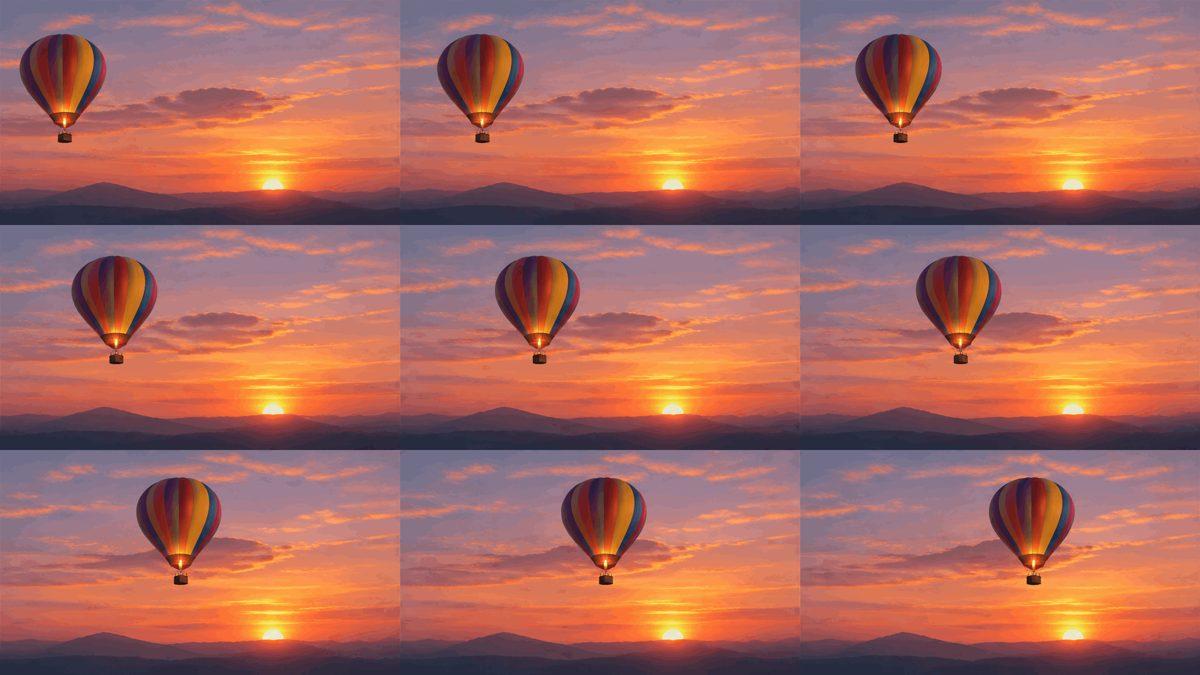
OpenAI introduced GIF generation with Images 2.6 in November 2026. This walkthrough uses Ciyo’s text-to-GIF workflow and a saved Sunburst example. You can inspect its nine frames and play the original file to see what happens at the restart.
Quick steps for a GPT Image 2.6 GIF
Describe one motion with a return to the starting pose. In Ciyo, choose GPT Image 2.6 Flare or Sunburst and set Format to Animated GIF. Generate one loop, watch it through two restarts, then select it on the canvas and use Download to save the GIF.
OpenAI announced GIFs and reference images on November 4. The steps below use Ciyo’s text-only GIF route.
1. Write a prompt with a return movement
Start with a single subject that reads clearly at the final display size. For a fictional balloon festival, use a striped balloon against a sunset. Give the balloon room to move, lock the camera and keep the horizon fixed.
Describe the return explicitly. “Drifts right, then eases back” gives the model a path it can fit into one loop. Replace the balloon and the movement for another concept. Keep the fixed elements in the prompt so you can check them frame by frame.
A striped hot-air balloon floats above a dark ridge in a warm sunset sky. In a locked wide shot, the balloon drifts slightly to the right and eases back toward its starting position. Keep its size and stripes, the horizon, and the light steady. Leave space around the balloon throughout. Create a short repeating loop with no text.2. Choose Animated GIF and set the crop
Open the Ciyo model tool or the Image Generator on a canvas. Select GPT Image 2.6 Sunburst to match the saved example, or try Flare for a quick concept. Open Image settings and choose Animated GIF. The format accepts text and creates one GIF with nine frames at 200 milliseconds each, for a 1.8-second loop.
Choose 16:9 for the wide balloon composition or 1:1 if the destination uses a square crop. The example used 16:9, Medium Quality and Medium Effort, with a finished size of 768 × 432 pixels. Read the displayed credit quote before you generate.
3. Watch the last frame return to the first
In the saved Sunburst result, the balloon moves steadily to the right. Frame nine puts it farther right than frame one, so it snaps left when playback starts over. The copyable prompt above adds a return movement to address that specific issue.
Play your result through at least two restarts. Look at the position and size of the balloon, then at the horizon and lighting. If the join still jumps, shorten the drift or ask the balloon to bob in place. If the whole scene moves, repeat the locked-camera instruction. Change one part of the prompt per retry so you can tell which revision helped.

4. Download the GIF and test where it will appear
Select the GIF on the canvas and click Download. Open the saved .gif in a browser, then check it in the destination’s preview. The saved balloon GIF repeats indefinitely and is 620,808 bytes. Your destination can impose its own limits or show only the first frame.
For a small team handing off the file, save the prompt, model and aspect ratio beside it. If the destination needs a lighter file, resize a copy and play it again. For an email, check that the first frame stands on its own before adding the file to the campaign.
When your animation needs a reference image
Use the Ciyo text route for a new illustration, such as a floating balloon or a simple reaction. If an approved mascot or product photo must guide the motion, OpenAI’s direct Images API supports GIF output with still references on its image edit endpoint. Check the resulting frames against the approved artwork, especially the silhouette, colors and labels.
GPT Image 2.6 GIF questions
How long is an Animated GIF in Ciyo?
Nine frames at 200 milliseconds per frame give you 1.8 seconds per loop. The format sets the timing.
Why does my GIF jump when it repeats?
The last and first frames may place the subject in different positions. Ask for a smaller movement with a return to the starting pose, then play the downloaded file through the restart.
Can I use an uploaded image for a Ciyo GIF?
Ciyo’s Animated GIF mode accepts a text prompt. For a workflow that takes a still reference, check the GIF settings on OpenAI’s direct image edit endpoint.
Make your first loop
Open the GPT Image 2.6 tool, select Animated GIF and edit the brief to give your subject one small motion with a clear return.