Product-video comparison
Kling 4.0 vs Seedance 2.5: Which Fits Your Product Video?

A model can produce an impressive commercial and still be the wrong choice for your product. If a camera move changes the handle, label or finish, the clip has missed the brief even when the lighting looks beautiful.
Kling 4.0 launched on October 15, 2026. This comparison reviews its official announcement alongside Seedance 2.5's provider contract and Ciyo's supported workflow, checked October 23. It is a comparison of documented controls and access, rather than a matched quality benchmark. Ciyo publishes this guide and offers Seedance; Kling 4.0 is not currently integrated into Ciyo.
The useful decision starts with the shot you need, the reference material you have and how you will reject an inaccurate take. Here is a way to make that decision before committing to a campaign.
Quick answer: choose the controls your shot actually needs
Consider Kling 4.0 when explicitly placed key images are central to your scene and you can use an external Kling interface that exposes those controls. Consider Seedance 2.5 in Ciyo when your work starts with existing product pictures and you want to prepare references and review takes together on a canvas.
Neither is a verified overall winner here. Ease of use depends on whether you need keyframe authoring or a connected reference workspace. The cheaper route also remains unknown until you compare equivalent requests and the number of usable takes.
| Your main requirement | Start by evaluating | Confirm before paying |
|---|---|---|
| Several specified visual moments within one clip | Kling 4.0 keyframe controls | The exact interface, supported inputs and availability |
| An existing product photo and a short motion brief | Seedance 2.5 in Ciyo | Input mode, actual quote and product continuity |
| The lowest cost for an acceptable shot | A small matched pilot | Retries, output settings and finishing work |
| A guaranteed unchanged label or geometry | Preserve an approved still or conventional footage | Neither model's feature list guarantees fidelity |
Compare model capabilities with the interface you can access
Kuaishou describes up to 30 seconds in one generation, Omni Reference with up to 15 reference assets and up to 10 keyframe inputs. Those are vendor descriptions of the model. Availability of each control still depends on the product or provider you use.
Ciyo's current Seedance 2.5 agent workflow accepts a start frame or up to nine image references and supports requested durations from four to 30 seconds. The underlying provider supports a broader contract. A provider limit is not a promise that every input is exposed by Ciyo's agent or every mode.
Keep output plans separate from current delivery. Kling's launch materials use future tense for some output formats and extension features. Do not make a purchase decision on a future setting until the service you will use actually offers it.
| Criterion | Kling 4.0 | Seedance 2.5 in Ciyo |
|---|---|---|
| Clip planning | Vendor describes native generation up to 30 seconds | Current agent supports four to 30 seconds |
| Visual control | Vendor describes Omni Reference and up to 10 keyframes | Start-frame or image-reference workflow; check the selected input mode |
| Where it runs | An external Kling service or supported provider | Ciyo's supported Seedance integration |
| Price | Verify a live quote for your chosen service and settings | Check the Generation quote for the actual request |
| Free access | Not verified for the relevant model, plan and account | Ciyo does not offer free generations |
| Quality and speed | No matched test in this guide | No matched cross-model test in this guide |
| Support | Check the service through which you buy the generation | Use Ciyo support for the Ciyo request; response time not benchmarked |
| Integration | Not available inside Ciyo at this review date | References, generated clips and review share a Ciyo project |
Kling 4.0: evaluate it when key visual moments lead the brief
A shot with a prescribed opening, a product reveal halfway through and a defined ending has a timing problem as well as an appearance problem. Kling's documented multi-keyframe approach is relevant to that kind of brief.
Its practical advantage is the possibility of stating several visual moments explicitly. The limitation is that constraints can conflict: dramatically different product angles may force the model to invent unseen surfaces between them. More keyframes do not automatically make a product depiction more accurate.
A production team already working in Kling should first check whether its current account exposes the needed controls. For a solo merchant who only needs a gentle movement from one approved photo, setting up several keyframes may add work without solving the actual problem.
Seedance 2.5 in Ciyo: evaluate it when your references lead the brief
A merchant often starts with a real front-view photo, a close detail and a short description of the desired motion. In Ciyo, those inputs and the resulting clips can stay together for review. That is useful when the next decision is whether the actual product survived the generation.
Choose Frames when the supplied image should define the starting composition. Choose Reference when it should guide the subject in a newly generated composition. Inspect the current model's controls instead of assuming those two roles are interchangeable.
The advantage is a connected preparation and review process. The limitation remains generation uncertainty: a reference does not lock the product's pixels. An agency should agree on rejection criteria with the client before generating a large set of variants.
Prepare one product-shot brief that either service can understand
For an illustrative Juniper Pottery shot, the subject is one ivory mug with a charcoal handle and a narrow amber band. The goal is a short, silent push-in for a product page. Juniper is fictional; this scenario supplies no customer result or evidence about a manufactured SKU.
Replace those details with your own authorized product photo. Record the visible identity cues and the surfaces that are not shown. For a first pilot, avoid asking for a full rotation when the source only shows the front.
Match duration, aspect ratio, audio state and output settings across services where possible. If the services cannot run equivalent settings, record the difference. A 720p silent clip and a higher-resolution dialogue scene answer different production questions.
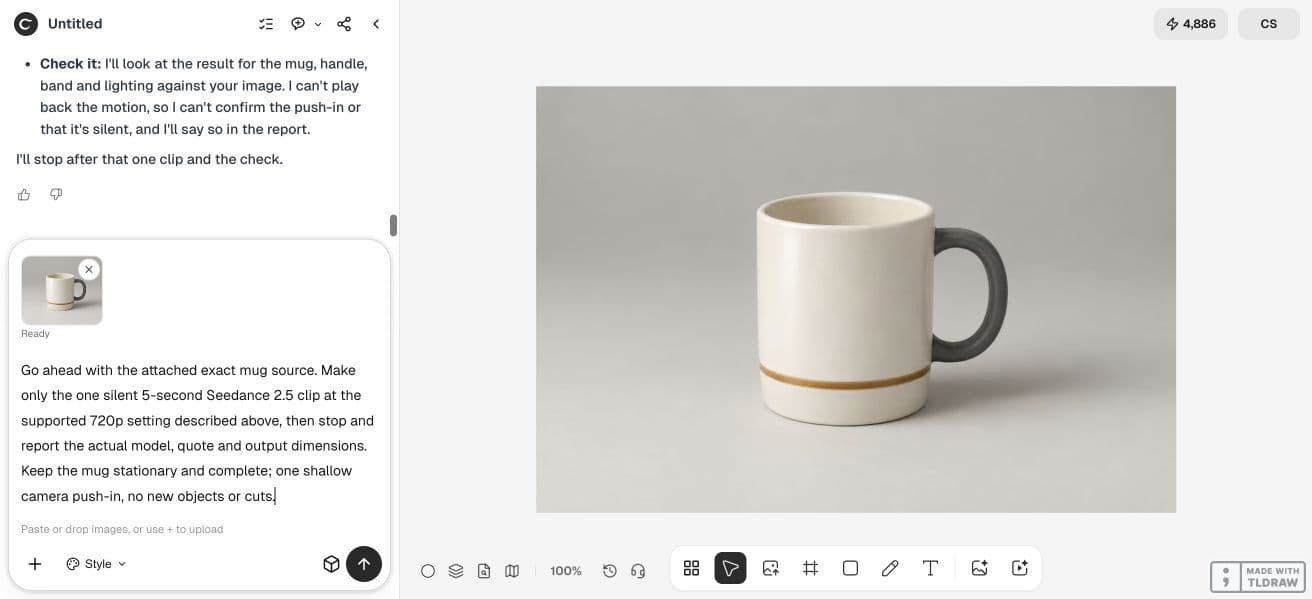
Use the attached product photo as the source for one five-second product shot. The product is [exact product and visible identity cues]. Keep the product stationary and fully in frame. Request one slow, shallow camera push-in with soft light from the left. Preserve the visible silhouette, handle or lid, markings and finish. No new accessories, cuts, product rotation or speech. Review the opening, middle and ending against the source before accepting the shot.Review usable shots instead of choosing a showcase winner
Keep every attempted output, including rejected takes. Watch at normal speed, then inspect the opening, middle, ending and any moment of rapid movement. A clip can pass three still-frame checks yet show a distracting change between them.
Separate appearance from compliance. Pleasant light does not excuse a changed label; smooth movement does not excuse a missing handle. Score each requirement as acceptable, revise or reject, with a short reason.
A fresh OpenArt community comparison used matched prompts and reference material, but it was a small promotional example involving fictional scenes. It supports the idea of comparing a shared brief; it does not establish that either model preserves your product or works better in Ciyo.
In our October 23 Ciyo dev pilot, the requested 720p, five-second silent shot returned a 1178 × 786, 24 fps H.264 file lasting 5.04 seconds, with no audio stream. The interface reported a 197-credit generation charge; agent work is separate. The original 3:2 reference shape was retained rather than a 1280 × 720 frame. Chronological samples show the complete mug growing larger while its charcoal handle and amber band remain visible. This sample does not prove performance on unseen products or establish a Kling winner.
| Requirement | Inspect | Record |
|---|---|---|
| Identity | Shape, construction, markings and finish | Any material change and the time it appears |
| Motion | Requested camera move and subject behavior | Unwanted rotation, drift or cuts |
| Delivery | Actual file dimensions, duration and audio | The downloaded file, not only its preset label |
| Usefulness | Whether the complete shot fits its placement | Accept, revise or reject with a reason |
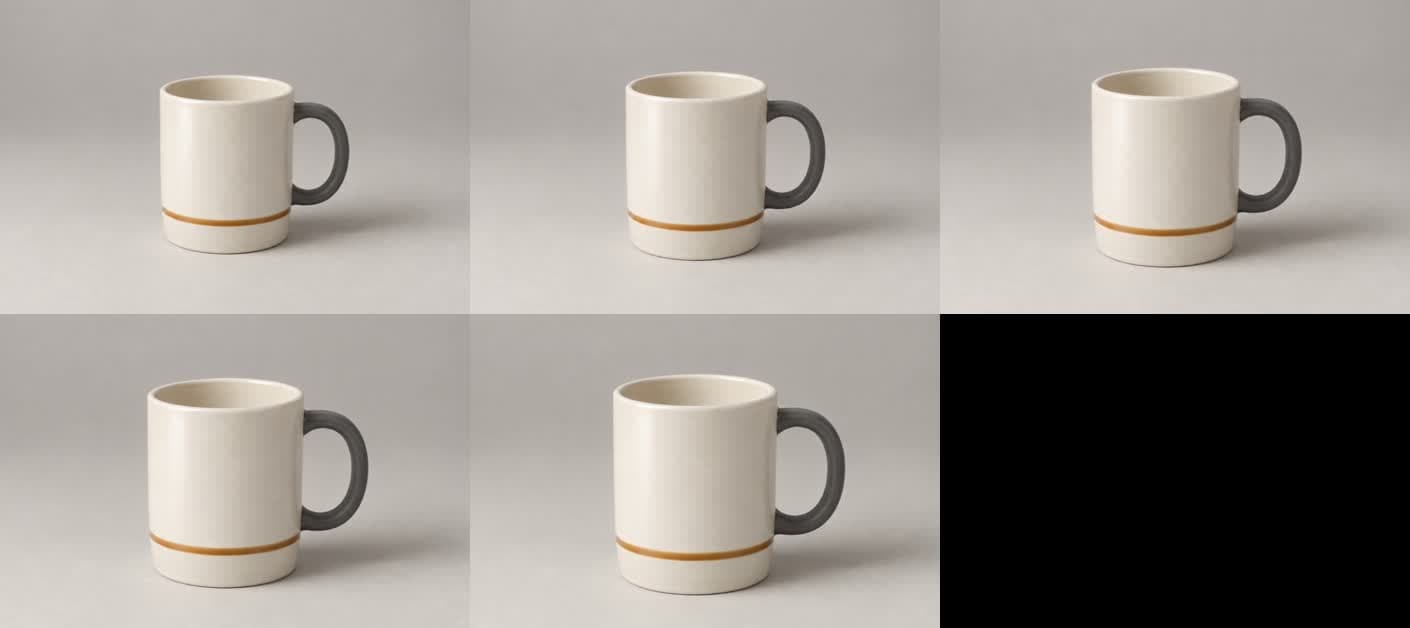
October 23, 2026, in r/OpenArtOfficial. The moderator's post promotes OpenArt and had no comments when inspected. It supplies a comparison-method example, not an independent benchmark or a Ciyo endorsement.
Compare the total cost of an accepted deliverable
There is no verified price winner in this guide. Check the current quote for each exact model, duration, resolution and audio setting. Different services can bundle credits, subscriptions and model access differently, so their credit counts are not directly interchangeable.
In Ciyo, one Ciyo credit is worth one US cent. Record the Generation quote and actual charge for each attempt. Design agent planning can also incur Billable LLM usage. Provider credits are a separate unit.
For a practical comparison, divide the total spend on the pilot by the number of clips you accept, then record any editing work separately. If no clip passes, report the unsuccessful pilot cost. Do not convert a failure into a misleading cost-per-usable-clip figure.
Choose by your production situation
For a solo seller, start with one approved product photo and one modest camera move. Test the supported workflow you can actually operate and judge the complete export before buying more attempts.
For an agency, specify the product's protected details, review owner and accepted deliverable first. Evaluate Kling externally if its keyframe controls solve a real timing requirement; evaluate Seedance in Ciyo if reference preparation and shared canvas review are the immediate need.
For a team switching services, retain original source files and the brief. Do not assume prompts, proprietary projects, credit balances or output settings migrate automatically. Run a small pilot in the destination service before moving a deadline-dependent production.
Practical comparison questions
Can I run Kling 4.0 inside Ciyo?
Not at this guide's October 23, 2026 review date. Ciyo's supported path here uses Seedance. Check future availability in the actual model menu rather than assuming an upstream provider integration is exposed.
Which is cheaper over a month?
It depends on the service, settings and accepted outputs. Compare current quotes, subscriptions if any, rejected attempts and finishing work. This guide does not establish a normalized price winner.
Can I try both for free?
Free Kling 4.0 access for the relevant model and account was not verified. Ciyo does not offer free generations. Check the live access terms before starting a trial or purchasing credits.
Which model preserves product labels better?
No matched label-preservation test was performed for this guide. Use your actual product reference, inspect the whole clip and keep exact commercial wording separate when the workflow allows it. A readable sample is not a reliability guarantee.
Does support for 30 seconds mean I should generate a full ad in one pass?
Only when one continuous generation fits the brief. A shorter accepted product shot plus separately checked offer copy can be easier to review. Longer duration alone does not establish a better finished ad.
Start with one reference and one acceptance checklist
Prepare an approved product photo, choose a short motion brief and inspect the resulting clip before expanding to a campaign.