Opus 5.5 motion production
Reframe an Opus 5.5 Motion Video for Vertical and Square

A pottery studio has a vertical workshop promo and also needs a square post. Changing the export dimensions is easy; keeping its headline, action and movement legible is the actual layout job.
Treat this as a second composition that shares content and timing. A crop can cut off the offer, and a stretch changes the shape of both type and artwork.
Ciyo’s Opus 5.5 agent built the fictional worked example below with code. The linked MP4 is the actual product export, drawn with Pillow and encoded with FFmpeg; it is not a generated camera-footage clip.
1. Separate content from coordinates
Store the approved strings and scene frame ranges once. Give each aspect ratio its own positions, line breaks and object sizes. Then a copy change can reach both editions while a layout correction stays local.
Use real pixel dimensions in the brief. In this example, the vertical master is 1080x1920 and the square layout is 1080x1080. The sizes are demo choices; confirm the actual placement requirements before delivery.
2. Choose what stays invariant
Keep the three scene meanings and six-second duration. Allow the square version to change the headline wrap and move a decorative shape. Requiring every coordinate to scale identically prevents useful composition changes.
Define the safe content rectangle separately for each layout. A vertical guard cannot be copied directly to the square canvas.
| Property | Vertical master | Square edition |
|---|---|---|
| Canvas | 1080x1920 | 1080x1080 |
| Length | 180 frames at 30fps | 180 frames at 30fps |
| Copy | Three approved lines | Same approved lines |
| Layout | Stacked | Recomposed; new bounds |
Using the approved Cedar Cup Studio vertical motion source, create a separate 1080x1080 square edition. Keep exact strings, scene meaning, 180 frames and 30fps. Rebuild positions, type wrapping and motion paths for square; do not stretch or crop the finished vertical MP4. Use an example 100px content inset. Save both layout settings, render square MP4, and add matching hold frames from both editions to canvas. Check all transformed text bounds.3. Rewrap before reducing type
Measure the longest phrase at the chosen font and weight. Decide where it wraps and whether the resulting lines have a sensible rhythm. Automatic wrapping can leave a lone word with too much emphasis.
Check visible letters rather than only the container. If a movement translates the container, test the transformed text bounds during the entrance and exit as well as the hold.
4. Rebuild motion paths for the new geometry
A shape that enters from the right edge needs a new off-screen position. A camera move or mask may also need a different extent. Keep the action’s purpose while recalculating its geometry.
For a decorative circle, use a position relative to the composition’s content area. Avoid a global scale transform around an arbitrary origin; it can move the call to action unexpectedly.
5. Compare matching frames in Ciyo
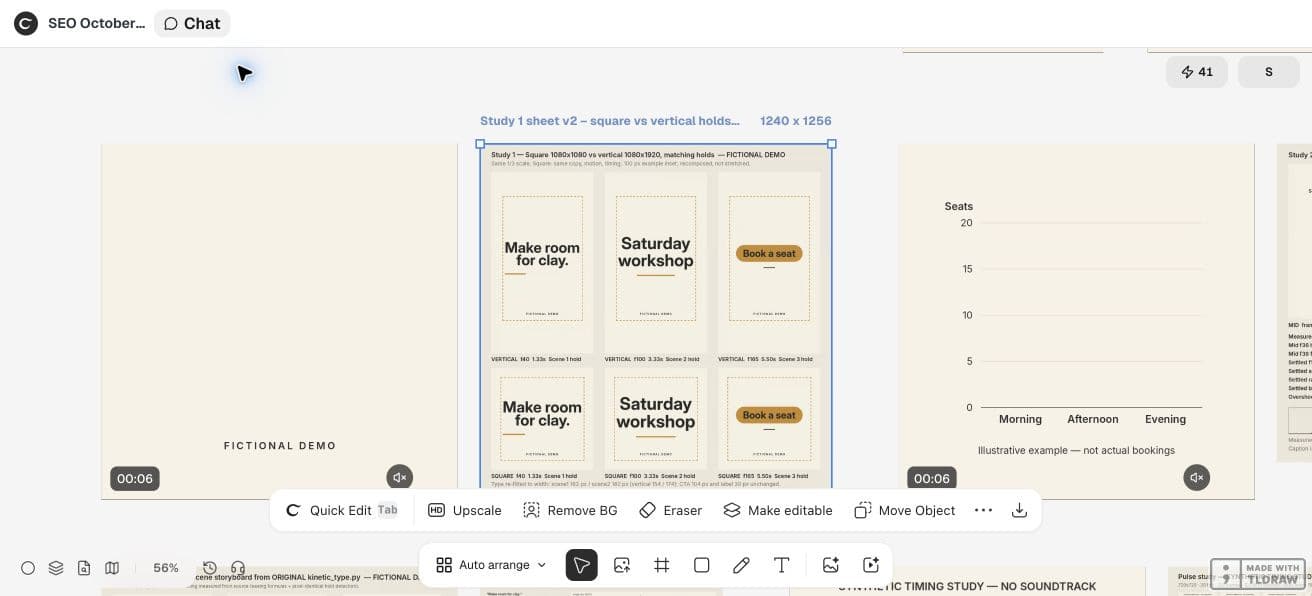
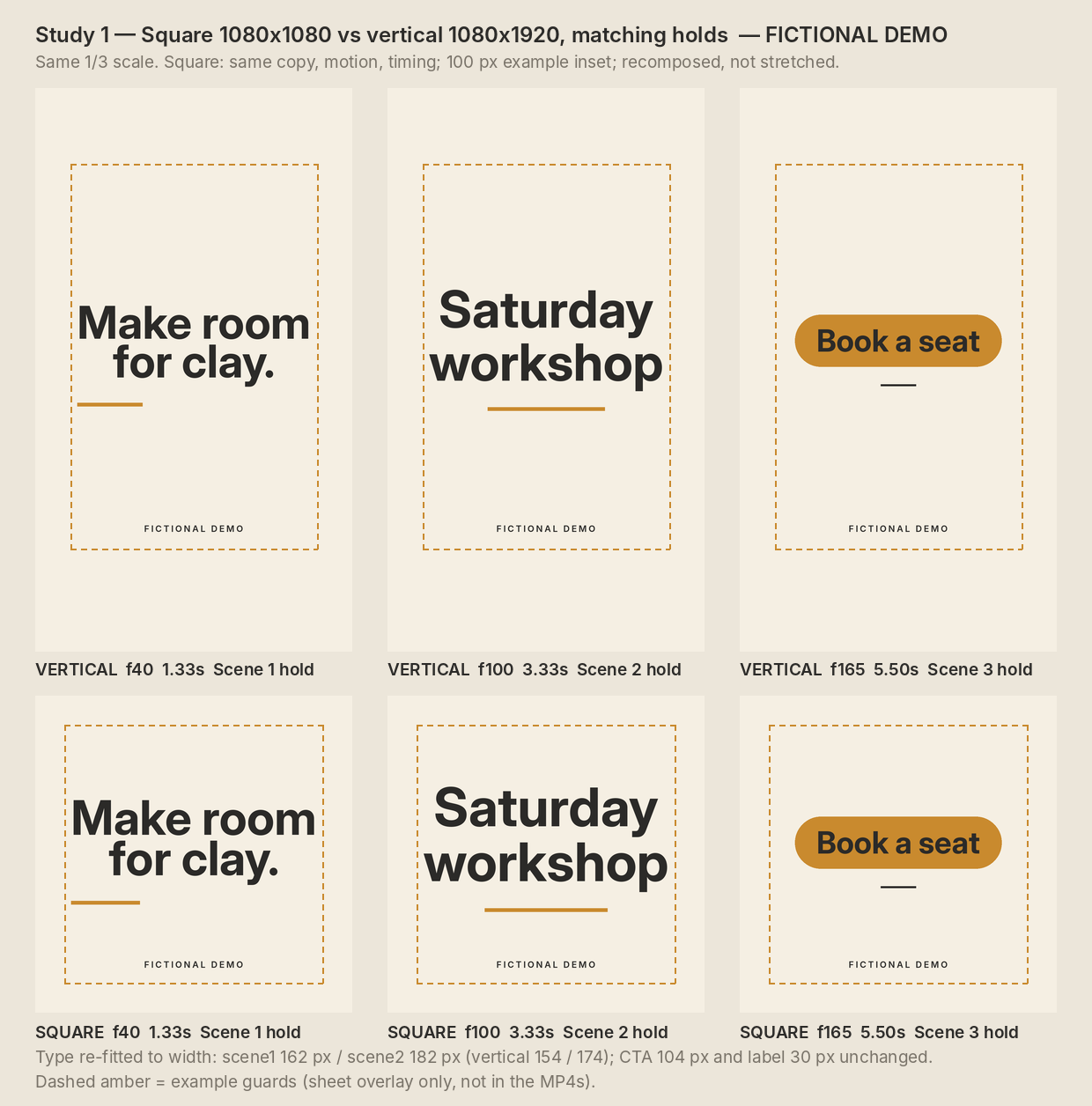
Ask the agent to render both versions at the same scene hold frame. Place the reference frames side by side on the canvas. Confirm that the invitation and action have similar hierarchy even though the positions differ.
Watch both complete exports. A hold frame can pass while a moving headline clips between scenes. Report a layout issue using its edition and frame number, then rerender only that edition.
The live square edition was recomposed at 1080x1080 with 180 counted frames at 30fps. The agent reported rendered content bounds x=122…959 and y=310…927 inside the example 100px inset.
The square headlines use larger sizes than the vertical source: 162 and 182 pixels versus 154 and 174. The comparison shows matching hold frames 40, 100 and 165, preserving words and timing while changing layout.
In this demo, Ciyo saved the Python sources in the project workspace but could not attach a source archive to the canvas. Ask the agent to paste the source in chat when you need a copy outside that workspace; the video download is a separate deliverable.
CFNStudio compares model outputs in Motion. This concerns another tool; our layout comparison is an original Ciyo exercise, not the poster’s advice or evidence of model superiority.
6. Hand off separate files and a shared brief
Name the exports by aspect ratio and revision. Keep the common copy/timing data with the per-layout settings. A reviewer should be able to tell which file belongs to the intended placement without opening both.
This exercise demonstrates layout adaptation, not higher engagement in a particular ratio. Verify the destination preview and final upload before using either file.
Practical questions
Can I just stretch a 9:16 video into a square?
That distorts the image. Recompose the source or choose an intentional crop after checking essential content.
Must the two editions use the same line breaks?
No. Preserve the approved words while selecting readable breaks for each composition.
Are the example insets platform safe zones?
No. They are working layout guards; inspect the current destination preview separately.
Make a small motion study you can check
Open an isolated Ciyo project, bring your approved copy, and ask the agent for source, a rendered draft and the specific checks your deliverable needs. Review the actual export before using it.