Opus 5.5 motion production
Opus 5.5 Seamless Loops: Check the Last-to-First Join
A studio wants a quiet four-second loop behind its workshop announcement. Three circles orbit a center point. The important question is what happens when the last encoded frame returns to the first.
A looping player setting cannot repair a discontinuity in the animation. Build a periodic state first, then inspect the exported join. This is a motion construction exercise, separate from the café menu-board design guide.
Ciyo’s Opus 5.5 agent built the fictional worked example below with code. The linked MP4 is the actual product export, drawn with Pillow and encoded with FFmpeg; it is not a generated camera-footage clip.
1. Define a cycle with a single clock
At 30fps, four seconds contains 120 frames. For frame i, use phase=2πi/120. Draw frames 0 through 119. The state at phase 2π matches phase zero, but it is the start of the next cycle rather than a second copy to append.
Place the circles using sine and cosine of phase plus a fixed offset for each circle. Keep their sizes, colors and ordering periodic too; a returning position does not compensate for a changed shadow.
2. Specify what may change during the cycle
List position, scale, rotation, opacity, background and any texture. If one property drifts continuously, either make it periodic or keep it fixed. For a simple orbit, keep the background and type still.
Ask for a seam sheet containing the penultimate frame, last frame and first two frames. It gives the reviewer a focused place to look while preserving the normal playback review.
| Property | Rule | Check |
|---|---|---|
| Duration | 4 seconds at 30fps | 120 encoded frames |
| Phase | 2πi/120 | i=0…119 |
| Background | Fixed ivory | No brightness jump |
| Objects | Three fixed circle identities | No order swap at the join |
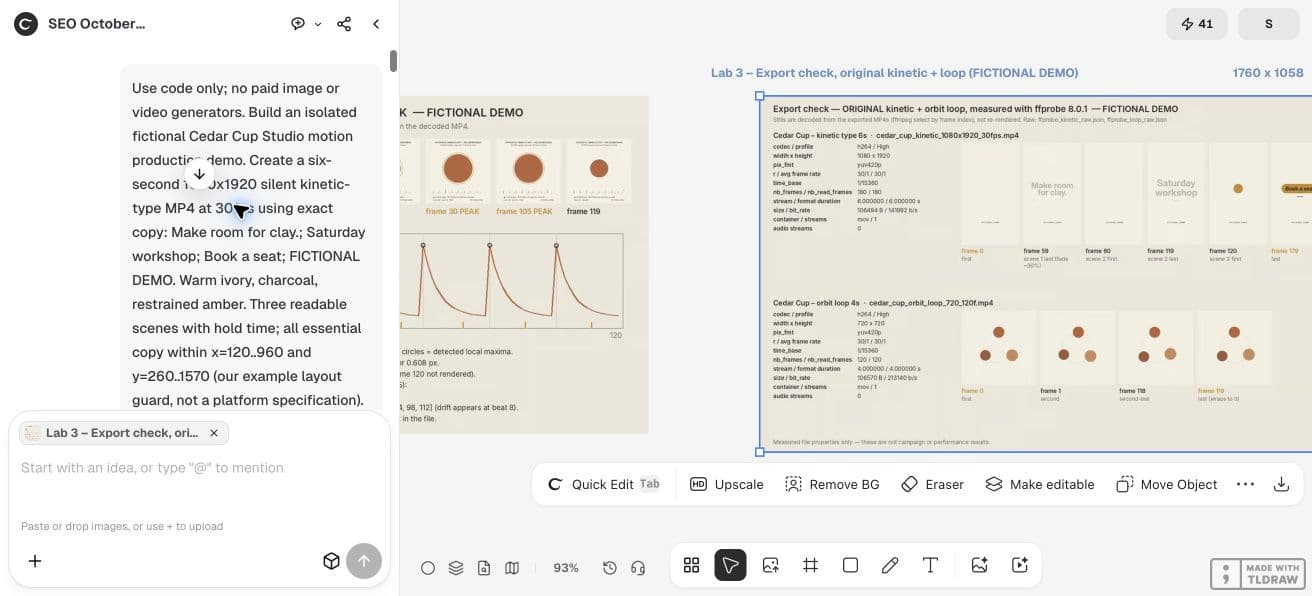
Use code only. Create a four-second 720x720 silent loop at 30fps for fictional Cedar Cup Studio: three simple clay-coloured circles orbit on warm ivory. Use phase=2πi/120 for i=0..119. No duplicated endpoint. Keep circle identity, background and lighting periodic. Export MP4, source and a seam sheet for frames 118,119,0,1. Report actual frame count and compare seam movement with normal adjacent frames.3. Expect adjacent frames to differ
Do not demand that frames 119 and 0 be identical. With continuous motion, their separation should resemble a normal one-frame movement. An identical duplicated endpoint can create a slight pause at every cycle.
Compare the movement from 118→119, 119→0 and 0→1. A sudden large jump at 119→0 is suspicious. If velocity changes at the boundary, position continuity alone may still produce a hitch.
4. Inspect pixels as well as equations
A formula can be periodic while the render flickers. Check rounding, antialiasing, shadows and random textures. Seed randomness and derive the visible texture from the same cycle phase or a fixed image.
A pixel difference statistic can flag a suspicious seam, but it cannot decide whether the motion feels natural. Use it alongside repeated playback. Review the loop at its actual intended display size.
5. Run the loop in Ciyo and preserve its source
Ask the agent for the code-based orbit in a clean project. Keep the MP4, seam sheet and source together. If a generated circle changes color at the join, request a narrow correction to that property and compare the same seam frames again.
Check whether the loop starts on a blank frame. A fade from blank at the beginning with a visible last frame is a designed intro, not a seamless cycle. Keep an intro as a separate file if you need one.
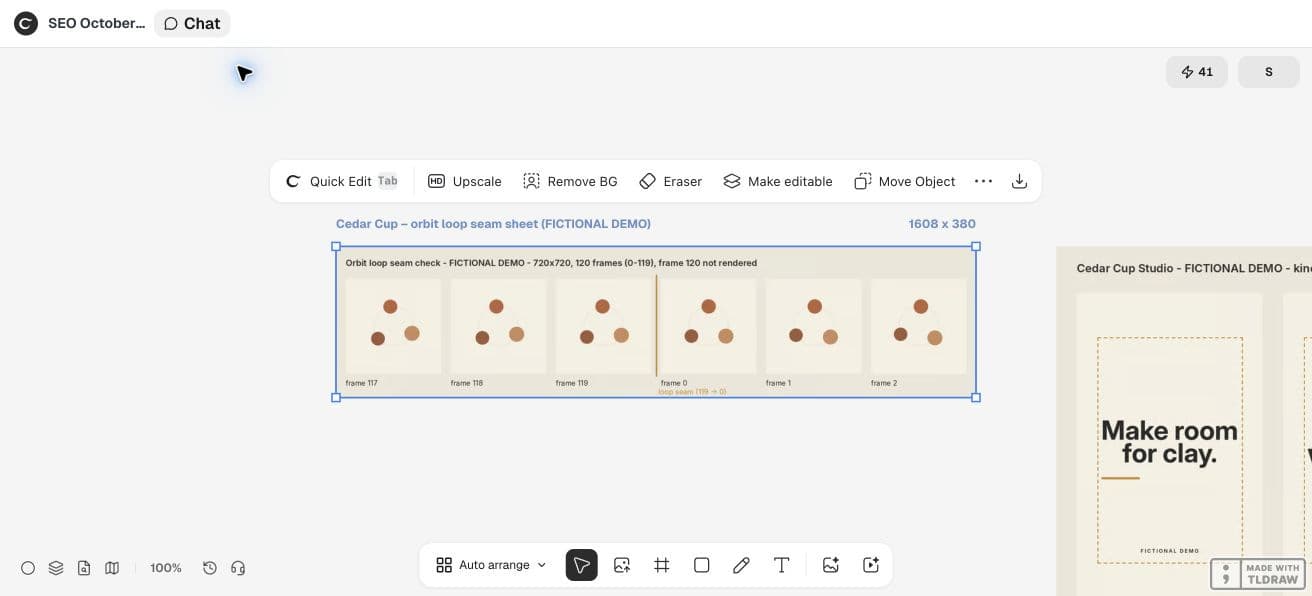
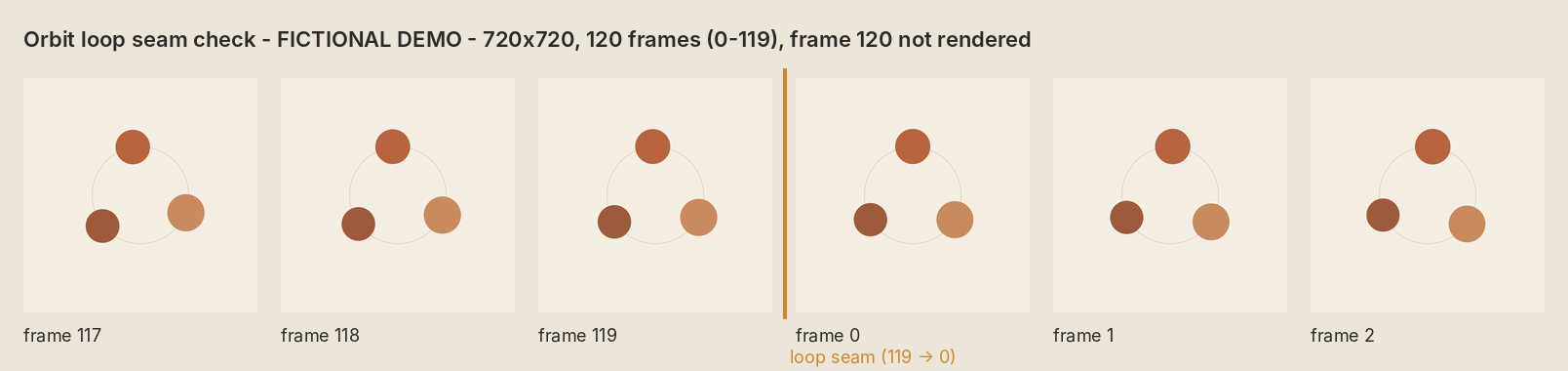
The live Ciyo loop export has 120 counted frames at 30fps, four seconds, 720x720 pixels and no audio stream. Its seam sheet shows frames 117, 118, 119, 0, 1 and 2.
The agent reported a mean pixel change of 1.17 across the seam against 1.16 for a normal adjacent step. That diagnostic supports inspection; it is not a universal smoothness threshold or a measured campaign result.
In this demo, Ciyo saved the Python sources in the project workspace but could not attach a source archive to the canvas. Ask the agent to paste the source in chat when you need a copy outside that workspace; the video download is a separate deliverable.
CFNStudio contrasts Opus 5.5 with and without the Motion harness. This concerns another tool; our seam inspection is an original Ciyo exercise, not a test of that harness or an endorsement.
6. Choose appropriate playback controls
For a website, a seamless file still needs a suitable playback experience. Avoid distracting movement behind essential reading. Provide a still alternative and appropriate controls when your use case requires them; W3C explains the pause, stop or hide criterion for applicable moving content.
For a social upload, inspect the platform playback rather than assuming its repeat behavior matches your local player. A smooth local loop is a file property, not a promise about every delivery system.
We retained the loop source from the agent’s chat reply. The download below is that original Python file; running it needs Pillow, NumPy and FFmpeg on your own machine. It writes the MP4 and seam stills into the current directory.
Practical questions
Should the first and last frames be identical?
Usually the last frame should be one step before the first. Appending an identical endpoint can create a repeated-frame pause.
Does selecting loop in a player make the file seamless?
No. The last-to-first transition must already fit the animation cycle.
Can a perfect formula still flicker?
Yes. Pixel rounding, unseeded randomness and changing render state can create visible differences.
Make a small motion study you can check
Open an isolated Ciyo project, bring your approved copy, and ask the agent for source, a rendered draft and the specific checks your deliverable needs. Review the actual export before using it.