Opus 5.5 motion production
Opus 5.5 Motion Video Export Checks: Inspect the Actual MP4

A renderer reports success and leaves an MP4. Before the studio uploads it, check that the file actually matches the six-second vertical workshop brief.
This is an export inspection checklist, not another renderer installation tutorial. The existing HyperFrames article covers its workflow; here the deliverable is a checked file plus a readable evidence note.
Ciyo’s Opus 5.5 agent built the fictional worked example below with code. The linked MP4 is the actual product export, drawn with Pillow and encoded with FFmpeg; it is not a generated camera-footage clip.
1. Write the expected file contract
For the demo: 1080x1920 pixels, 30fps, 180 frames and six seconds, with no audio stream. Keep these expectations next to the source. If the brief requests sound, silence would be a defect instead.
Do not infer encoded properties solely from canvas settings. An encoder option or a conversion step can change the file after the frames have been drawn.
2. Inspect the encoded streams
Use ffprobe where available. A practical starting command is: ffprobe -v error -count_frames -show_streams -show_format -of json output.mp4. Inspect the video stream’s width, height, frame-rate fields and counted frames, plus any audio stream.
Distinguish nominal frame-rate metadata from actual frame timing. If a count is unavailable, report that limitation rather than silently treating duration multiplied by rate as a measured frame count.
| Property | Expected | Why inspect it |
|---|---|---|
| Dimensions | 1080x1920 | Detect a wrong ratio |
| Frame rate | 30fps | Check timing basis |
| Frame count | 180 | Detect missing/extra frames |
| Audio | No stream | Silent demo by design |
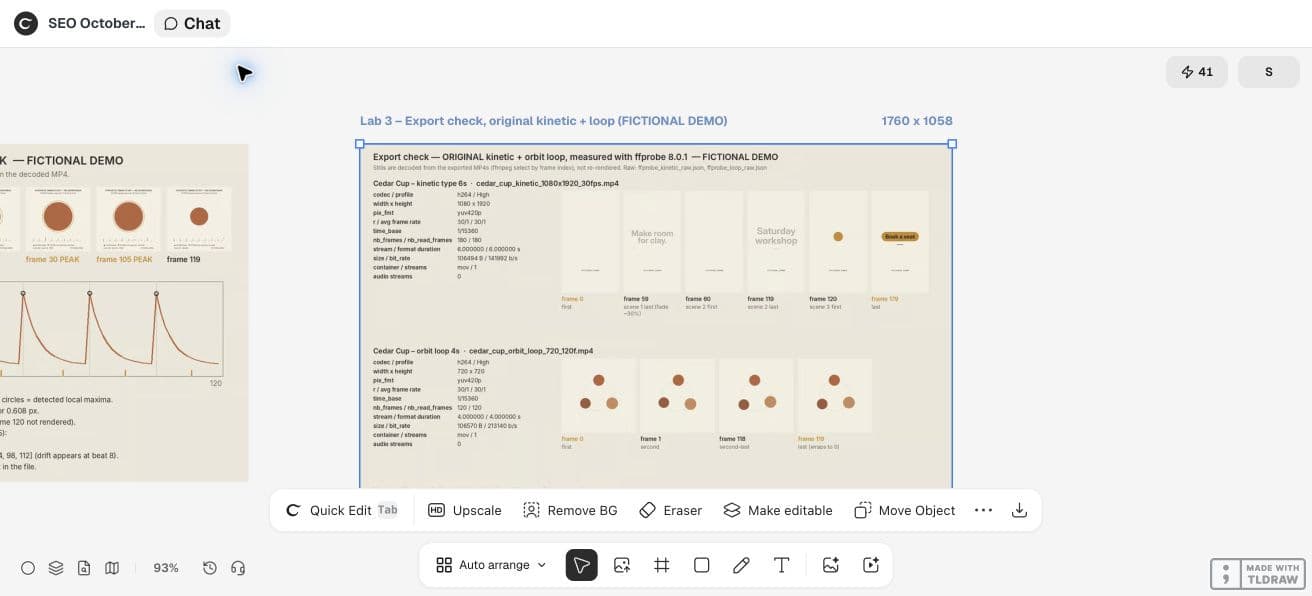
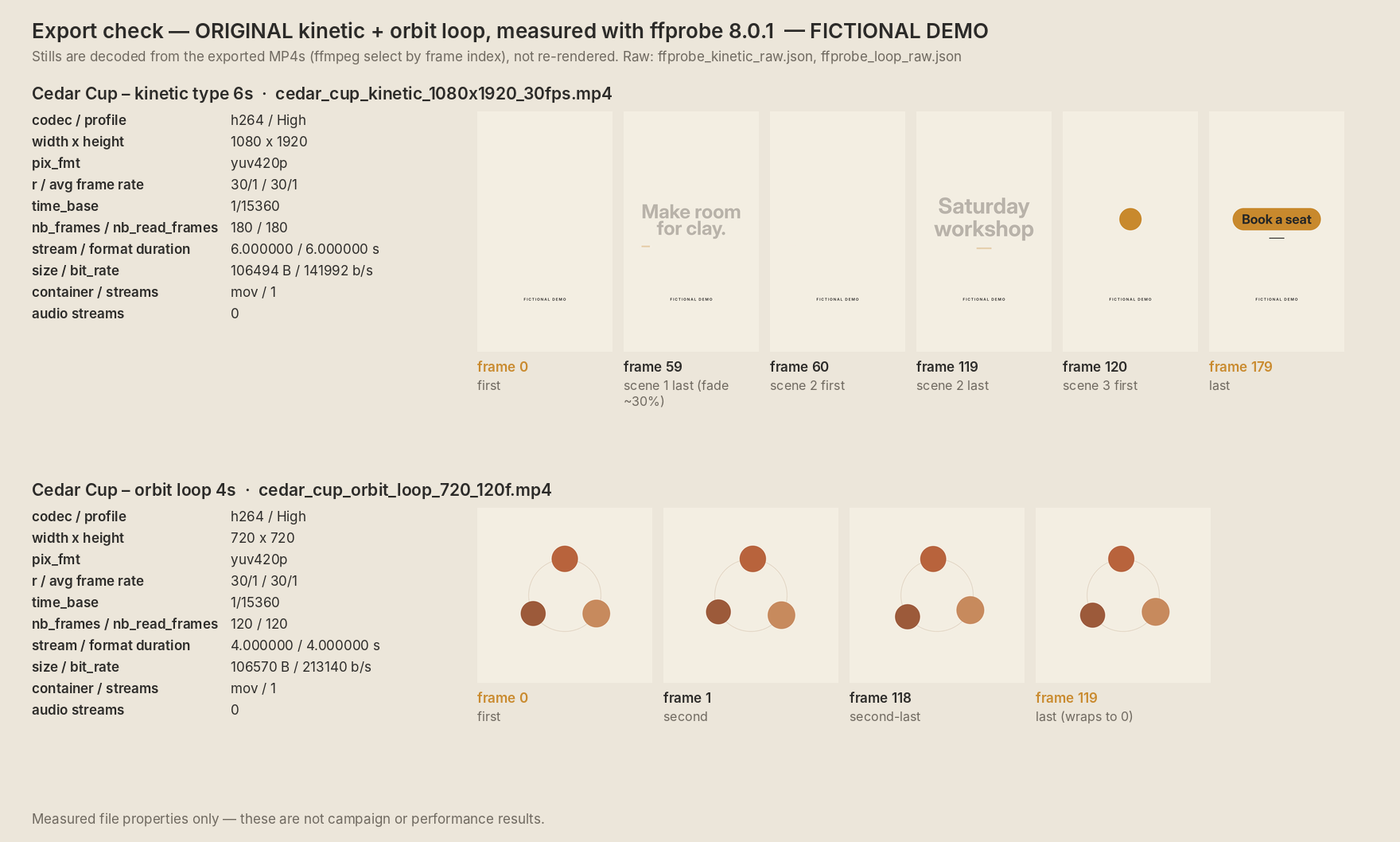
For the Cedar Cup Studio kinetic and loop MP4s, inspect the actual encoded files with ffprobe if available: dimensions, rate, counted frames, duration and audio streams. Expected kinetic: 1080x1920,30fps,180 frames,6s,silent. Expected loop:720x720,30fps,120 frames,4s,silent. Save the raw report, source and decoded boundary contact sheets. Report unavailable measurements honestly; do not substitute requested settings for actual measurements.3. Render from frame time, not preview time
Frame i should draw the intended state at i/fps. A browser preview driven by wall-clock time can skip work or pause in a background tab. MDN notes that requestAnimationFrame usually follows display refresh and can pause when hidden.
A frame-index render should resolve dependencies before drawing and keep randomness deterministic. This makes a retry easier to compare; it does not automatically prove bit-identical files across all encoders.
4. Decode the edge frames
Inspect the first frame, each scene boundary and the last frame. Look for blank starts, half-finished transitions or an end card that disappears one frame too early. Review a few interior frames too.
Then play the whole video with a normal player. Metadata and still frames cannot establish smooth playback, visual pacing or audio quality.
5. Ask Ciyo for the file and its report
Request the MP4, editable source, contact sheet and actual probe results from the code workflow. Keep any stated unavailable tools visible in the production note. If the agent only reports source settings, run an independent check on the downloaded file.
Treat a failed probe or an undecodable file as an export issue, even if the canvas shows a thumbnail. Preserve the failing file and log before rerendering.
Our independent ffprobe inspection of the actual downloaded files confirmed the original kinetic MP4 is H.264, 1080×1920, 30/1fps, 180 counted frames and 6.000 seconds. The loop is H.264, 720×720, 30/1fps, 120 counted frames and 4.000 seconds. Neither contains an audio stream.
The decoded boundary stills also expose design choices that metadata cannot certify: the kinetic scenes cut before the fade reaches zero, and its final CTA stays to the end. A file can meet the requested frame count while still needing editorial revision.
Ciyo kept the renderer source and reports in this project’s workspace. The canvas cannot attach a source archive in this workflow; ask the agent to paste the code in chat if you need to retain it elsewhere.
CFNStudio contrasts Opus 5.5 with and without the Motion harness. This concerns another tool; our export inspection is an original Ciyo exercise, not a test of that harness or an endorsement.
6. Hand off a concise verification note
Record filename, source revision, dimensions, rate, count, duration and audio state. Add what was visually reviewed and what was not. For example: “Silent local draft; metadata checked; no platform upload reviewed.”
The result is a usable production check, not a promise that every platform will accept or preserve the video. Inspect the destination preview and uploaded playback before publication.
Practical questions
Is a success message enough to approve the MP4?
No. Inspect the actual encoded properties, decode key frames and play the file.
Does duration times frame rate prove the frame count?
It is an expected count, not a counted measurement. Use an actual decode/count when available.
Does a silent demo establish audio support?
No. It deliberately contains no audio stream; sound needs a separate implementation and review.
Make a small motion study you can check
Open an isolated Ciyo project, bring your approved copy, and ask the agent for source, a rendered draft and the specific checks your deliverable needs. Review the actual export before using it.