Video · Tested
Opus 5.5 Makes Motion Graphics Now. Here's How to Get the Good Stuff

If you were on X the week after Claude Opus 5.5 came out, you saw them: showreels, launch videos, music videos, even little history films. Every one of them was made from code. No After Effects, no timeline, no keyframes.
The captions all said "one prompt". Honestly? That's half true. Some clips really did come from one sentence. Others came from a brief the length of a short story, a folder of add-on skills, a couple of API keys and a computer that worked all night. So if your first try came out as a centered title on a gradient with everything fading in, you didn't do it wrong. You just skipped the part nobody posts about.
This guide walks through the whole ladder, and on September 28, 2026 we tried the core recipe ourselves: a six-second vertical teaser for a made-up café app, rendered frame by frame and then fixed after one look at its own frames. Quick note before we start: Ciyo does not run Claude Opus 5.5. The motion work happens in Claude Code or claude.ai; Ciyo is where you make the stills, logos and reference frames that feed it.
First, what's really going on
Here's the thing most people miss: Opus 5.5 can't hand you an MP4. It reads text and images and writes text. So every one of those videos is really a small program that Opus wrote, and something else turned that program into frames.
The trick is one function that answers a single question: what does the screen look like at time t? A headless browser asks that question for every frame (900 times for 15 seconds at 60 fps), takes a screenshot each time, and ffmpeg glues the screenshots into a video. Because the picture depends only on the time, you get the exact same video every run. Want to change one shot? Edit a line and render again.
Left alone, Opus tends to pick the simplest route: one HTML file, no framework, Playwright for the screenshots, ffmpeg for the video. If you'd rather work in Remotion (React) or HyperFrames (HTML and GSAP), just say so in your prompt.
Posted 2026-09-27. Movez rounded up the week's viral Opus 5.5 videos and laid out a complete pipeline, from the one-line showreel prompt to overnight briefs and a self-critique loop. This guide is our own friendly take on the same ideas, with our own test; read theirs for the deep version with every template.
The kit: about ten minutes of setup
The chat app can write an animation. But the magic happens when Opus can render it, look at the result and fix it, and for that it needs a terminal. That means Claude Code, or any agent that can run commands.
One more tip: drop a short house-rules file (CLAUDE.md) in your project folder. Claude Code reads it every time, so you only say things once. Good rules to start with: the picture depends only on time, with no timers and no unseeded random numbers; no centered title on a gradient, no fading everything in, no little labels in the corners; something new happens every couple of seconds; and before showing anything, render a sheet of stills, look at it, and fix the worst three problems.
And turn the effort up. The standout one-shots people shared ran on xhigh or max effort. Keep medium for small tweaks and re-renders.
| Tool | What it does for you |
|---|---|
| Node and Playwright with Chromium | Plays the animation in a hidden browser and captures every frame |
| ffmpeg | Turns frames into an MP4 and makes contact sheets for review |
| Python with an audio library such as librosa | Finds the beats in a music track so cuts land on them |
| Claude Code on Opus 5.5 | Writes the code, runs the render and checks its own frames |
| Optional: Remotion or HyperFrames skills | A framework, if you prefer one over a single HTML file |
Level 1: the one-line showreel
A lot of the viral clips started from the same tiny prompt: ask Opus for a punchy 15-second motion graphics video that shows off what it can do, "like it's your showreel for a résumé", and tell it to go all out. Stephan Livera's version on max effort is one of the posts that kicked it off.
Why does something so short work so well? "Showreel" is a genre Opus already knows: fast cuts, a new trick every shot, best stuff first. It makes Opus the subject, so there's no product to get wrong. Fifteen seconds is short enough to finish in one go and long enough for six to eight shots. And "go all out" works like an effort booster.
The catch: hundreds of people ran the same prompt, and the results started to look alike. Use the one-liner to test your setup, then move on. It tests the engine, not your idea, because it doesn't have one.
Posted 2026-09-25. Stephan Livera shared the showreel Opus 5.5 made on max effort from the one-line résumé prompt. It is one of the posts that started the trend; watch it to see what a single sentence can do before you add any setup.
Level 2: point it at your product
This is where it gets useful if you sell something. Indie maker Tony Dinh posted that he paid about $1,000 for a launch video like this a year ago, and made a similar one with Opus 5.5 in under 30 minutes. In a reply he shared the prompt: the showreel idea plus his product link, an instruction to use the real screenshots, logo and assets, and a demand for music that the motion follows.
Two more habits help. Stay in the same chat for the same brand, because the second video comes out faster once the renderer and sound setup exist. And keep API keys in a .env file and tell Opus the variable name; never paste a real key into a prompt you might screenshot.
Here's a prompt in that spirit you can adapt. Brewline is a made-up café app, so swap in your own product.
Make a punchy 20-second vertical (1080 x 1920) launch video for Brewline, a café ordering app (brewline.example). Showreel energy.

1. Visit the site first. Grab the real screenshots, logo, colors and fonts, save them to ./assets and list what you found. Never invent a screen.
2. Story, one beat every 2 to 4 seconds: a hook in big type, the app appears, three features each shown with a cursor doing a real tap, one number that proves it works, then the logo and "Try it free".
3. Original music around 120 BPM, made in code, with small clicks and whooshes on the beat.
4. Before the full render, show me one still per beat so I can check the flow.Posted 2026-09-26. Tony Dinh compared this Opus 5.5 video for his own product with a similar one he paid about $1,000 for a year earlier. His prompt is in the replies. The Brewline prompt above is our own adaptation of the same idea.
Level 3: give it a look to copy
Without a reference, Opus falls back to its comfort zone. Yep: centered text, gradient, fade. The fix is to show it a style instead of describing one.
One frame works: screenshot a moment from a video you love, attach it, and say what to take (colors, type, texture) and what to leave (the subject). A whole video works too: ask Opus to pull frames with ffmpeg and describe the pacing shot by shot before it writes any code. Best of all is your own library, since nobody else can copy it. Ask Opus to write a short style_guide.md and shotlist.md first, and approve both before any animation code gets written. Borrow the grammar of a reference, never its logos or characters.
This is the easy place to use Ciyo. Generate a few key frames or a clean logo there, then hand them to Opus as the reference, so the look is yours before the motion starts.
Level 4: list the states, not the vibe
The most-saved motion prompts that week weren't one-liners. They were structured specs for slick UI animations where one shape never cuts. It just keeps morphing: a button becomes a loader, then a check mark, then a card, then a chart, and finally loops back to the start, with a cursor driving every change.
What made them work wasn't magic words. It was a clear list: what to ask you for (product, screens, colors, a music track), the direction (calm background, one accent color, no bouncy easing, no glows), the states laid out on a beat grid so something happens on every beat, the build rules (one file, time-based, the last frame matches the first) and the known gotchas. If you can list the states, Opus can animate them.
We tried the recipe: a six-second teaser
To check that all of this holds up, we built the core recipe on September 28, 2026 in Claude Code with Opus 5.5: one HTML file with a seek(t) function, a Playwright script that steps through time, and ffmpeg for the encode. The film is a six-second vertical teaser for our fictional Brewline app. One dark shape never cuts: it goes from a dot to a coffee cup with steam, to an order card with a check, and back to a small pill with the call to action.
It rendered 180 frames (six seconds at 30 fps, 1080 x 1920) in about nine seconds on a MacBook. We rendered it twice and the two MP4 files had the same hash, which is the whole point of drawing from time alone.
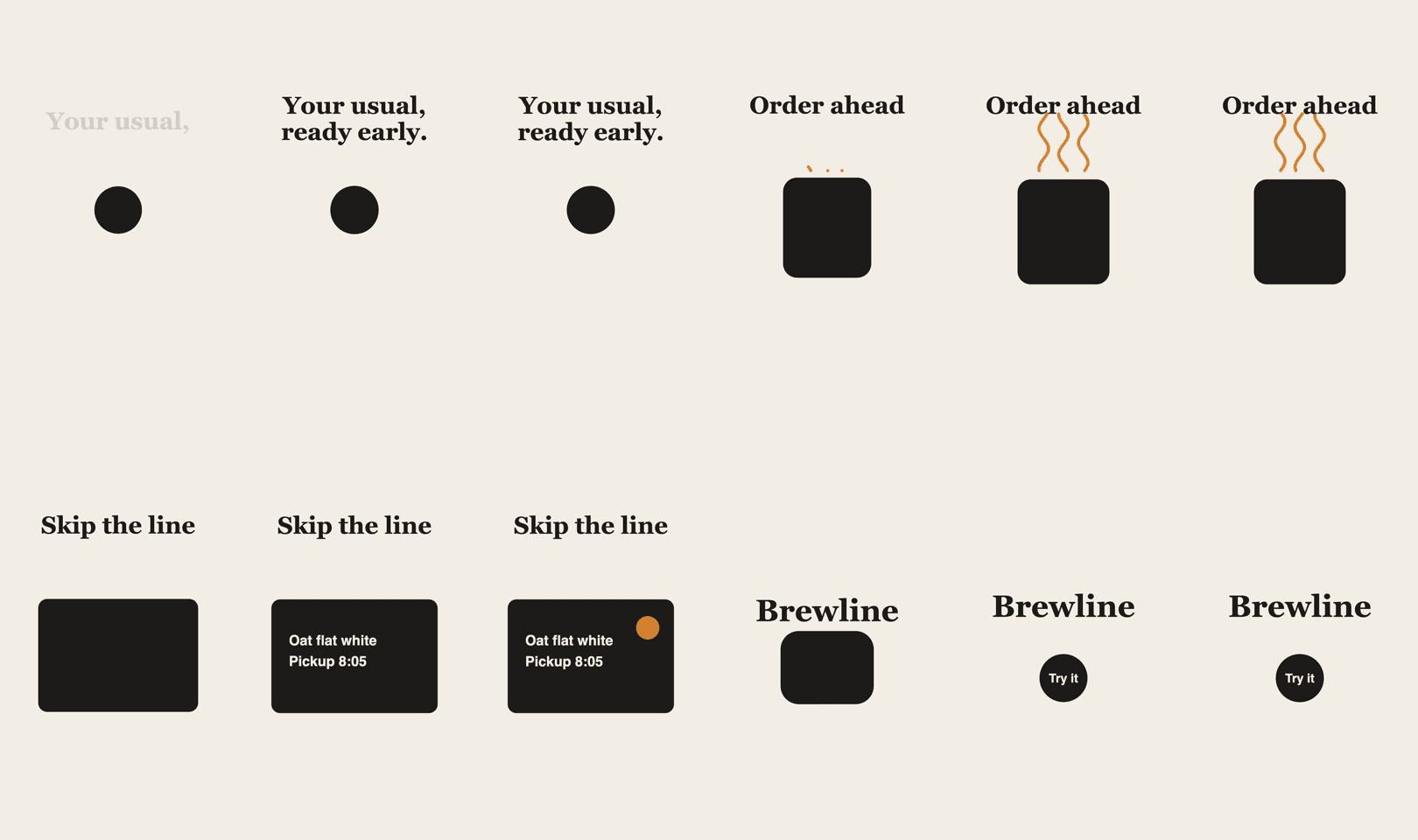
Then we made the contact sheet below, two stills per second, and looked at it the way a picky motion director would. It had three real problems: the steam ran into the "Order ahead" headline, the first second and a half was just a still dot, and the "Try it" button was too small to read on a phone.
The real secret: make Opus watch its own frames
Opus 5.5 can read images, which means it can look at what it just made. In our experience that one habit does more for quality than any clever wording in the prompt.
Our three fixes took one edit and one re-render: the headlines moved up and the steam got shorter, the dot now stretches into a pill during the first beat, and the final pill got wider with bigger type. The second contact sheet shows all three fixed. Same code, same nine-second render.
Iteration isn't cheating, it's the method. Watercolor animator Mable Joseph was refreshingly upfront that her hand-painted Opus 5.5 short wasn't a one-shot: in a follow-up she said it needed a well-planned character file, animation notes, a character design and a story prompt.
A contact sheet is one line of ffmpeg: ffmpeg -i out/final.mp4 -vf "fps=2,scale=270:-1,tile=6x5" -frames:v 1 out/contact.png (6 x 5 tiles covers 15 seconds at two stills per second). Then hand Opus the critique prompt below.
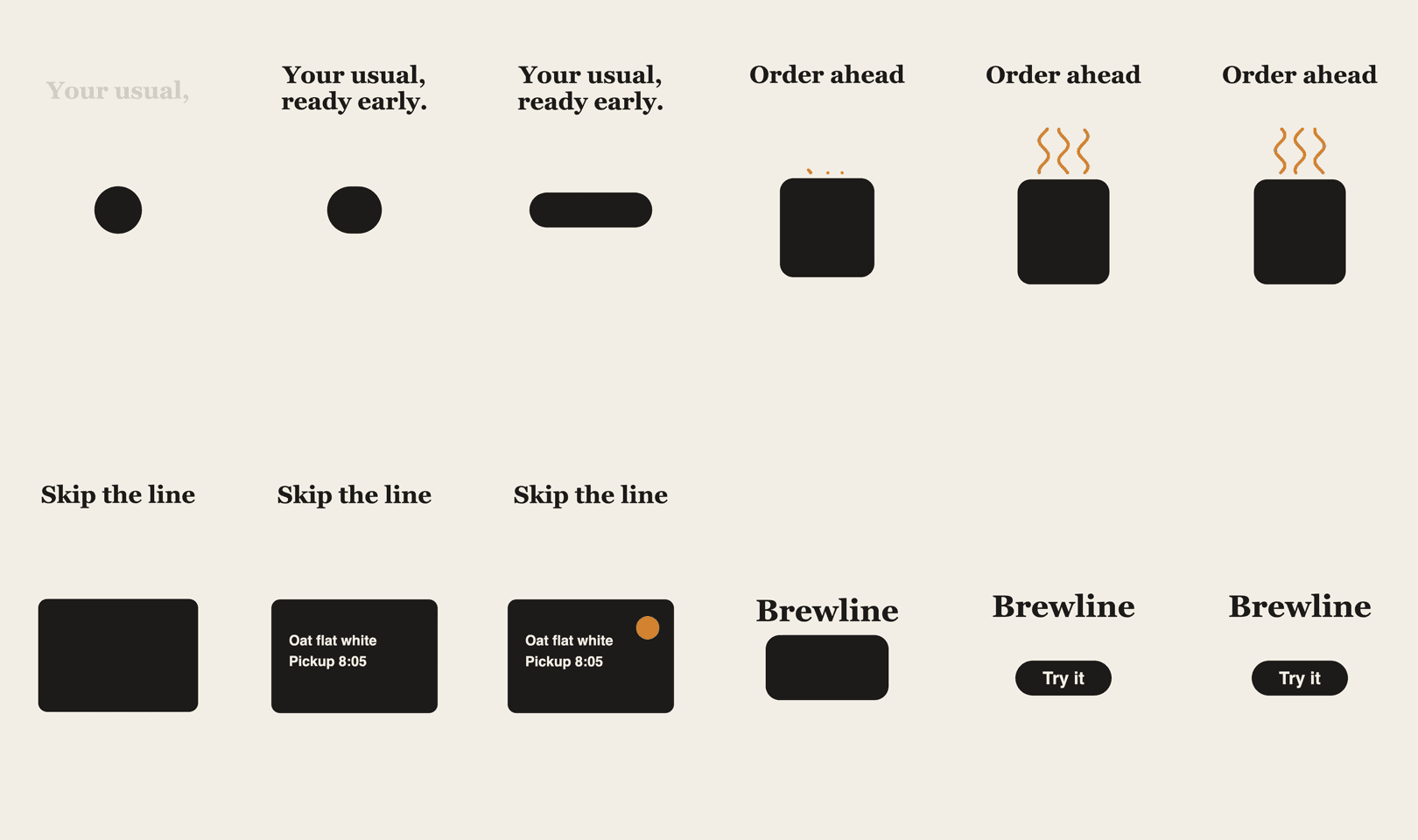
Open out/contact.png and look at it carefully. Be a harsh motion director, not a proud author.
Score 1 to 10: hook in the first 2 seconds, readable on a phone, motion quality, variety (something new every 2 to 4 seconds), on-brand, sound sync.
List the 3 worst problems with timestamps. Look especially for text that overlaps, shots where nothing moves, and text too small to read.
Fix them, re-render only those seconds, and show me the new contact sheet and scores. Repeat until every score is 8 or higher.Posted 2026-09-25. Mable Joseph's watercolor short, where every brushstroke and sound is generated in code. In a follow-up she explained that it was not a one-shot and took careful planning, which is why we include it here.
Make motion feel expensive: springs and sound
Cheap motion slides from A to B on a fixed curve. Expensive motion feels like it has weight: it speeds up, overshoots a hair and settles. That's a spring, and you can write it as a plain formula of time, so the picture still depends on time alone and you can jump straight to frame 812 without playing frames 0 to 811.
When something moves to several spots in a row, like a cursor or our morphing shape, don't restart the spring each time. Add one spring per move, each starting at its own moment, and the motion stays smooth all the way through. You can ask for it in plain words: "Switch all the motion to time-based springs, with a little bounce on buttons and cards and none on headlines."
Then there's sound, which is where it starts to feel like a real film. You have two options. Bring a track and have Opus measure its beats with a short Python script, then line every cut and click up with a real beat. Or let Opus make the music and sound effects in code, on the same timeline as the picture. Our teaser is silent; a real launch clip shouldn't be.
// Where is the spring at time t? Starts at 0, settles at 1.
function spring(t, stiffness = 170, damping = 26) {
  if (t <= 0) return 0;
  const w = Math.sqrt(stiffness);
  const z = damping / (2 * w);
  if (z >= 1) return 1 - Math.exp(-w * t) * (1 + w * t);
  const wd = w * Math.sqrt(1 - z * z);
  return 1 - Math.exp(-z * w * t) * (Math.cos(wd * t) + ((z * w) / wd) * Math.sin(wd * t));
}

// A value that moves to several targets: one spring per move, added together.
function track(t, keys, stiffness, damping) {
  let v = keys[0][1];
  for (let i = 1; i < keys.length; i++)
    v += (keys[i][1] - keys[i - 1][1]) * spring(t - keys[i][0], stiffness, damping);
  return v;
}
Going big: the overnight film
The biggest hit of the week came from donald (@donaldjewkes), who said he talked to his computer for five minutes, Claude worked for 12 hours, and he woke up to a finished music video.
Long, hands-off runs like that work because the brief reads less like a description of a video and more like a job handed to a small studio. We'd group yours into four questions. What is it for: the story in a sentence and how people should feel at the end. What can it use: your references, the tools and keys it may call, and a budget. How should it work: stages with a stop to check stills and a rough cut before the full render, plus the critique loop at every stage. And what do you want back: the video, a poster frame, a contact sheet and tidy source code.
One twist worth stealing: some of these films used a video model for rough base shots with tricky motion, then had Opus redraw everything on top in code. The viewer only sees the clean code-drawn layer, so the whole film keeps one consistent look.
Posted 2026-09-23. donald says he spoke his brief for about five minutes and Claude worked for 12 hours to make this music video. His full prompt is linked from the post; the four-question brief above is our own summary of what such a brief needs.
Last step: make the one prompt real
Once your setup works, package it as a Claude Code skill: a short instruction file that lists what to ask for (product, length, formats, colors, a reference, music), the pipeline step by step, and your hard rules, such as real product screens only and no timers or random numbers in render mode.
After that, your next video really is one line, something like "/motion-reel for brewline.example, 20 seconds, vertical, use ./refs/frame.png as the look". That's the one prompt everyone was talking about. It just took a little setup to earn it.
| You want | Do this |
|---|---|
| A quick test | The one-line showreel prompt on xhigh effort |
| A product video | Give the URL, demand real screenshots, ask for music |
| A look that isn't generic | Attach a reference frame, a video or your own images |
| Slick UI motion | Write the list of states on a beat grid |
| Motion that feels premium | Time-based springs with a tiny overshoot |
| Sound that fits | Measure the beats, or have Opus make the music |
| Better results, fast | Contact sheet, harsh critique, fix, repeat |
| A long film | A full crew-style brief with checkpoints |
| Speed next time | Package the whole pipeline as a skill |
Opus 5.5 video questions
Can Claude Opus 5.5 make a video file by itself?
Not directly. It writes code that draws each frame. A headless browser and ffmpeg turn that code into an MP4, and Claude Code can run both for you.
Is the one-prompt thing real?
For short showreels, yes. Polished, on-brand or longer pieces usually rest on a good setup, a reference and several rounds of self-review, even when the final request is one line.
Do I need to know how to code?
Not much. You install the tools and give clear direction; Opus writes the code, and you judge the frames like a director would.
Which effort level should I use?
Xhigh for new videos, max for launch-critical pieces, and medium for small fixes and re-renders.
Can I make these videos inside Ciyo?
Ciyo does not run Claude Opus 5.5. Make your logo, key frames and reference stills in Ciyo, then animate them with Opus 5.5 in Claude Code or claude.ai.
Make the look in Ciyo, then set it in motion
Generate a logo, key frames and a reference still on the Ciyo canvas, then hand them to Opus 5.5 so your video starts from your own style.