Models · Tested
Can Claude Opus 5.5 Generate Images? We Asked It for Pixel Art
Short answer: Claude Opus 5.5 is not an image generator. It reads images and writes text and code. Code can still draw a picture, and for pixel art that can be exactly what you want.
On September 27, 2026 we asked Opus 5.5 in claude.ai for a 32 × 32 mascot sprite for Rook & Rabbit, a fictional board-game café, and checked every pixel of what came back. Ciyo does not run Claude Opus 5.5; this is a test in Anthropic's own app.
What Opus 5.5 can and cannot make
Anthropic released Claude Opus 5.5 on September 22, 2026. Its announcement is about coding, knowledge work, computer use and cost: $4 per million input tokens and $20 per million output tokens. It does not describe an image generator.
What Opus 5.5 can do is write code that draws: an SVG file, an HTML canvas, a small script. For logos, icons and pixel art, that is useful, because code places every shape exactly where it says. For a photo, a painting or a soft illustration, use an image model.
Posted 2026-09-23. The author, who had earlier found language models poor at pixel art on his own benchmark, reported that Opus 5.5 scored perfectly on most of its challenges and stressed that the pictures were drawn pixel by pixel, not generated. His benchmark is not ours; the test below is our own.
The test: a 32 × 32 mascot
We asked for one sprite with hard limits we could check afterwards: a 32 × 32 grid, one square per pixel, at most eight colours, a transparent background and no text. We used Opus 5.5 at the Medium effort level in claude.ai.
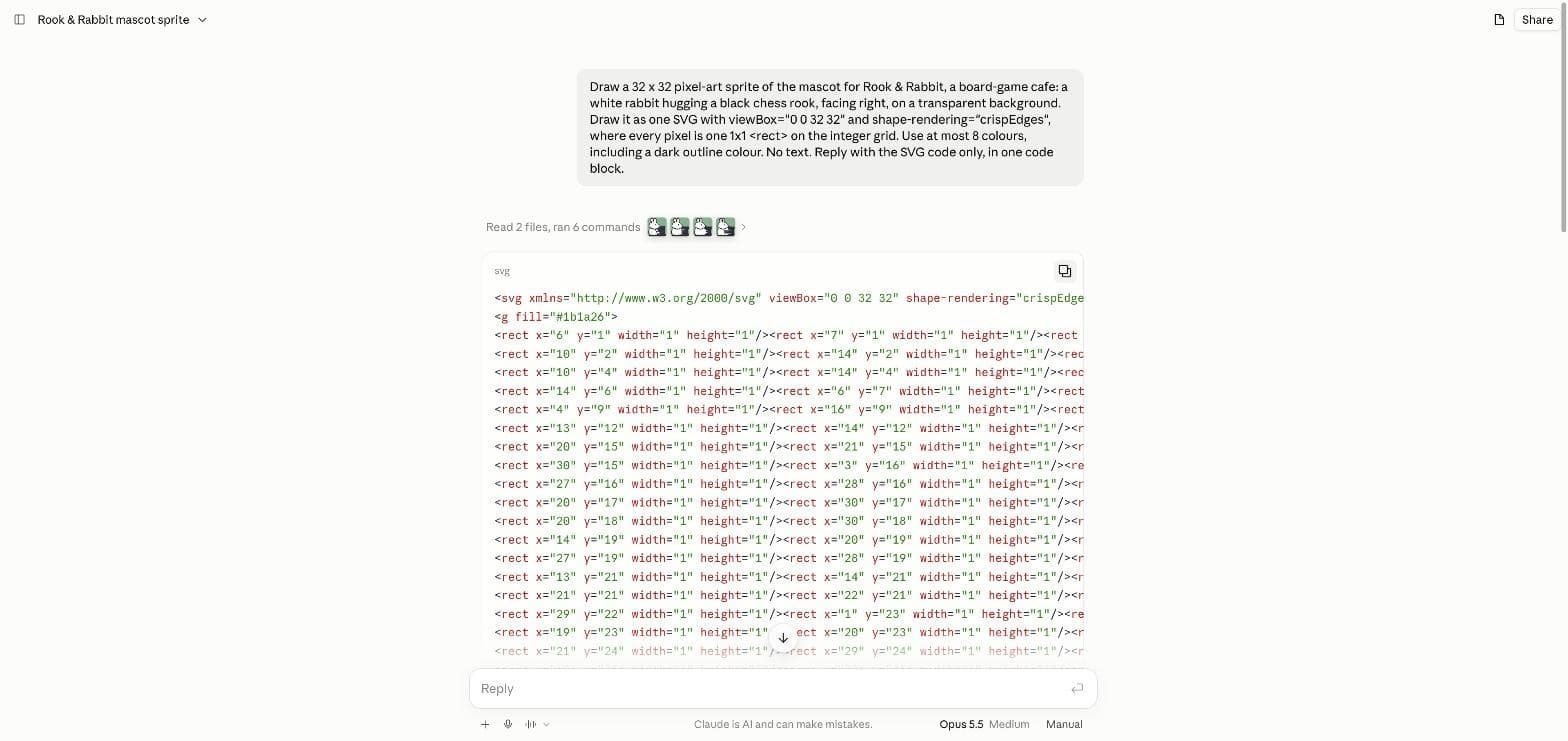
Draw a 32 x 32 pixel-art sprite of the mascot for Rook & Rabbit, a board-game cafe: a white rabbit hugging a black chess rook, facing right, on a transparent background. Draw it as one SVG with viewBox="0 0 32 32" and shape-rendering="crispEdges", where every pixel is one 1x1 <rect> on the integer grid. Use at most 8 colours, including a dark outline colour. No text. Reply with the SVG code only, in one code block.It looked at its own drawing four times
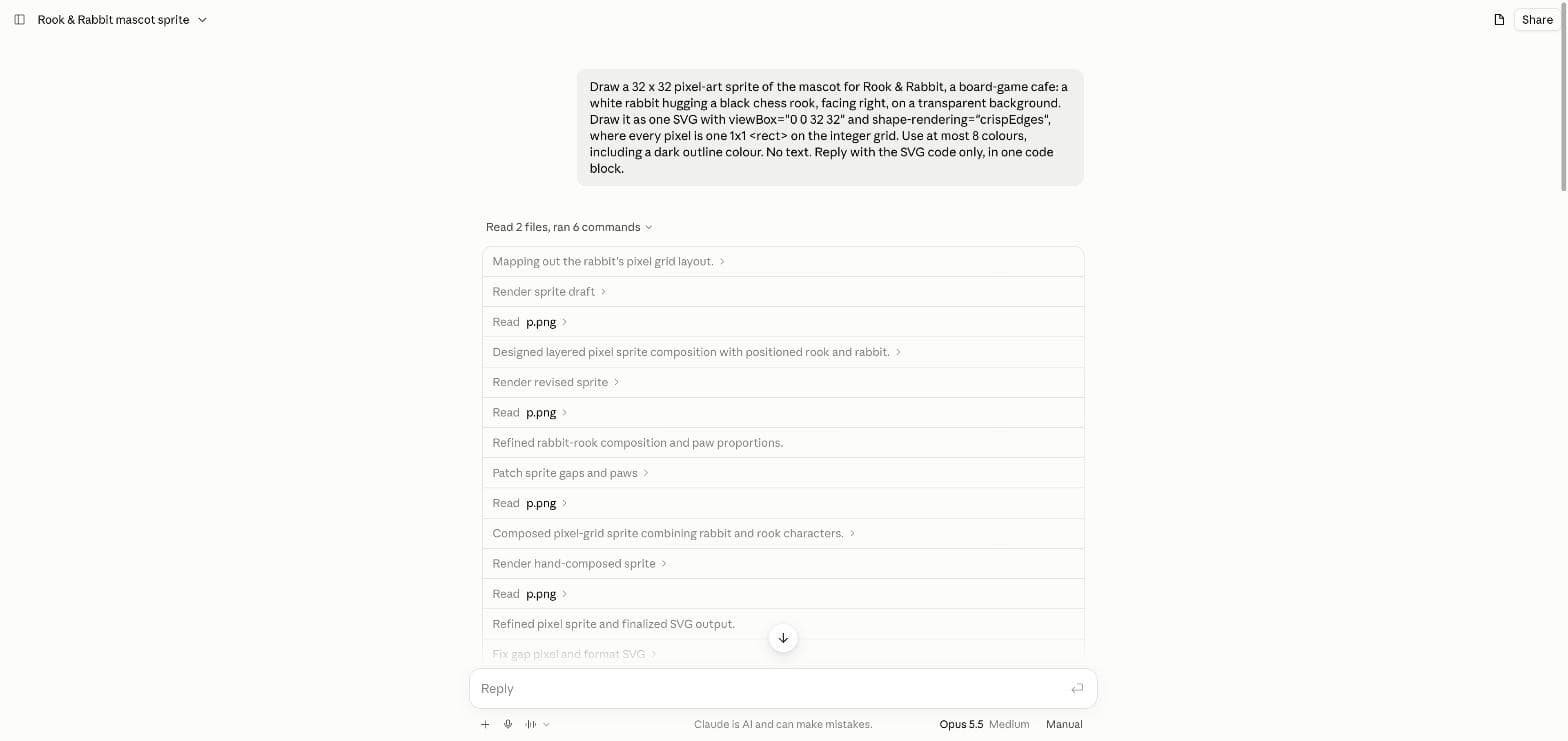
Before it answered, Opus 5.5 turned its SVG into a picture and looked at the result. The step list shows four rounds: a first draft, a revised sprite, a patch for gaps and paws, and a hand-composed version, each followed by reading the rendered file. The whole answer took a little over a minute.
That loop is the main reason the result holds together. A model that writes code for a picture without seeing it tends to leave gaps and stray pixels.
What we measured
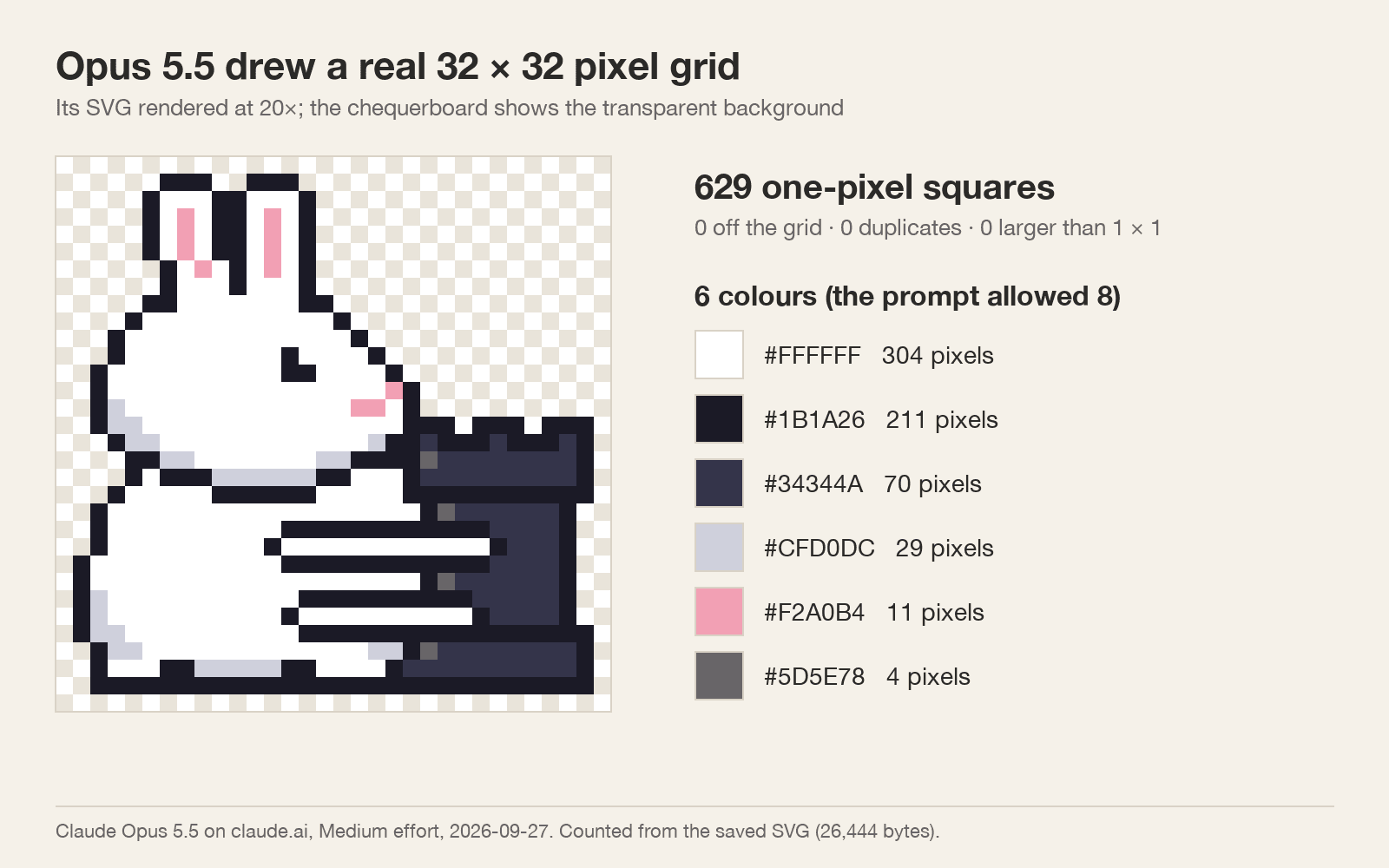
We copied the SVG, 26,444 bytes, and counted it with a script. It holds 629 squares, every one exactly 1 × 1 on the integer grid, with no duplicates and nothing outside the 32 × 32 frame. It uses 6 colours, under the limit of 8, and the unused pixels are transparent.
Compare that with “pixel art” from an image model. In our photo-to-pixel-art test the same day, a generated image that looked like pixel art held 173,508 distinct colours and blocks of uneven size. Code gives you the grid by construction.
| Requirement | Asked | Delivered |
|---|---|---|
| Grid | 32 × 32 | 32 × 32, 629 filled pixels |
| Pixel shape | 1 × 1 squares on whole numbers | All 629, 0 off the grid |
| Colours | At most 8 | 6 |
| Background | Transparent | Transparent |
| Text | None | None |
Where it falls short
Look at the arms. At this size the rabbit's hug reads as two white bars across the rook, and most of the rook hides behind the body. A pixel artist would cheat the pose to keep both characters readable; the model kept to the literal brief.
The file is also heavy for what it is: 26,444 bytes of SVG for a picture that saves as a PNG of a few hundred bytes. Export it to PNG at 1× and at a whole-number scale before you use it in a game or on a website.
When to use a code model and when to use an image model
Use Opus 5.5 or another code model when the grid has to be exact: sprites, icons, simple logos, patterns you will edit by hand. Use an image model when you need texture, light, a photo or a full scene. In Ciyo, GPT Image 2.5 Flare and Sunburst make the pictures; Ciyo does not run Claude Opus 5.5.
The two also work together. You can draw the sprite as code and then use an image model for the poster or the shop sign around it.
Claude Opus 5.5 and images
Can Claude Opus 5.5 generate images?
Not as an image model does. It writes code, such as SVG, that draws a picture. In our test it rendered its own drafts to check them and gave us SVG code, as asked.
Is the pixel art exact?
In our one test on September 27, 2026, yes: 629 one-pixel squares on a 32 × 32 grid, 6 colours, no stray or oversized squares.
Can I use Claude Opus 5.5 inside Ciyo?
No. Ciyo does not run Claude Opus 5.5. We ran this test in claude.ai. Ciyo's image tools use models such as GPT Image 2.5.
What does Opus 5.5 cost?
Anthropic lists $4 per million input tokens and $20 per million output tokens on its API. In claude.ai it is part of the paid plans.
Make the pictures around your sprite in Ciyo
Generate the poster, the sign or the background with GPT Image 2.5, and keep your code-drawn pixel art exact.