Pixel art · Tested
Make a Seamless Pixel-Art Tileset With AI (and Fix the Seams)
A tileset is the set of small square pictures a 2D game repeats to build its map: grass, paths, water, floors. Image models now draw convincing tileset sheets in seconds. The question for a game maker is whether the tiles actually fit together when the engine repeats them.
On September 28, 2026 we generated a tileset for Mossfall, a fictional cosy farming game, in Ciyo. Then we tested the sheet the way a game engine uses it, tile by tile, and fixed the worst seam with Ciyo's Quick Edit.
The sheet in one prompt
We asked for a 4 by 4 sheet of 16 tiles, 16 by 16 game pixels each, with a 16-colour palette and every tile seamless. GPT Image 2.5 Flare in Ciyo's Image Generator returned a 1024 × 1024 sheet for 2 credits.
At a glance it is exactly what we asked for: grass, flowers, paths, water, a water edge, stone, planks, a fence, a bush and tilled soil, in a clean top-down pixel style.
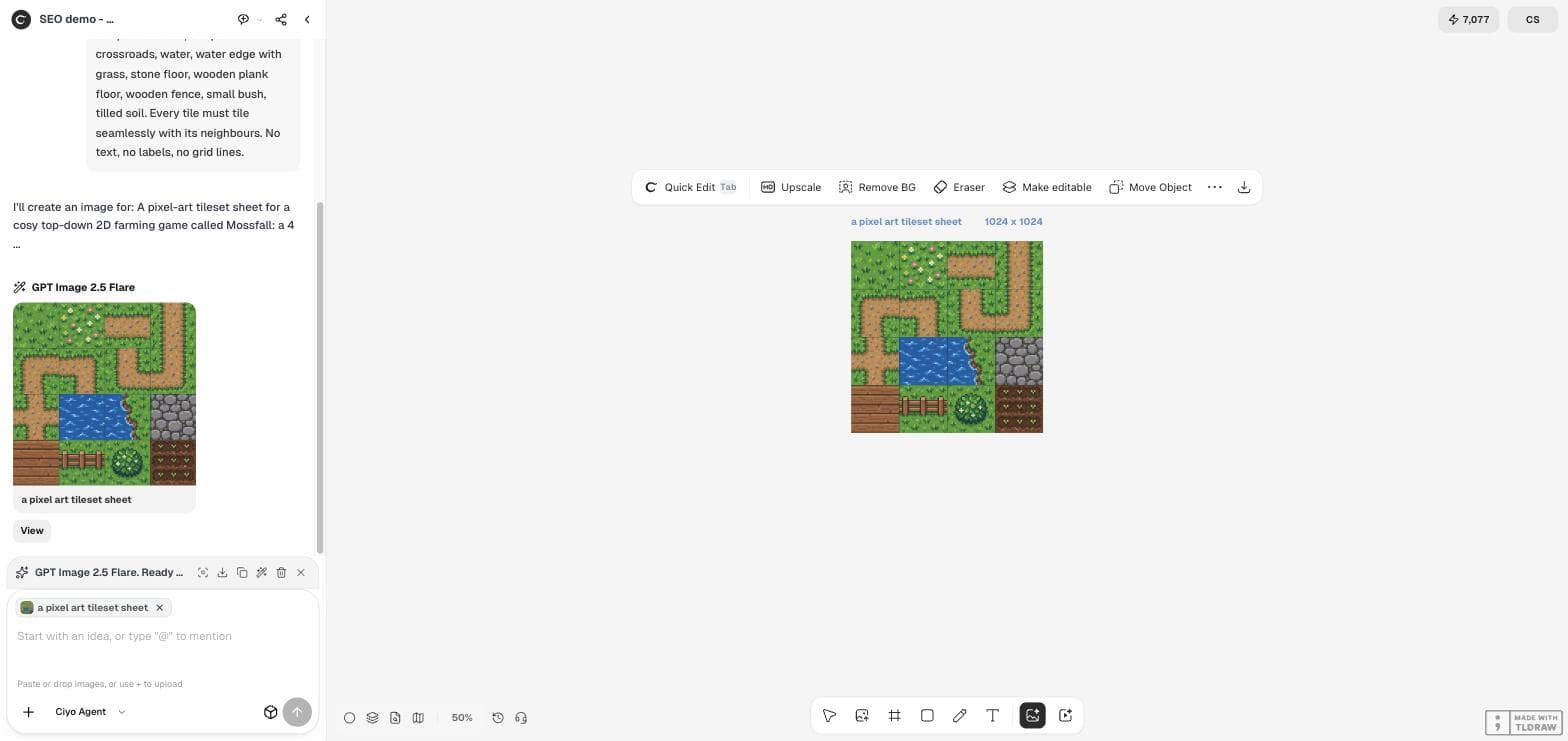
A pixel-art tileset sheet for a cosy top-down 2D farming game called Mossfall: a 4 by 4 grid of 16 square tiles with no gaps between them. Each tile is 16 by 16 game pixels, drawn with hard square pixels, a limited palette of 16 colours and no anti-aliasing. Tiles: plain grass, grass with flowers, dirt path horizontal, dirt path vertical, four dirt path corners, dirt path crossroads, water, water edge with grass, stone floor, wooden plank floor, wooden fence, small bush, tilled soil. Every tile must tile seamlessly with its neighbours. No text, no labels, no grid lines.Five checks before you import it
A game engine does not see a picture. It cuts the sheet into squares and repeats each square. So we cut the sheet the same way and measured it. The grid was right: the tile edges sit exactly at 256, 512 and 768 pixels. Almost everything else needed work.
| Check | Asked for | Got |
|---|---|---|
| Grid | 4 × 4 tiles | 4 × 4 tiles of 256 px, exact |
| Game pixels per tile | 16 × 16 | About 32 × 32 (blocks mostly 7–8 px wide) |
| Colours | 16 | 143,372 (soft edges and texture) |
| Lines between tiles | None | A dark 1–2 px line at every tile edge |
| Independent tiles | Each tile on its own | Some paths run across two tiles |
The seam test
A tile is seamless when its left edge continues its right edge, and its top continues its bottom. We measured the colour jump across each edge and compared it with the normal step between two neighbouring pixels inside the tile.
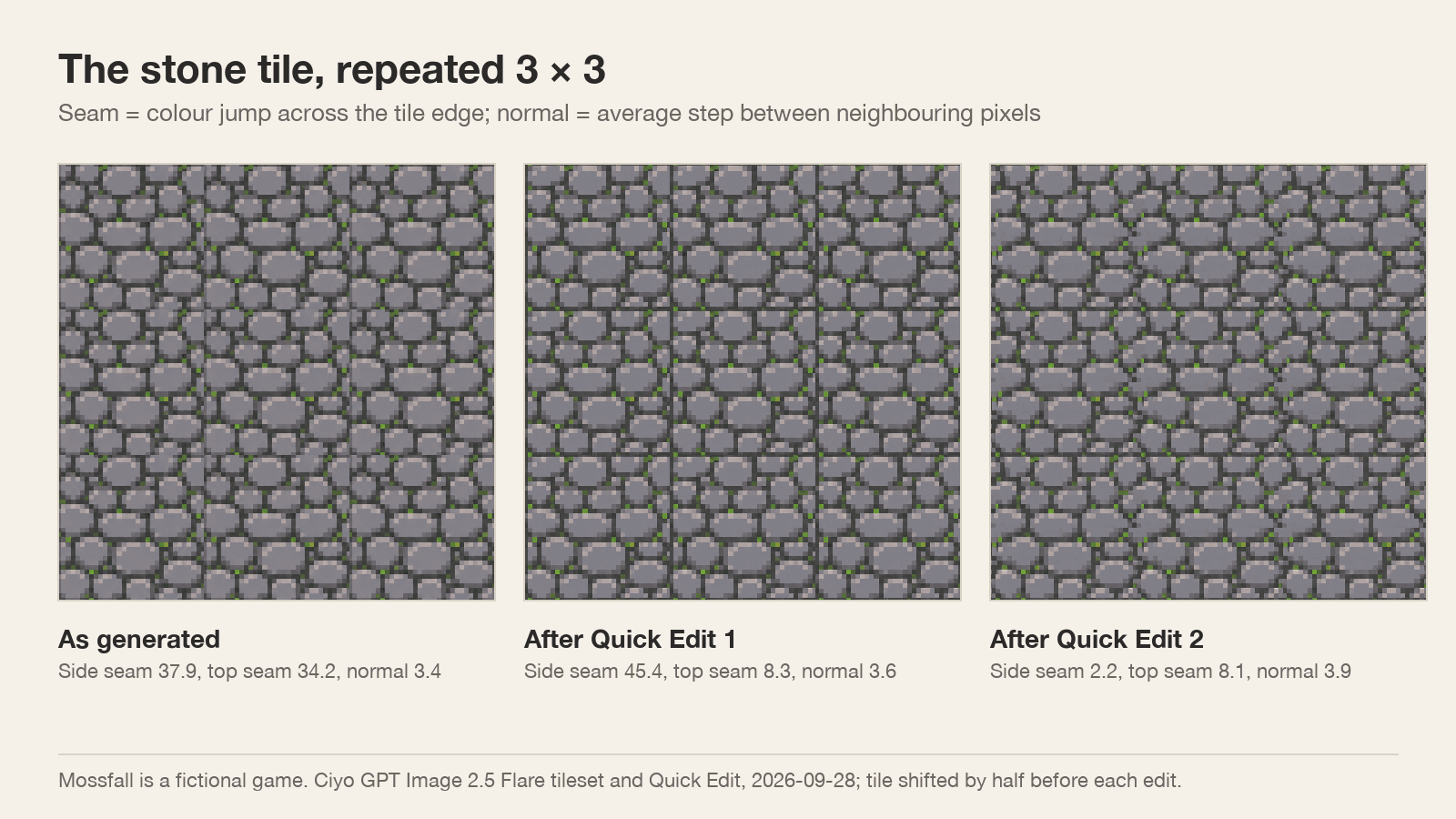
For plain grass the edge jump was 3 to 4 times the normal step, and for water about 7 times. The stone floor was worst: 38.1 across the side edge against a normal step of 3.4, eleven times higher. Repeated 3 × 3, it shows clear vertical and horizontal lines where the stones are cut in half.
Fix the seam with Quick Edit
The classic fix is to shift the tile by half its size in both directions, so the old edges meet in a cross through the middle, repair the middle, and shift it back. We made the shifted copy, uploaded it to the Ciyo board and asked Quick Edit to redraw only the cross. Each Quick Edit run was marked +5 credits, and each result came back at 2048 × 2048, twice the input size.
The first run joined the top and bottom edges: that seam fell from 34.2 to 8.3. But it drew a straight dark mortar line down the centre, which made the side seam worse, from 37.9 to 45.4. A second run that named the problem removed the line.
There is a straight dark vertical line running down the exact centre from top to bottom. Remove it: let the stones on both sides join into whole stones that cross the centre, with mortar that zigzags naturally. Same pixel-art style, pixel size and colours. Keep the outer quarter on every side unchanged.The result, repeated
After the second run we shifted the tile back and measured it again. The side seam is 2.2 and the top seam 8.1, against a normal step of 3.9, so both edges now sit close to the tile's own texture. Repeated 3 × 3, the stone floor reads as one continuous surface.
Quick Edit also changed the outer parts of the tile a little, not only the centre, so compare the whole tile with the original before you replace it in your game.
A workflow that holds up
Use the generated sheet as a style guide and a source of individual tiles, not as a finished asset. For each tile you keep, remove the border line, test the seams by repeating it 3 × 3, fix one seam at a time with a precise Quick Edit, and snap the final tile to your real pixel size and palette.
Generate the path pieces as separate tiles rather than one sheet. In our sheet, the corners and the tall vertical path crossed tile edges, so they only work in the exact arrangement the model drew.
AI pixel-art tilesets
Can AI make a seamless tileset?
It can draw a convincing sheet, but in our test on September 28, 2026 the tile edges did not match: the stone tile's seam was 11 times its normal pixel step. Test every tile by repeating it before you use it.
Does the model respect my pixel size and palette?
Not exactly. We asked for 16 × 16 tiles and 16 colours and got about 32 × 32 game pixels per tile and 143,372 colours. Snap the tiles to your grid and palette afterwards.
How do I fix a seam?
Shift the tile by half, so the seam runs through the middle, repair the middle with a precise Quick Edit, and shift it back. It took us two Quick Edit runs to fix the stone tile.
What did it cost?
The sheet cost 2 Ciyo credits and each Quick Edit run was marked +5 credits.
Draw your tiles in Ciyo
Generate a tileset in your game's style, then repair each seam with Quick Edit on the same canvas.