Practical product imagery
Product Image Gallery Order: Hero, Detail, Scale and Use

A gallery can contain six good pictures and still leave a shopper confused. A detail arrives before the product is identifiable, a lifestyle image obscures the size, and two nearly identical hero shots use space that could answer a missing question.
This guide uses a Ciyo review-board workflow informed by Photoroom’s product-detail-page guidance. It is a method for planning a sequence, not a claim that one fixed gallery order improves conversion for every product.
The deliverable is a numbered handoff with a purpose for each image. Publishing that sequence in a storefront remains a separate merchant step.
Quick workflow: assign one question to every gallery position
Start with clear identification, then choose the order of detail, scale and use images according to the purchase decision. Review the complete sequence at a small display size and remove redundant pictures.
The sequence below is a starting hypothesis for a simple product, not a platform requirement or a universal ranking rule.
| Position | Shopper question | Candidate image |
|---|---|---|
| 1 | What exactly is the item? | Clear hero view |
| 2 | What construction or finish matters? | Relevant detail |
| 3 | How large is it? | Verified dimension or scale view |
| 4 | How is it used? | Truthful use context |
| 5 | What else must I know? | Product-specific variant, back or included-item view |
1. Inventory the pictures before creating more
Import the approved product images into a clean Ciyo project. Keep their filenames or assign short asset labels. Include actual hero, detail, scale and use views where available, and mark any illustrative concept clearly.
For a fictional Juniper mug, an ivory front view, a handle detail and a tabletop scene are distinct candidates. A real catalog requires real SKU evidence; a generated mug does not validate capacity, dimensions or construction.
Write the product’s unresolved questions beside the board. If none of the images shows the underside or the closure a buyer needs to understand, another lifestyle concept will not fill that gap.
2. Give the opening image one clear job
The opening should make the product identifiable in the context where the gallery appears. Check the store or marketplace’s current requirements separately if they constrain background, text or props.
Place the strongest identification image first in the proposed row. Follow it with the image that answers the next important uncertainty. For a textured ceramic item that may be the finish; for a bag it may be the opening or capacity.
A small merchant can make the first decision by asking a colleague what they think is being sold after seeing only the first picture. An agency should include the product owner in this check rather than treating the sequence as decoration.
3. Build a row of images with explicit roles
Use the canvas to place the candidate images in order and add short role labels. Keep the labels beside the images rather than embedding them into the source photos. The board is a handoff document, not necessarily the public gallery itself.
Ask the Design agent to review the proposed sequence against the shopper questions. If it arranges images, check the actual positions and labels afterward. Do not assume a visual order on the canvas automatically changes the storefront.
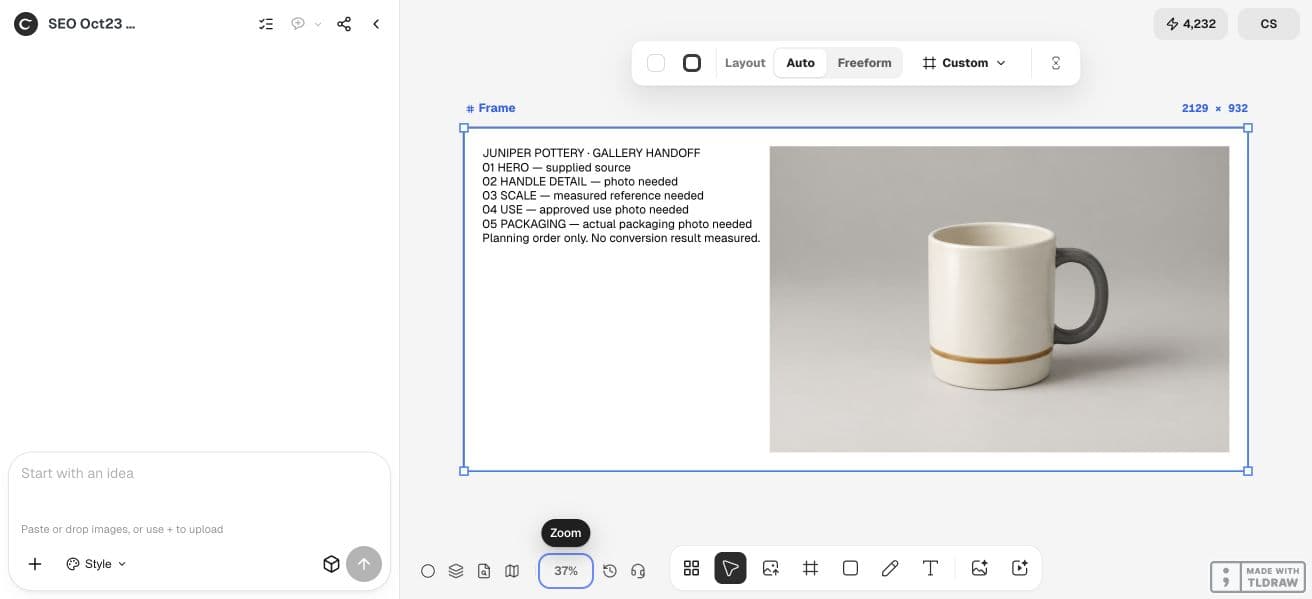
In our Juniper walkthrough, only the synthetic hero existed. We entered the numbered handoff with the Text tool and grouped it with that image using Auto Layout. The other four positions stayed marked as missing. The Design agent reviewed the gaps but did not create native editable canvas cards, so this board was arranged manually.
Review these approved images for [product] and the shopper questions [list]. Propose a gallery sequence beginning with clear product identification. Give each image one role: identity, construction/detail, scale, use or another justified product-specific question. Identify duplicate roles and questions with no supporting image. Do not invent specifications or reorder the live store. Return a numbered handoff using the actual image labels.4. Review the sequence at its likely display size
Zoom out until the row resembles a thumbnail strip, then inspect individual images at a plausible mobile size. A beautifully detailed crop may look like an unidentified texture when it is small.
Check continuity across the row: same variant, compatible color and consistent item quantities. A second picture that quietly switches from a one-mug offer to a two-mug scene creates a different problem from a simple ordering mistake.
| Check | Useful question | Possible action |
|---|---|---|
| Identity | Can the first image stand alone? | Choose a clearer hero |
| Coverage | Does each image answer a new question? | Remove repetition or request a missing view |
| Consistency | Is the same SKU shown throughout? | Correct a mismatched variant |
| Scale | Are size cues supported by facts? | Replace invented dimensions |
| Handoff | Can someone map every position to a file? | Add exact labels or filenames |
5. Export a handoff and verify the storefront separately
Keep a numbered list of image labels, their roles and any unresolved issue. Export the approved board or copy the list into the merchant’s handoff document. Preserve originals so a later reorder does not detach instructions from their files.
After the merchant applies the sequence, inspect the actual gallery on desktop and mobile. The store may crop or display thumbnails differently from the review board. That final check belongs to the storefront, not to an assumption about Ciyo export behavior.
For a larger team, record who approves factual product accuracy and who applies the change. Do not claim conversion lift without a measurement that isolates the sequence change.
Practical questions
Is hero, detail, scale, use always the best order?
No. It is a useful starting structure. Move the next most important purchase question earlier and follow the destination’s current requirements.
Does Ciyo reorder my Shopify or marketplace gallery?
This guide creates a review board and handoff. Applying the sequence in the storefront is a separate action.
How many product pictures do I need?
Enough to answer the product’s actual questions without unnecessary repetition. This guide does not prescribe a universal count.
Can generated images fill missing factual views?
Only if their details are verified against the real product. A plausible invented back, capacity or accessory does not supply missing product evidence.
Give every gallery image a purpose
Start with one permitted source image and a clear acceptance check. Keep the original beside the result and approve the complete export before using it.