New models · Tested
Qwen-Image-2.1 Makes Transparent PNGs. Can Your Shop Use Them?
Alibaba's Qwen team released Qwen-Image-2.1 on September 20, 2026: one open-weight 7B model that generates and edits images and, unusually, outputs transparent RGBA images directly. For stickers, product cut-outs and logos, that sounds like the end of background removal.
On September 27, 2026 we read the model card and licence, made the same sticker in Qwen's official demo and in Ciyo, and measured both files. Ciyo does not run Qwen-Image-2.1; this is a comparison, not an integration.
What Qwen-Image-2.1 is
According to the model card on Hugging Face, it is a 7B text-to-image and editing model that can generate regular or transparent images, edit transparent layers, extract subjects from photos and take up to ten reference images. Its listed sizes run from 2,048 × 2,048 for 1:1 to 2,752 × 1,536 for 16:9.
For transparency the card recommends a fixed prompt pattern: start with “This is an RGBA image with transparency.” and end with “The image has alpha channel and the background is transparent.”
Posted 2026-09-20. ComfyUI announced support for the open weights on release day, listing native 2K generation, editing from up to ten reference images and RGBA output with alpha. It is a useful summary of the release; it says nothing about commercial rights, which is the question below.
The licence is research only
This is the part a shop owner needs. The weights are free to download, but they come under the Qwen Research License Agreement, dated September 20, 2026. It grants use “for non-commercial purposes only” and defines non-commercial as research or evaluation. Commercial use needs a separate licence from Alibaba's Tongyi lab.
Earlier Qwen-Image releases were Apache 2.0, so do not assume the old terms carry over. A sticker you sell, a product photo in your shop or a logo for your business is commercial use.
| Use | Allowed under the research licence? |
|---|---|
| Testing the model, research | Yes |
| Stickers or products you sell | No — needs a commercial licence |
| Images for your business's marketing | No — needs a commercial licence |
| Redistributing the weights | Only with the licence and notices |
Our test: the same sticker in both tools
We used Qwen's official Hugging Face demo with prompt enhancement off and the recommended RGBA pattern. The queue was 20 of 28 when we started; the result arrived about eighteen minutes later as a 2,048 × 2,048 RGBA PNG. Because of the licence we do not reproduce it here.
In Ciyo we made the same design with GPT Image 2.5 Flare on a light-grey background and removed the background with Remove BG: a 1,024 × 1,024 RGBA PNG in well under a minute.
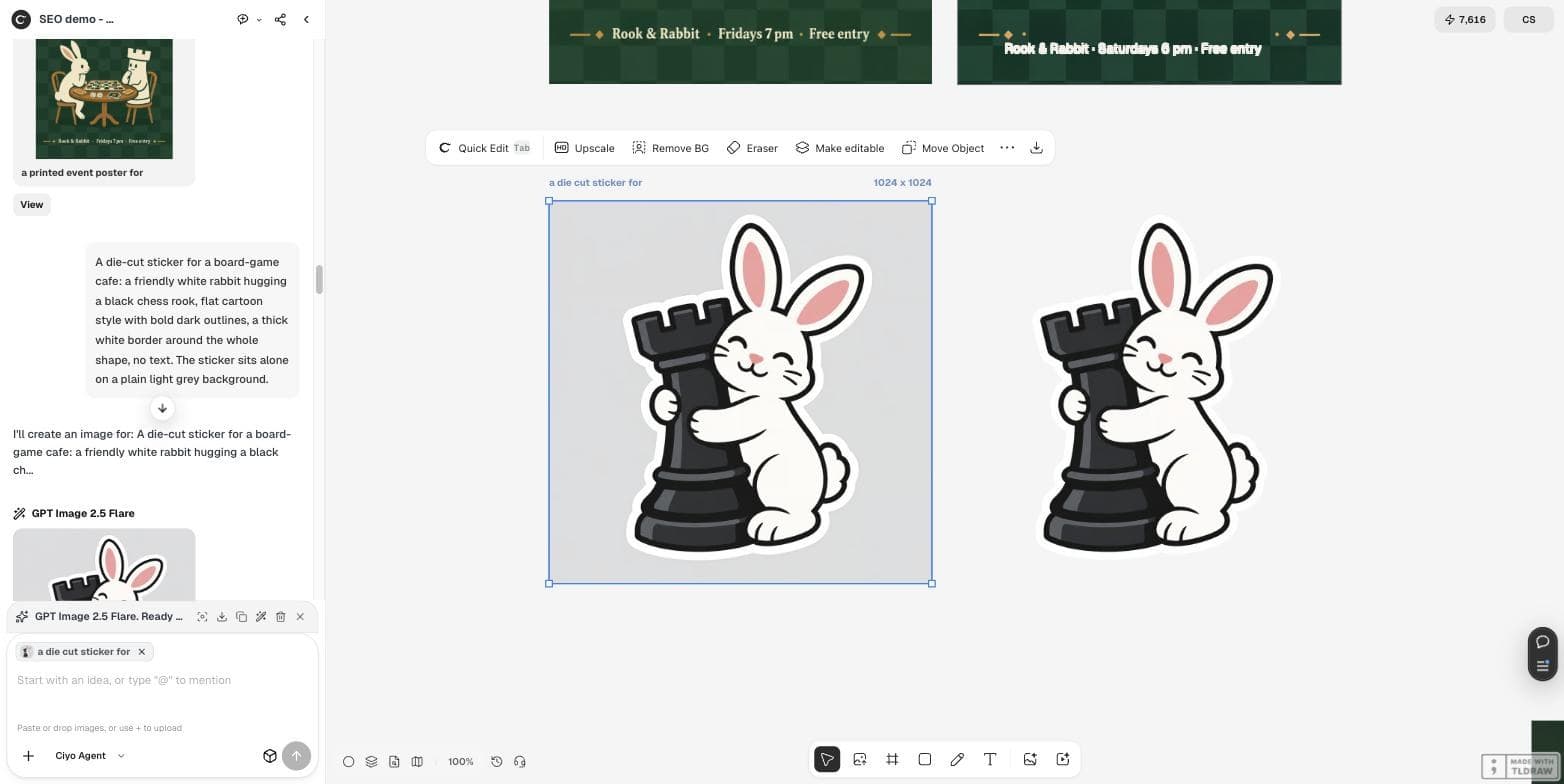
This is an RGBA image with transparency. A die-cut sticker for a board-game cafe: a friendly white rabbit hugging a black chess rook, flat cartoon style with bold dark outlines, a thick white border around the whole shape, no text. The image has alpha channel and the background is transparent.What we measured
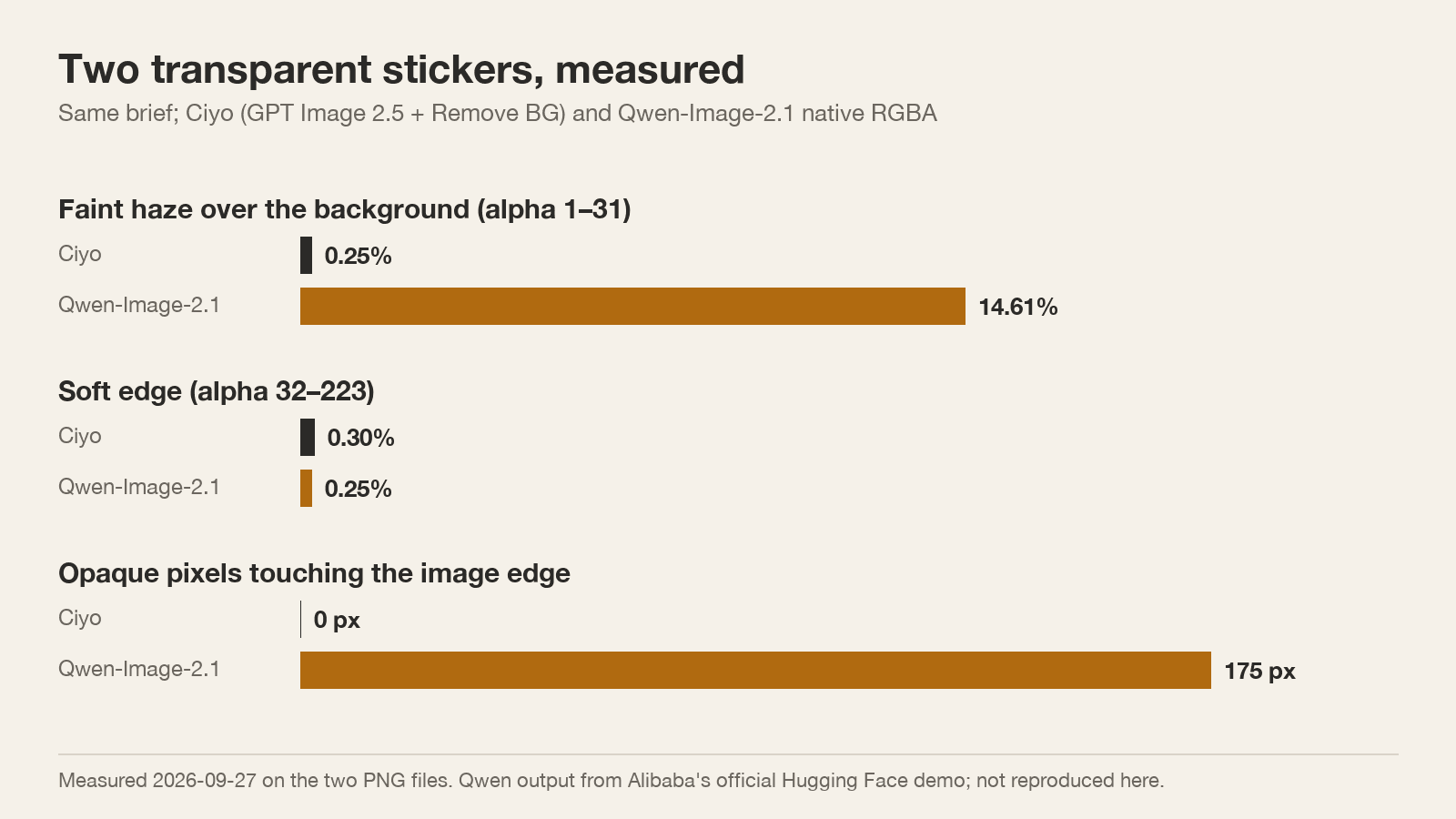
Qwen's transparency is real, and its soft edge was slightly thinner than Ciyo's. Two details would trouble a sticker printer, though. The “empty” background was not fully empty: 14.6% of pixels carried a faint alpha of 1 to 31, a haze that some cutting software treats as part of the design. And the sticker touched the image edges, with 175 opaque pixels on the border, so its white border was cut off at the frame.
Ciyo's cut-out had almost no haze, nothing on the edges and a margin on every side. One run each is an example, not a benchmark.
If you try it for research
The quickest route is Alibaba's official demo on Hugging Face. Prompt enhancement is on by default and rewrites your prompt; turn it off when you want to test your own wording. Expect a queue: ours took about eighteen minutes.
To run it yourself, the model card shows Diffusers code, and ComfyUI added support on release day. Whatever the route, open the result on a checkerboard and on a dark colour: a white border on a white page is invisible, and so is a faint haze.
Should you use it?
For research, learning or a personal project, Qwen-Image-2.1 is worth trying: native transparency in an open 7B model is new. For anything your business sells or advertises, the licence says no without a commercial agreement.
If you only need transparent files for your shop, generating on a plain background and removing it gets you there today, and you can check the result with the same alpha tests.
Qwen-Image-2.1
When was Qwen-Image-2.1 released?
On September 20, 2026, with open weights on Hugging Face and ModelScope.
Can I use Qwen-Image-2.1 commercially?
Not under its licence. The Qwen Research License allows non-commercial use only; commercial use needs a separate licence.
Does it really make transparent PNGs?
Yes. Our demo result was a 2,048 × 2,048 RGBA PNG, though 14.6% of pixels carried a faint haze and the sticker touched the edges.
Does Ciyo run Qwen-Image-2.1?
No. Ciyo does not run it; in Ciyo you can generate and then use Remove BG for a transparent file.
Make transparent files you can use
Generate in Ciyo, remove the background and check the alpha before you print.