Image generation · Behaviour
Same Prompt, Different Picture. Every Time.
You found the good one. You run the prompt again to get a second size, and something else arrives: a different cup, different light, a different mood. Nothing you typed changed.
This is the single most common surprise for people new to image generation, and it is not a fault. To show exactly how much moves, we ran one prompt three times in a row on September 21, 2026, changing nothing at all. The results are below, and one of them caught something worth knowing before you publish anything.
The three runs
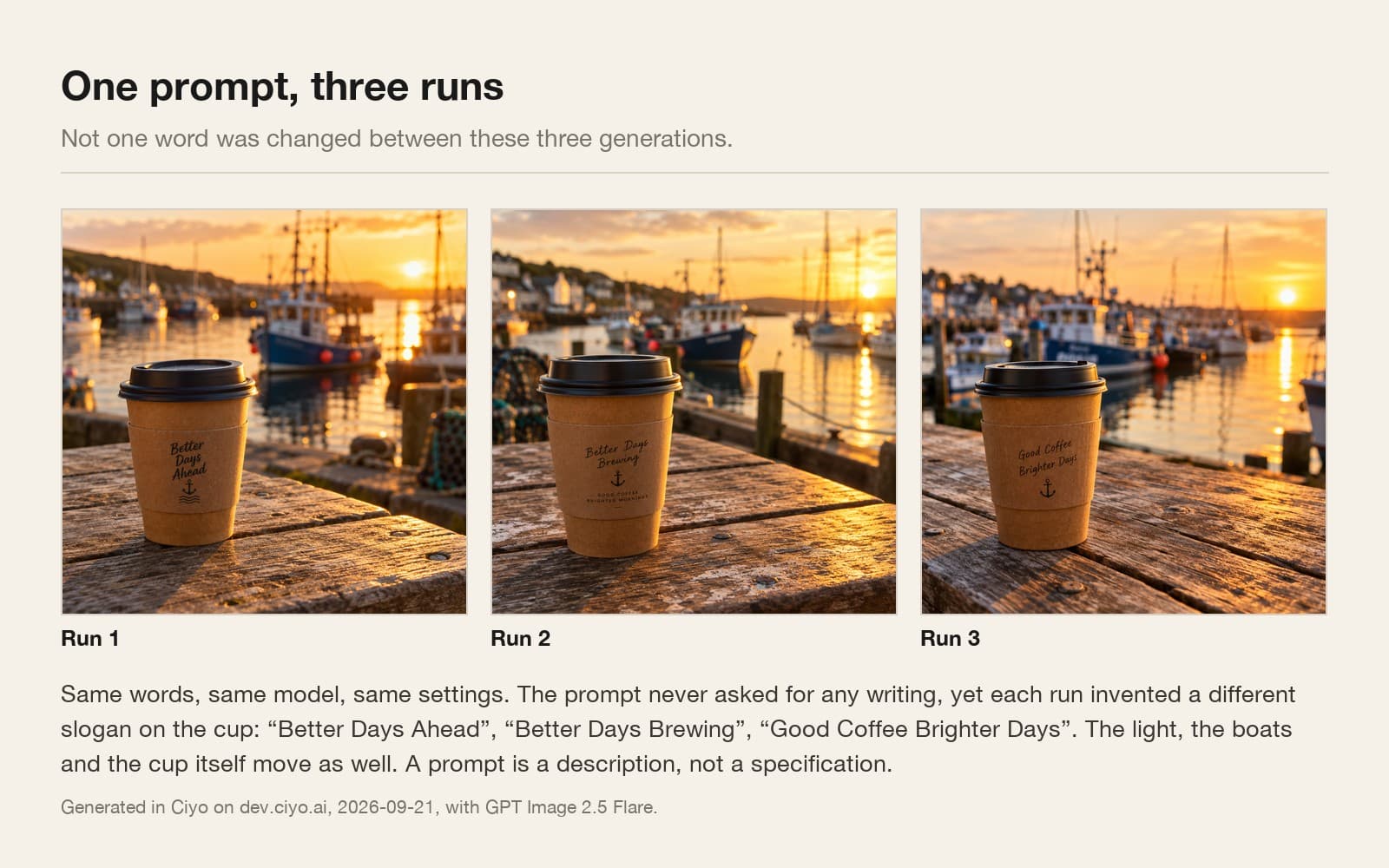
One prompt, sent three separate times, with the same model and the same settings: a takeaway coffee cup on a weathered harbour table at golden hour, boats blurred behind.
Look past the obvious differences in light and composition and read the cup. The prompt never mentions writing of any kind. Every run put a different slogan on it: “Better Days Ahead”, then “Better Days Brewing”, then “Good Coffee Brighter Days”.
That is the part that matters commercially. A generator will invent branding you did not ask for, and it will invent different branding each time. If you publish without reading the picture, you are publishing somebody else's imaginary coffee shop.
Why it happens
An image model does not look up your prompt and return the matching picture. It starts from noise and removes it step by step, steering towards something that fits your description. The starting noise is different every time, so the path is different, so the destination is different.
Your prompt is a constraint, not a coordinate. “Warm and inviting” rules out a great many images and still leaves millions. Every one of those is a legitimate answer to what you asked.
Where the description runs out, the model fills the gap with something plausible. You did not specify what was written on the cup, so it wrote something. It will keep doing that for every detail you leave open.
What to change when you need it twice
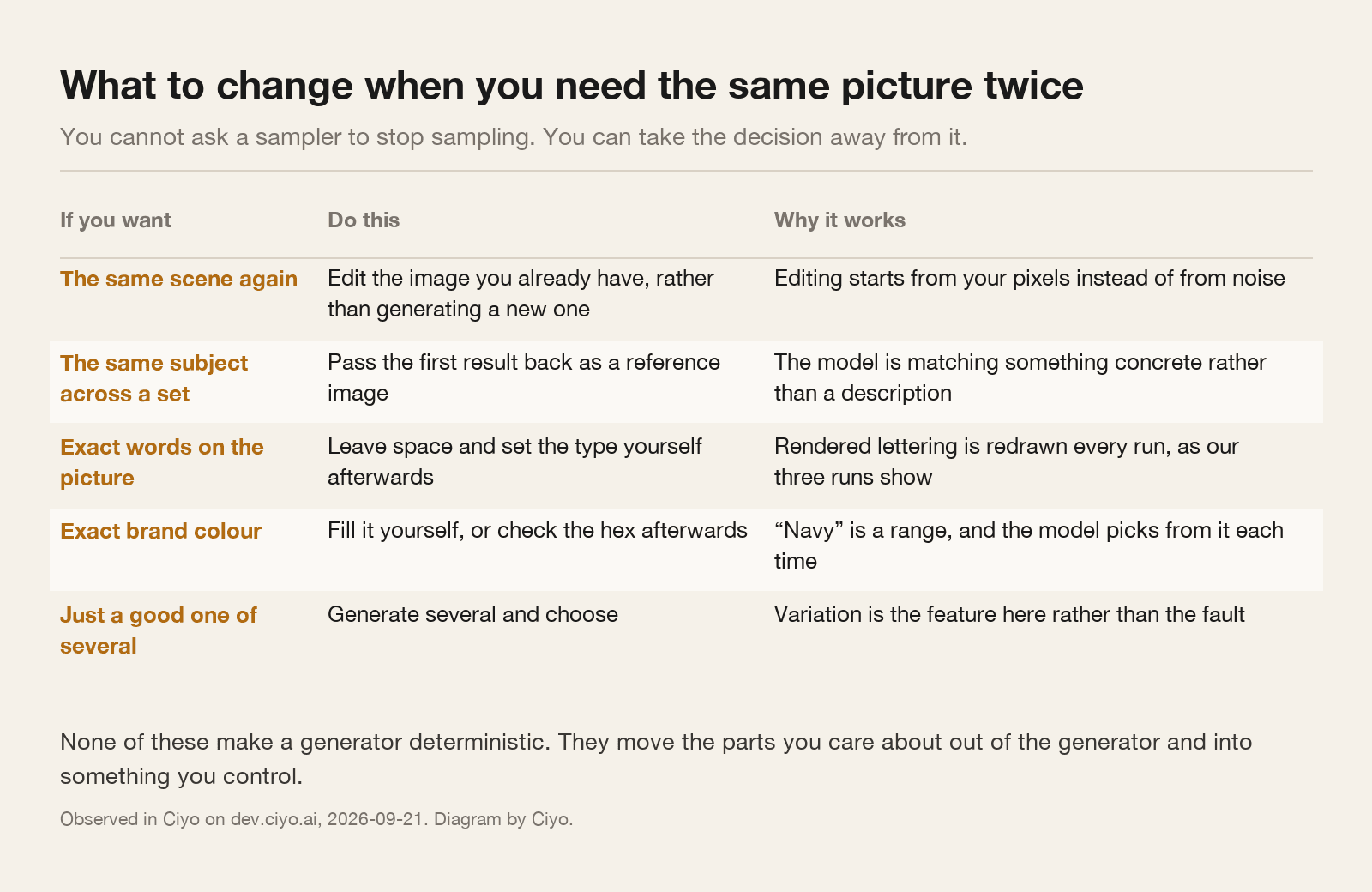
You cannot ask a sampler to stop sampling. What you can do is move the parts you care about out of the generator and into something you control.
Edit, do not regenerate
This is the habit that saves the most time and the one people find least obvious. If you like a picture and want a change, edit that picture. Do not rewrite the prompt and run it again.
Editing starts from the pixels you already have, so everything you did not ask to change stays put. Regenerating starts from noise again, and everything is back in play.
The same applies across a set. If you need four posts that look like siblings, generate one, then pass it back as a reference image for the other three. The model is then matching something concrete instead of interpreting an adjective.
Using the image on the canvas, change only the cup: remove all writing from it and leave the surface plain. Keep the table, the light, the boats and the composition exactly as they are.The check to run before anything is published
Read every word that appears inside the picture. Not the caption you are about to write, the words the renderer drew.
Then check the things a description leaves open and a customer will notice: the number of items, the colour of the packaging, whether a hand has the right number of fingers, whether the signage in the background says something.
It takes fifteen seconds and it catches the invented slogan, the invented award, and the invented prices. None of those were in your prompt, which is precisely why they are easy to miss.
| What moves | How much | Your best lever |
|---|---|---|
| Any text inside the picture | Completely, every run | Leave space and set the type yourself |
| Light, angle and background | A lot | A reference image |
| The subject's shape and material | Noticeably | A reference image, or edit instead of regenerate |
| Overall style and mood | A little, if the prompt is specific | Precise style words, kept identical |
| Aspect ratio and size | Not at all | The settings, which are yours |
When the variation is the point
It is worth remembering that this behaviour is the reason the tool is useful at the start of a job. If you do not yet know what the poster should look like, four different answers to one brief is exactly what you want, and picking is faster than describing.
The frustration only begins later, once you have decided. So treat the two phases differently: generate widely while you are choosing, then stop generating and start editing the one you chose.
Teams that get consistent output are not using a secret prompt. They generate once, then edit and reference from that first result for everything that follows.
Repeatability questions
Can I set a seed to get the same image again?
Not from the canvas in Ciyo. The practical equivalents are editing the image you already have, and passing it back as a reference for anything that has to match it.
Why did it write something on my product?
Because you did not say what was written there, and the model fills gaps with something plausible. In our three runs it invented a different slogan each time.
Does a longer prompt make it more repeatable?
It narrows the range without closing it. Detail helps, but a description can never be a specification: everything you leave open is still being decided for you.
Should I use the same prompt for a whole campaign?
No. Generate the first piece, then use it as a reference image for the rest. Matching a picture is far more reliable than matching a paragraph.
Generate once, then edit
Make the first one, keep it, and build the rest of the set from it rather than from the prompt.