Sketch workflows
Sketch to Image AI: Turn a Rough Drawing into a Visual Direction

You run social media for a neighborhood florist. The weekend mini-bouquet offer needs a post, and your starting point is three flowers, some paper wrapping and a headline scribbled into a portrait layout. That is enough to begin a useful conversation about the image.
This walkthrough turns that rough idea into a poster concept for a fictional florist. We drew the sketch in Ciyo, asked the design agent to read it, corrected the interpretation and developed the campaign direction. The screenshots show that actual demo; the offer is fictional and no sales result is claimed.
1. Draw the relationships that matter
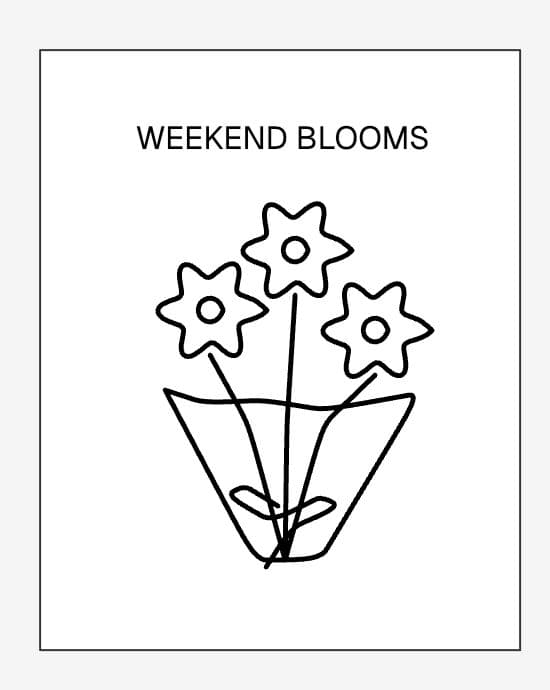
Open the Ciyo canvas. Use a rectangle to mark out a portrait post, then use Pencil for the main subject. Our example has three simple flowers inside tapered paper wrapping. Add a rough headline at the top. You can also upload a drawing made elsewhere.
The job is specific: attract nearby residents who want a small gift and invite them to enquire by direct message. Choose the intended format before adding detail; this example uses a 4:5 portrait composition. The sketch needs to show reading order and room for text. It does not need polished petals or realistic shading.
2. Check what the agent sees before asking it to create
Bring the whole sketch into view at a readable zoom level. The agent’s visual view is captured when you send your message. After a significant edit or pan, send a new message with the relevant area visible. Choose Plan in the conversation-mode menu to discuss the direction before creating.
Our first response recognized three flowers and noticed that the headline ran past the poster edge. It described the wrapping as a vase. We corrected that detail and resized the headline. This is why a quick interpretation check is useful: you can fix a mistaken assumption before it becomes part of the finished image.
Look at the sketch on my canvas. In two short sentences, describe what you see and one layout issue. Do not create an image yet.3. Separate the composition from the finish
Write two short lists: what should stay and what may change. For this florist, keep three blooms, the wrapped-bouquet silhouette, a headline above and a clear call to action below. Let the rough lines become a more polished illustration.
Keep the first request focused on one visual direction. We chose warm ivory, coral and leafy green for a friendly local-shop feel. Supply the actual wording: “WEEKEND BLOOMS”, “MINI BOUQUETS” and “DM TO RESERVE”. Leave prices and deadlines out until the business has confirmed them.
| Part of the post | Keep | Develop |
|---|---|---|
| Composition | Portrait 4:5; headline above; bouquet in the middle; CTA below | Give each part breathing room |
| Subject | Three blooms in paper wrapping | Clarify the petals, stems and folded paper |
| Appearance | A simple, recognizable bouquet | Warm ivory, coral and leafy green |
| Message | WEEKEND BLOOMS / MINI BOUQUETS / DM TO RESERVE | Check every word before using the post |
4. Create one poster concept from the agreed direction
Once the direction is agreed, switch the conversation menu to Create and request one poster concept. If Ciyo presents a plan with a Create from this plan action, use that handoff. The design agent carries the conversation; the selected image model renders the result.
Canvas understanding is not an exact tracing control. The agent can interpret your drawing and turn that understanding into generation instructions, but proportions, placement and details can change. Compare the result with the sketch. Treat any generated lettering as something to inspect carefully, even when you supplied the exact words.
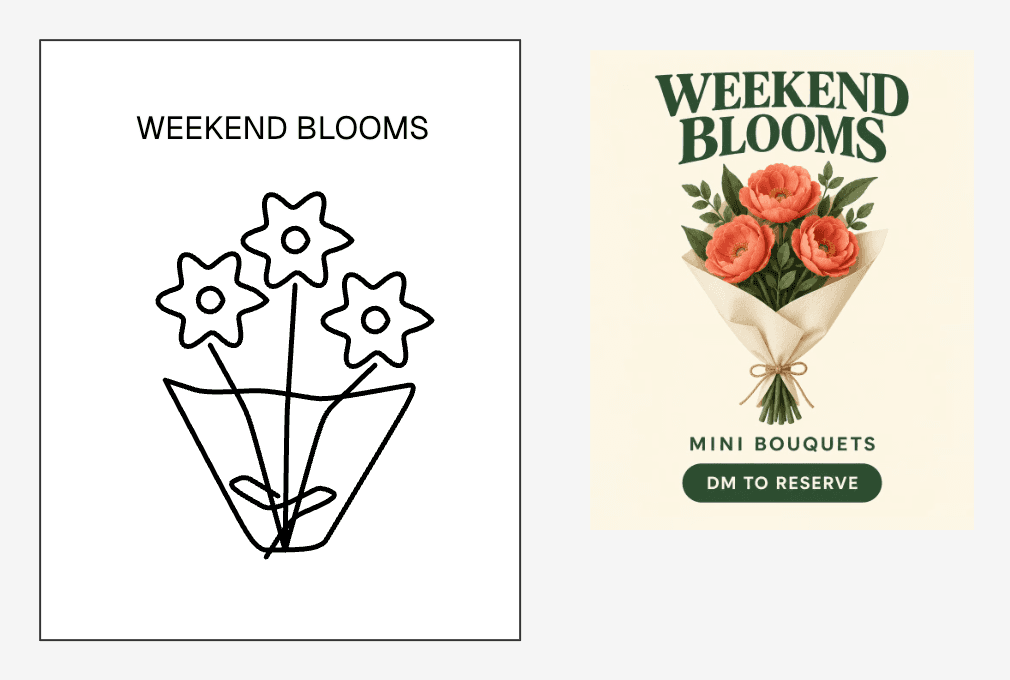
Create one polished 4:5 Instagram poster concept for our fictional florist using the brief we agreed on. Keep three simple blooms in paper wrapping. Use warm ivory, coral and leafy green, with clear hierarchy and generous margins. Include only this text: WEEKEND BLOOMS; MINI BOUQUETS; DM TO RESERVE. Do not invent a logo, price, pickup date or deadline. Make the bouquet the visual focus and keep the call to action easy to find.5. Revise the largest mismatch first
Review in this order: recognizable offer, reading order, exact words, then decorative details. Can a viewer see that this is a bouquet offer and find the action to take? If the call to action is hidden, adding texture will not fix the main problem.
In our result, the three blooms and all three supplied text lines were visible. The image developed the simple marks into a much more detailed bouquet. We checked the actual image in the browser at 896 × 1120 pixels; check your own exported file and intended publishing size before using it.
Ask for one correction and say what should remain. For example: “Keep the bouquet and colors. Give DM TO RESERVE more space below the illustration.” Keep the sketch and current result visible for the next message. The feedback guide below shows how to turn a broad opinion into a specific layout decision.
Why composition needs an explicit check
In a Reddit question, u/Desiaster asked how to turn their own sketches into photographic images while keeping the composition. The replies discuss several other tools and workflows. The question captures a useful distinction: an attractive image and a faithful interpretation are separate things to judge.
Our florist exercise makes that distinction practical with a short keep-list and a comparison against the drawing. It does not establish exact composition preservation or adopt the thread’s model recommendations as a benchmark.
May 27, 2026: a community question about preserving sketch composition. The discussion concerns other tools; this Ciyo workflow is an independent exercise, not a result or endorsement from the poster.
If the sketch is missed, simplify the next turn
Make sure the drawing is visible rather than hidden or outside the current view. Zoom in if its lines occupy only a tiny part of the canvas. If the agent reports that it cannot access the visual view, try a fresh message with the sketch in view or upload a clear image of it. Ask it to describe the subject again before proceeding.
Before posting, check the final text, crop, offer details and destination for enquiries. If the visual is an illustration, use it as a campaign graphic; show an accurate product photo when customers need to judge the bouquet they will receive. The useful outcome here is a clear visual direction you can review and finish.
Frequently asked questions
Do I need polished drawing skills?
No. Use clear marks for the subject, its rough proportions and its position. Explain ambiguous details in the message. The sketch needs to communicate your intention, not look finished.
Can Ciyo see a freehand sketch without an uploaded image?
The design agent can receive the visible canvas as an image, including freehand drawings. Keep the relevant drawing in view when sending. If the visual capture is unavailable, the agent should say so.
Will the generated image match every line?
Do not assume exact tracing or locked geometry. Check the result against the sketch and revise important differences. A visual interpretation is a starting point for generation, not a guarantee of identical outlines.
Does moving the canvas update an answer already in progress?
No. The visual view belongs to the message you sent. Reframe or edit the sketch, then send a new message to discuss the updated view.
Sketch your next social post
Start with one offer, a rough layout and the action you want viewers to take. Ask Ciyo what it sees, agree on the direction and create one concept to review.