Editing · Tested
Split an AI Image into Editable Layers
The most common complaint about AI images is that they are flat. The poster is almost right, but the date changed, and fixing one line means generating the whole picture again.
On September 27, 2026 we made an event poster for Rook & Rabbit, a fictional board-game café, and split it into layers with Ciyo's Make editable. This is what it gave us, what we could change in a minute, and what it cannot do.
The poster
We generated a 3:4 poster with GPT Image 2.5 Flare for 2 credits: a “FRIDAY GAME NIGHT” headline, a rabbit and a chess rook playing at a small table, and a bottom line with the name, day, time and price. All the text came back spelled correctly.
A printed event poster for a board-game cafe. Top: the headline "FRIDAY GAME NIGHT" in bold cream letters. Middle: a flat illustration of a white rabbit and a chess rook playing a board game at a small table, with dice and cards. Bottom line: "Rook & Rabbit · Fridays 7 pm · Free entry". Deep green background with a subtle checkerboard pattern, warm amber accents. Clean flat vector style, lots of space around each element.Make editable: one picture becomes 17 layers
Select the picture and click Make editable in the image toolbar. It costs 50 credits and took two to three minutes. The original stays untouched; a new layer set appears beside it.
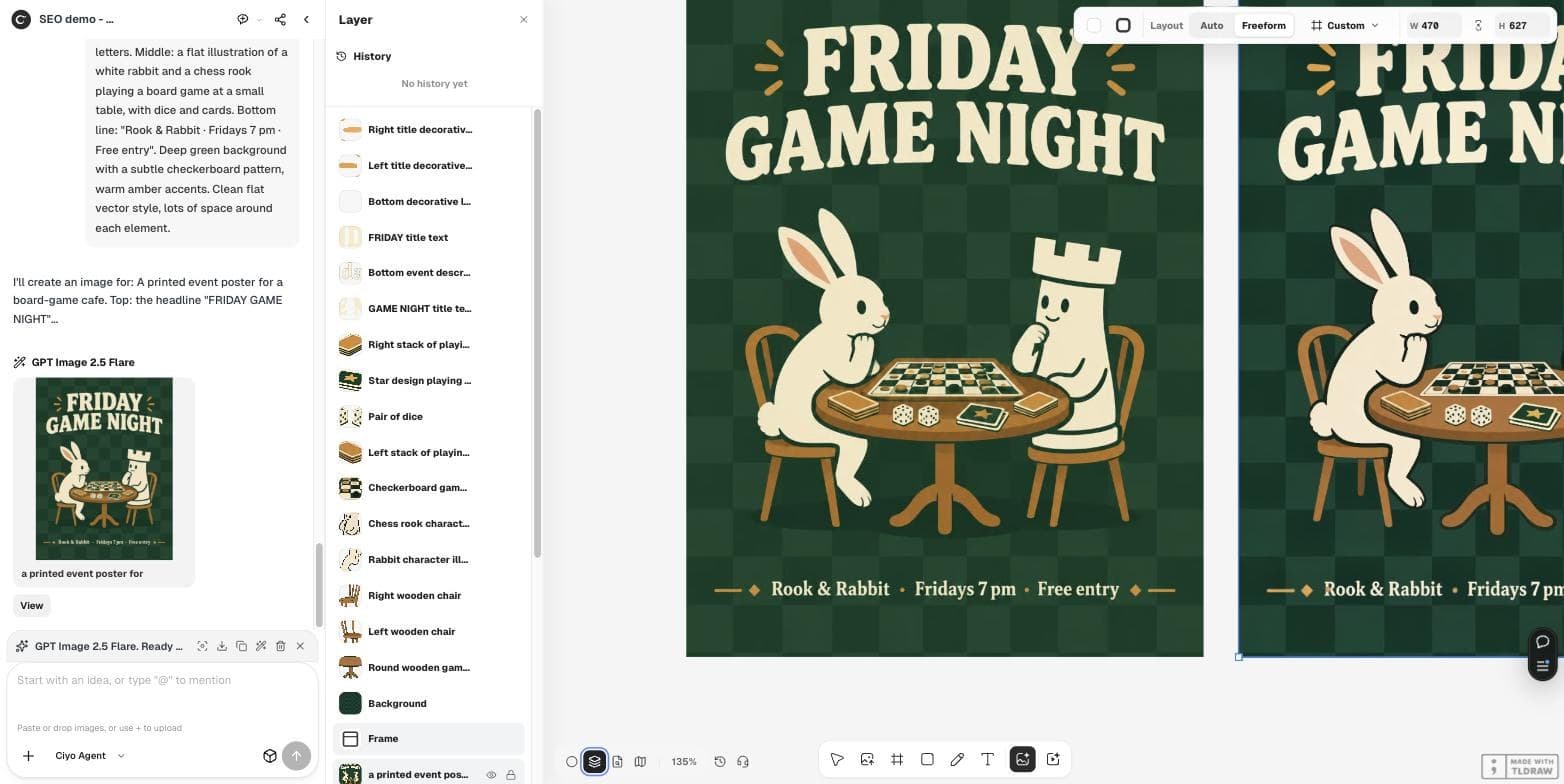
Ours had 17 layers, each named: the two headline words, the bottom line, the decorations, the rabbit, the rook, the table, both chairs, the dice, three card piles, the board and a background. That is one background plus 16 cut-outs, the most a split produces.
Change the date line in a minute
The event moved to Saturday at 6 pm. We hid the “Bottom event description” layer with its eye icon. The background under it was already clean checkerboard: the background layer had been filled in behind the text.
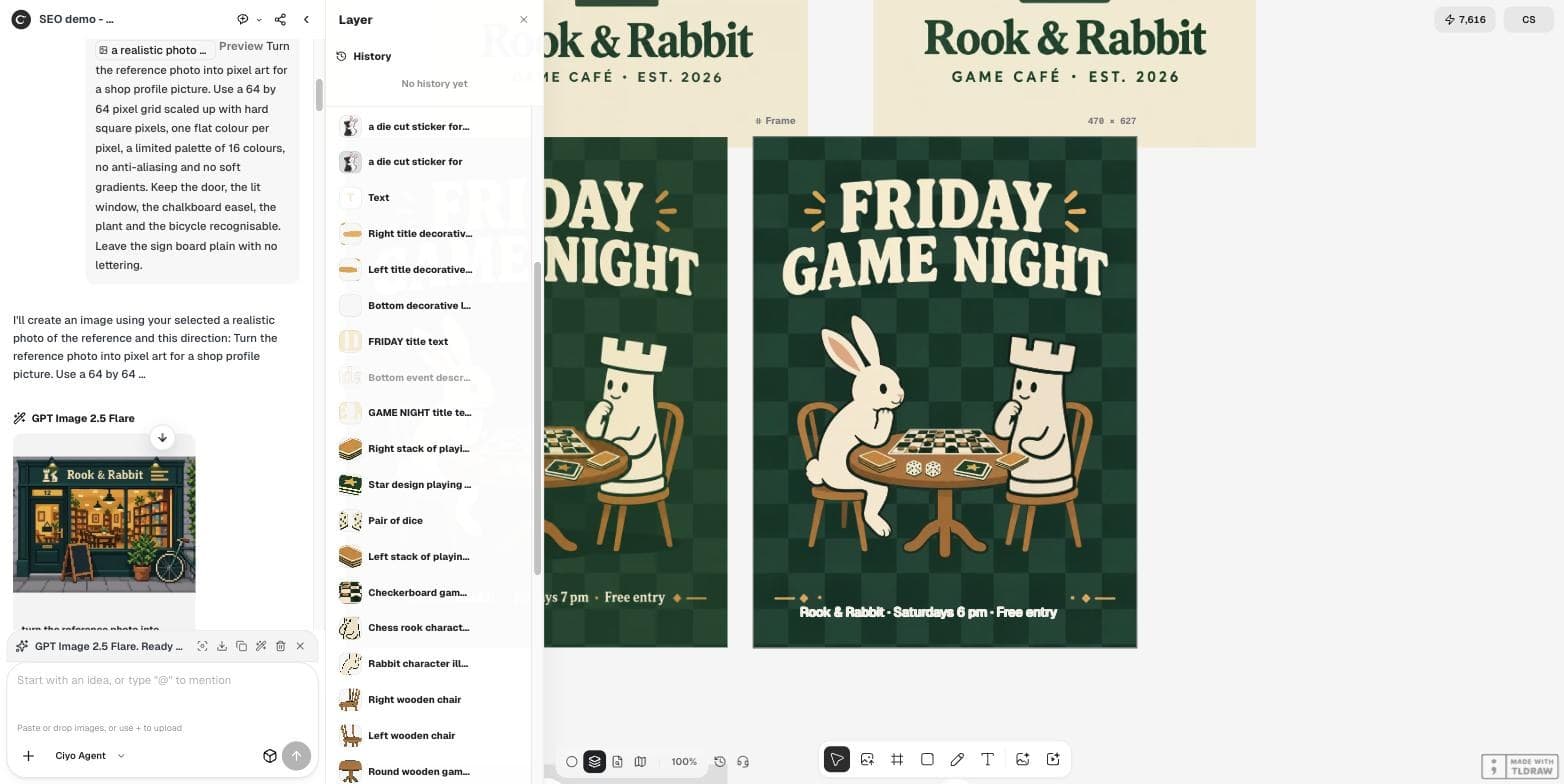
Then we used the Text tool to type the new line, set it to size 16 and to the poster's cream, #F3E9D2. That line is now real text you can edit again next week.
What you cannot change this way
Text layers are pictures of letters, not live text. The headline still said FRIDAY, and the new line is in Inter, not the poster's display lettering. To change the headline you can generate a new headline picture with Quick Edit, or replace it with live text in a font you choose.
If you move a cut-out, zoom in on its edges before you publish, and check that nothing behind it looks unfinished.
| Task | With Make editable | Notes |
|---|---|---|
| Hide or move an object | Yes | Each cut-out is its own layer |
| Replace a line of small text | Yes | Hide the layer, type live text |
| Edit the headline words | No | Letters stay pictures; use Quick Edit or live text |
| Match the display lettering | No | Live text uses your chosen font |
The industry is moving the same way
Layered output is where image tools are heading, because people need files they can change. You do not need a new model to benefit: split the picture you already like.
Posted 2026-09-22. Ant Ling announced open-source Ming-Image-0.1-Design models, including a layer model, and an agent skill that turns an image into an editable PowerPoint. It is a different product; Ciyo does not run these models. The announcement shows the same demand our test answers: a picture you can edit part by part.
When to split, when to regenerate
Split when the picture is right and a few parts must change: dates, prices, positions, a product swapped out. Regenerate when the composition itself is wrong. A 50-credit split pays off when it saves several regenerations of a poster you already like.
Editable layers from an AI image
Can I turn an AI image into layers?
Yes. Ciyo's Make editable split our poster into 17 named layers: 16 cut-outs and a background.
How much does it cost and how long does it take?
50 credits per picture. Our split took two to three minutes on September 27, 2026.
Can I edit the text after splitting?
Text layers are pictures of letters. Hide them and type live text, or remake them with Quick Edit.
Does hiding a layer leave a hole?
Not in our test. The background under the hidden line was already filled in.
Make your next poster editable
Generate it in Ciyo, split it with Make editable, and change the parts that move.