Small business · Merchandise
A T-Shirt Graphic a Printer Will Accept
Shirt printing is unforgiving in a way that screens are not. A gradient becomes a band, a thin line disappears into the weave, and a white background prints as an actual white rectangle around your design.
So the question is not whether a generator can make a nice graphic. It can. The question is whether the file it hands you is the kind of file a printer can use. We made one for a fictional coffee bar's staff shirts on September 21, 2026 and then opened the file to find out.
The brief, and why every clause is in it
Each constraint below maps to a specific way shirt prints go wrong. Flat and no gradients, because printers separate colours and a gradient has to be faked with a halftone. Two colours, because most screen printers charge per colour. No mockup, because you want the artwork, not a photograph of a shirt.
Design a flat t-shirt graphic for the Pier Six Coffee staff shirts: one simple two-colour mark with the words PIER SIX underneath it, flat vector look, no gradients, no shading, plain white background, square, and no shirt mockup. Print no other words.What came back
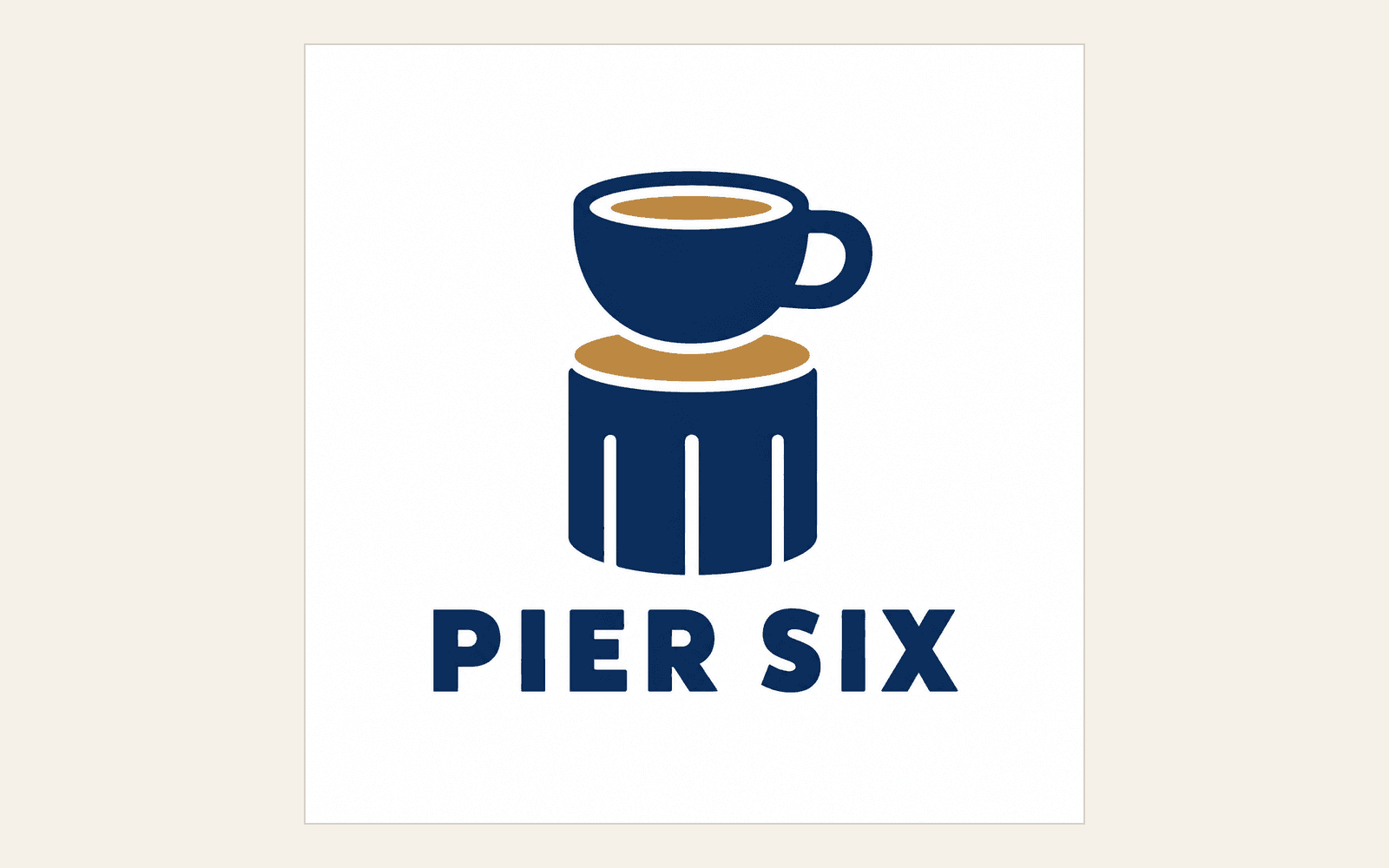
A cup sitting on a pier post in navy, with an ochre coffee surface and an ochre band, and PIER SIX set underneath in heavy capitals. No extra words, no mockup, no shading.
It is a good answer to the brief. The mark is simple enough to survive a chest print, the lettering is heavy enough to hold at small sizes, and the whole thing reads at a glance across a room, which is the actual job of a staff shirt.
What the file actually contains
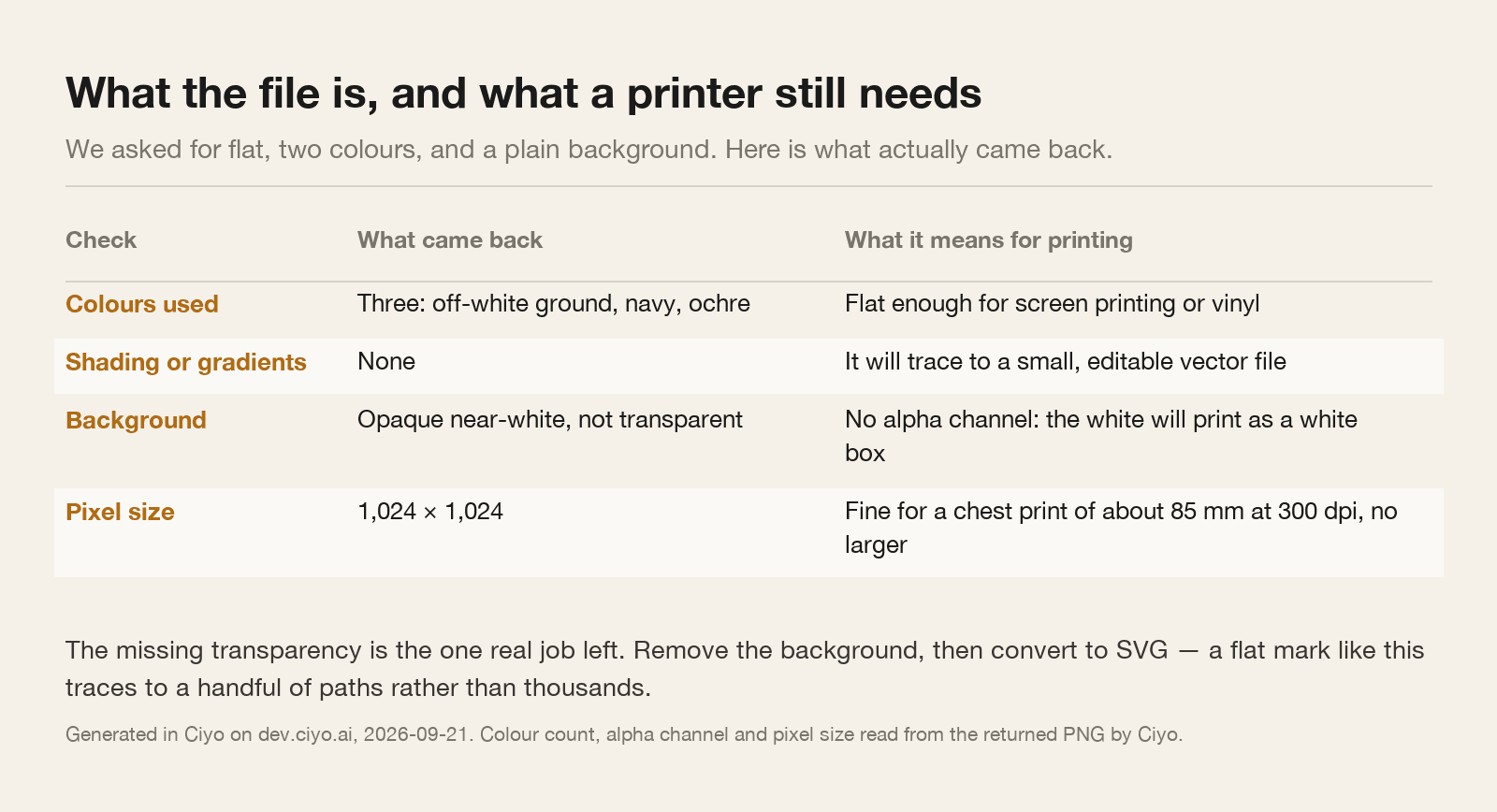
Looking at the pixels rather than the picture: three colours account for almost everything. An off-white ground, a navy, and an ochre. No gradients and no shading, exactly as asked. That is unusually clean, and it means the design will separate easily and will trace into a small vector file.
One thing is missing, and it is the thing people forget. The background is opaque near-white, not transparent. The file has no alpha channel at all. Send it as it is and a printer will either print a white box or come back with questions.
The size is 1,024 × 1,024. At 300 dots per inch that covers about 85 millimetres, which is a modest chest print and nothing larger. A full front print wants more.
The two jobs left
Remove the background. On a flat graphic with a clean ground this is quick and reliable, and it is the difference between artwork and a picture of artwork.
Then convert it to SVG. A flat, three-colour mark like this is exactly the input an image tracer handles well: in a comparison we ran the same day, a flat two-colour mark traced to 8 paths and 5.7 KB, while a photographic image traced to 3,908 paths and 2 MB. A vector file also means the printer can scale it to any size without asking you for a bigger PNG.
If you need it larger than a chest print and you are staying raster, generate at a higher resolution rather than enlarging. 300 dpi across a 280 millimetre front print is about 3,300 pixels.
| They ask for | Why | How to get it |
|---|---|---|
| Transparent background | So the shirt colour shows through, not a white box | Remove the background; a flat graphic makes this easy |
| Vector, or very high resolution | So the art scales to the print size cleanly | Convert the flat mark to SVG |
| A named colour count | Screen printing is usually priced per colour | Count them: ours used two, plus the background |
| The print size in millimetres | So they can check your resolution against it | Decide the size first, then check pixels ÷ (mm ÷ 25.4) |
What to avoid asking for
Do not ask for a mockup unless you want a mockup. A photograph of a folded shirt is useful for a shop listing and useless to a printer, and people routinely send the mockup by mistake.
Do not ask for a distressed or vintage texture on a first pass. It looks convincing on screen and turns into mud at print resolution, and it also destroys the clean tracing you want for the vector file.
And do not put small print on a shirt. Anything under about 8 millimetres tall fills in on fabric. If the brief tempts you to add a web address under the mark, put it on the sleeve or leave it out.
The short version
Ask for flat, two colours, no gradients, no mockup, and dictate any words exactly. You will usually get a printable design first time.
Then do the two things the generator cannot: take the background off and turn it into a vector. Those five minutes are what turn a nice square picture into a file a shirt printer can quote against.
T-shirt printing questions
Can I send the generated PNG straight to a printer?
Not usually. Ours had no alpha channel, so the background would print as a white box. Remove the background first, and convert the flat mark to SVG if you can.
How big can I print a 1,024 pixel graphic?
About 85 millimetres at 300 dpi, which is a modest chest print. For a front print of about 280 millimetres you want roughly 3,300 pixels, so generate larger rather than enlarging.
Why ask for flat with no gradients?
Screen printers separate colours and usually charge per colour, and a gradient has to be faked with a halftone. Flat art also traces into a small, clean vector file.
Should I ask for a shirt mockup?
Only for a shop listing. A printer needs the artwork on its own; a photograph of a folded shirt cannot be printed.
Make the artwork, not the mockup
Generate a flat two-colour mark, remove the background, convert it to SVG, and send the printer a file they can quote against.