3D · Reality check
Can the AI Actually Build the 3D Model?

Somebody posts a Blender render, credits an AI, and the comments fill with people asking which button they pressed. Then they go looking for the skill, install it, and discover that nothing has been built for them.
The gap is not a missing feature. It is a misunderstanding about what a skill is and which machine does the work, and the published documentation settles it in about four sentences. This article is that answer, written for somebody who wants to know what they are actually getting before they spend an evening on it.
A skill is a folder, not an engine
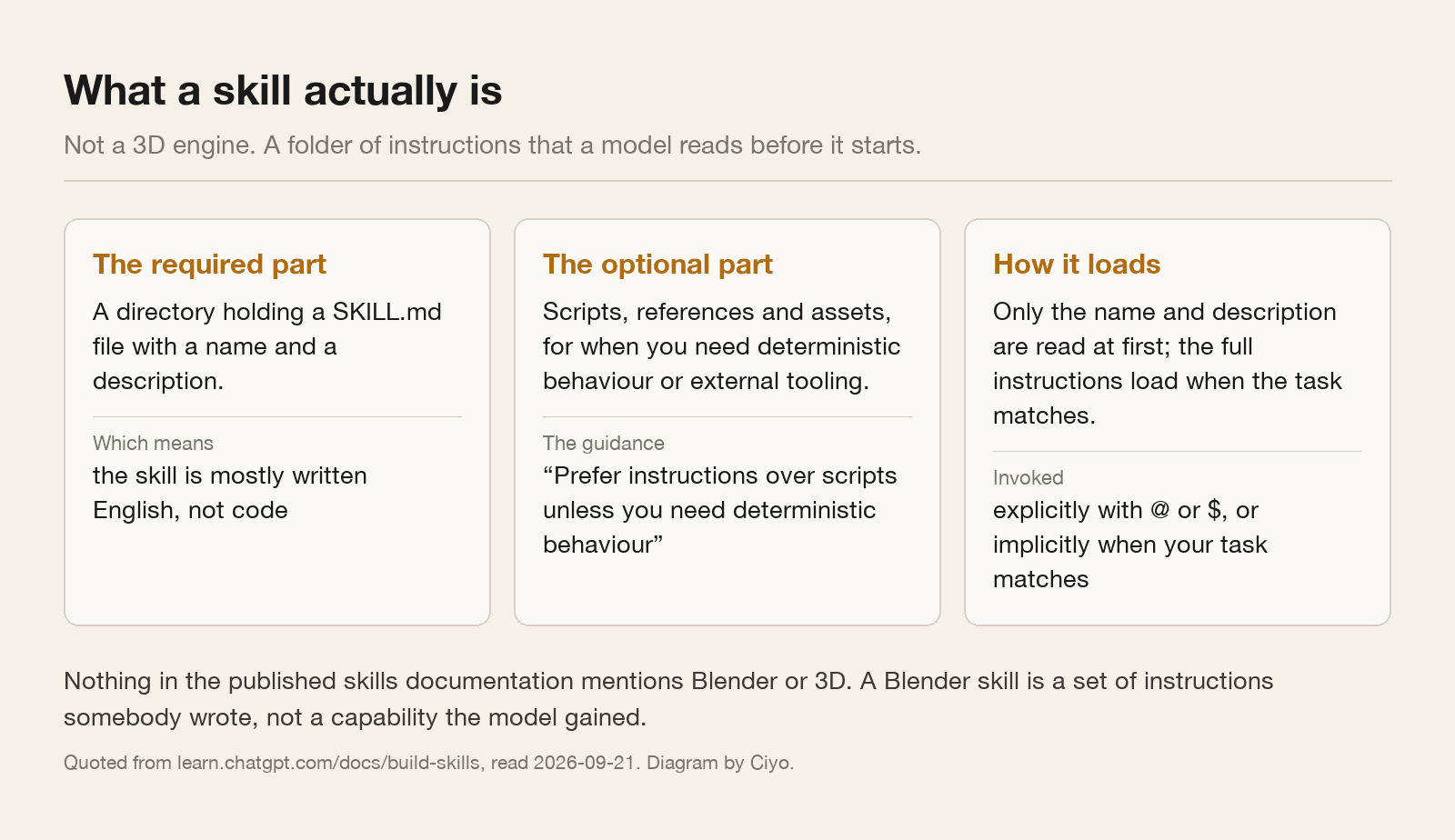
The documentation is plain about this. A skill packages instructions, resources and optional scripts so the product can follow a workflow reliably. The only thing it requires is a directory with a `SKILL.md` file holding a name and a description. Scripts, references and assets are optional extras.
The guidance even discourages code: prefer instructions over scripts unless you need deterministic behaviour or external tooling. Skills load progressively, so the model reads only the name and description until your task matches, then loads the rest.
Search the published skills documentation for Blender, or for 3D, and you will not find either word. A Blender skill is a set of instructions somebody wrote, packaged so a model reads them at the right moment. It is closer to a very good briefing note than to a plugin.
So what is actually doing the work
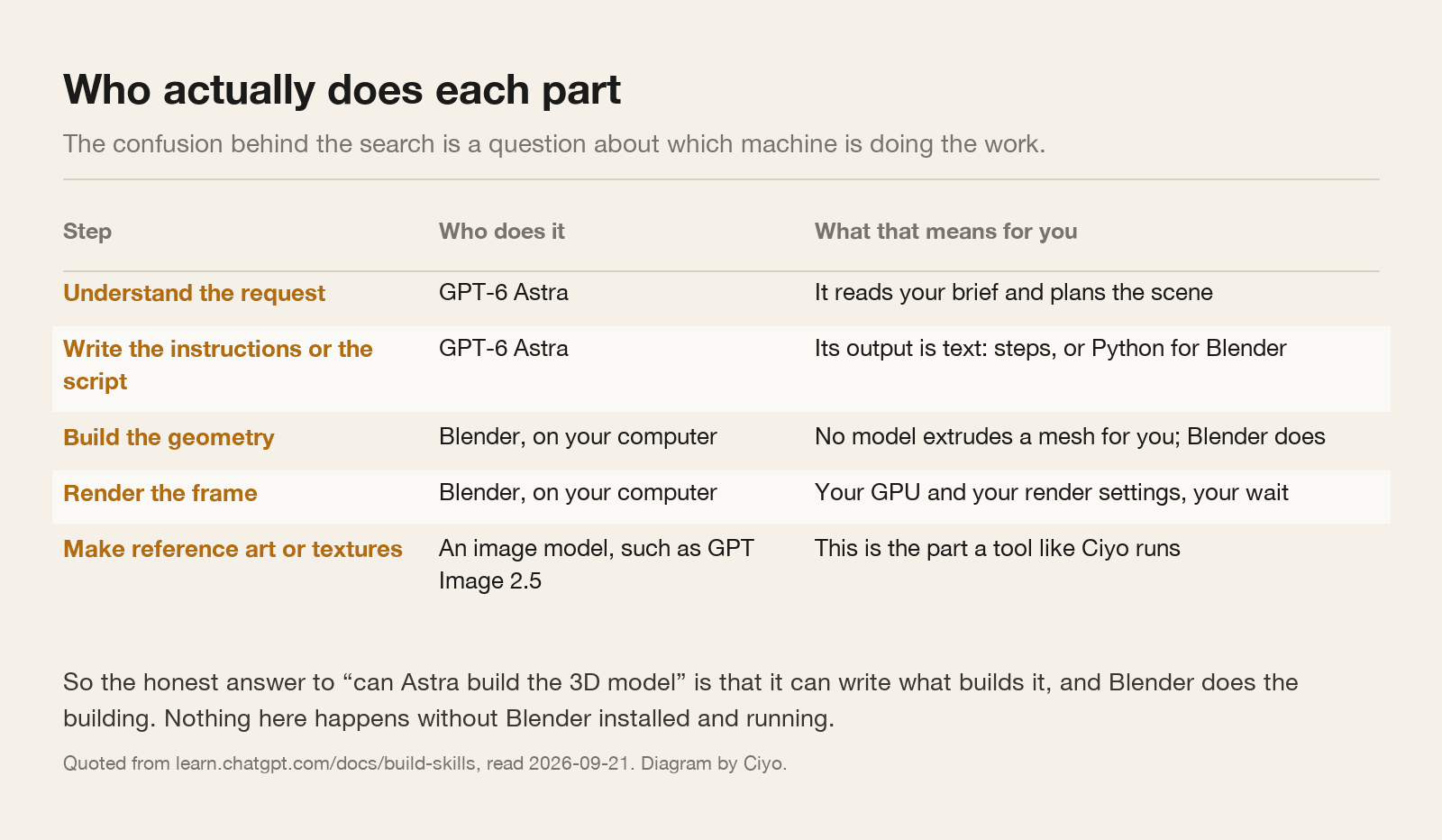
GPT-6 Astra is a text and reasoning model. It reads your brief, plans, and writes. What it produces is words: a list of steps, or Python for Blender's scripting console.
Blender builds the geometry. Blender runs the script. Blender renders the frame on your graphics card, on your machine, in your time. If Blender is not installed and running, nothing in the chain produces a single vertex.
That is not a disappointment once you see it clearly. Writing a correct Blender script is genuinely the hard part for most people, and it is the part a reasoning model is good at. The model is not the sculptor; it is the person who can read the manual faster than you can.
What this means in practice
You still need Blender, and you still need to know roughly what you are doing in it. A script that fails will fail silently in ways that need a person to read the console.
You get the most from the pairing when the task is fiddly and well defined rather than creative: array this object along a curve, set up a three-point light rig, batch-rename two hundred materials, export every collection separately. Those are exactly the jobs people avoid because the clicking is tedious, and exactly the jobs a written script does perfectly.
Where the model helps least is taste. It cannot see your viewport, and it does not know that the composition is boring.
| What you ask for | What comes back | What you still do |
|---|---|---|
| “Build me a coffee shop scene” | A plan and a long script, guessing at everything | Most of the work, and probably a rewrite |
| “Write a script that arrays this object along the selected curve” | Usually working Python | Paste it, run it, read the error if there is one |
| “Why is my render grainy at 200 samples?” | A shortlist of likely causes | Change one setting at a time and re-render |
| “Make me a reference image of this material” | A picture, from an image model | Use it as a texture reference, not as geometry |
The part a tool like Ciyo does run
Ciyo does not run Blender and does not pretend to. What it runs is the image side: reference art, texture plates, mood boards, the product shot you are trying to match, the backdrop you will composite behind a render.
That division is worth knowing when you are choosing where to spend. An image model will give you a convincing reference in seconds and will never give you a mesh. Blender will give you a mesh and will never invent the reference for you.
Make a square reference image of a brushed ceramic glaze in warm off-white, lit by a single soft window light from the left, shot straight on, flat and even, no props and no background. I want it as a texture and lighting reference, not as a finished picture.Reading the demos honestly
When you watch a convincing demonstration, ask three questions. Was Blender open? Did a human paste the script and fix it when it failed? And how many attempts were cut out of the recording?
None of those questions are cynical. They are the difference between a workflow you can repeat on Tuesday and a clip that was true once.
We have written the practical side of this pairing elsewhere, and those articles assume Blender is doing the building, because it is.
The one-line answer
No, the AI does not build the model. It writes the instructions that build the model, and Blender carries them out on your computer.
That is still a real saving, and it is a much smaller promise than the one the demos imply. Knowing which one you were sold is worth the five minutes it takes to read a `SKILL.md` before installing it.
Blender and AI questions
Does the Astra Blender skill make 3D models?
No. A skill is a directory containing a SKILL.md file of instructions, plus optional scripts and assets. The published skills documentation does not mention Blender or 3D at all. Blender does the building.
Do I still need Blender installed?
Yes. Every mesh, modifier and render happens inside Blender on your own machine. Without it there is nothing to run the script against.
What is it genuinely good at?
Well-defined, tedious scripting: arraying objects, building light rigs, batch renaming, batch exporting. Those are the jobs where a correct script saves an hour of clicking.
Can Ciyo do the 3D part?
No. Ciyo runs image and video models. It is useful for the reference art, textures and backdrops around a 3D job, not for the geometry.
Make the references, not the mesh
Generate the texture and lighting references your 3D scene needs, then take them into Blender.