Pixel art · Tested
Can Claude Opus 5.5 Make Pixel Art? One Fox, Pixel by Pixel
Claude Opus 5.5 is a language model. It does not output pictures the way an image model does. So when people search for “Opus 5.5 pixel art”, the useful question is not whether it can paint, but whether it can build a sprite you can actually use: the right grid, a short palette, clean edges and a transparent background.
On September 30, 2026 we gave the same small job to Claude Opus 5.5 directly, to the Ciyo Agent, and to an image model: a 32 × 32 fox mascot for a fictional board-game café. We measured every file. The code route gave exact pixels every time. The image model gave the better drawing and the worse sprite.
The short answer: yes, if it draws with code
A language model makes pixel art the way a person does in a spreadsheet: it decides the colour of each cell. In practice that means a short script, for example in Python with the Pillow library, that sets each pixel on a fixed grid and saves a PNG. The grid and the palette are then exact by construction, because nothing is resized or blurred.
The limit is drawing skill. The model has to imagine the shape row by row, so poses stay simple and small details need a second look. That is why the test below matters more than a yes or no.
| Compared | Code route (a language model places pixels) | Image route (an image model paints) |
|---|---|---|
| Grid and size | Exact: 32 × 32 means 32 × 32 | A large picture that only looks pixelated |
| Palette | The colours you allow, nothing else | Tens of thousands of colours until you reduce them |
| Transparency | Clear or solid pixels only | Usually a solid background to remove |
| Drawing quality | Simple shapes, needs review | Richer pose and character |
| Credits in our test | None for the drawing | 2 credits for the picture |
The brief: a mascot for a board-game café
Pip & Pine is a fictional board-game café that wants a small mascot for its Discord emoji and a game-night poster. A good pixel-art brief states the grid size, the colour limit, the outline, the background and the pose, and it says how the file should be made.
We sent the same brief to Claude Opus 5.5 in Claude Code, with only Python and Pillow allowed, and to the Ciyo Agent on a new Ciyo board.
I run Pip & Pine, a board-game café. I need a 32x32 pixel-art mascot for our Discord emoji and a game-night poster: a small orange fox holding a mug of cocoa, facing right, dark outline, no more than 12 colours, transparent background. Please draw it yourself, pixel by pixel, without an image model: place every pixel on a 32x32 grid in code, then save the 1x PNG and a 10x preview to the board. Tell me the palette you used.What Claude Opus 5.5 drew on its own
Claude Opus 5.5 wrote a Pillow script that sets every pixel from a hand-made grid. It rendered the result, looked at it and revised it twice. Its own log says the dark arm “read as a stick”, so it made the upper arm orange, and it removed a stray cream pixel from the tail. The whole job took about 3.6 minutes.
We checked the file: 32 × 32 pixels, 11 colours, 536 solid pixels, and every other pixel fully clear. There were no half-transparent edge pixels, which is what makes a sprite look crisp in a game engine or in Discord. Its only warning was honest: the very light grey steam is hard to see on a light background.
The same brief in Ciyo
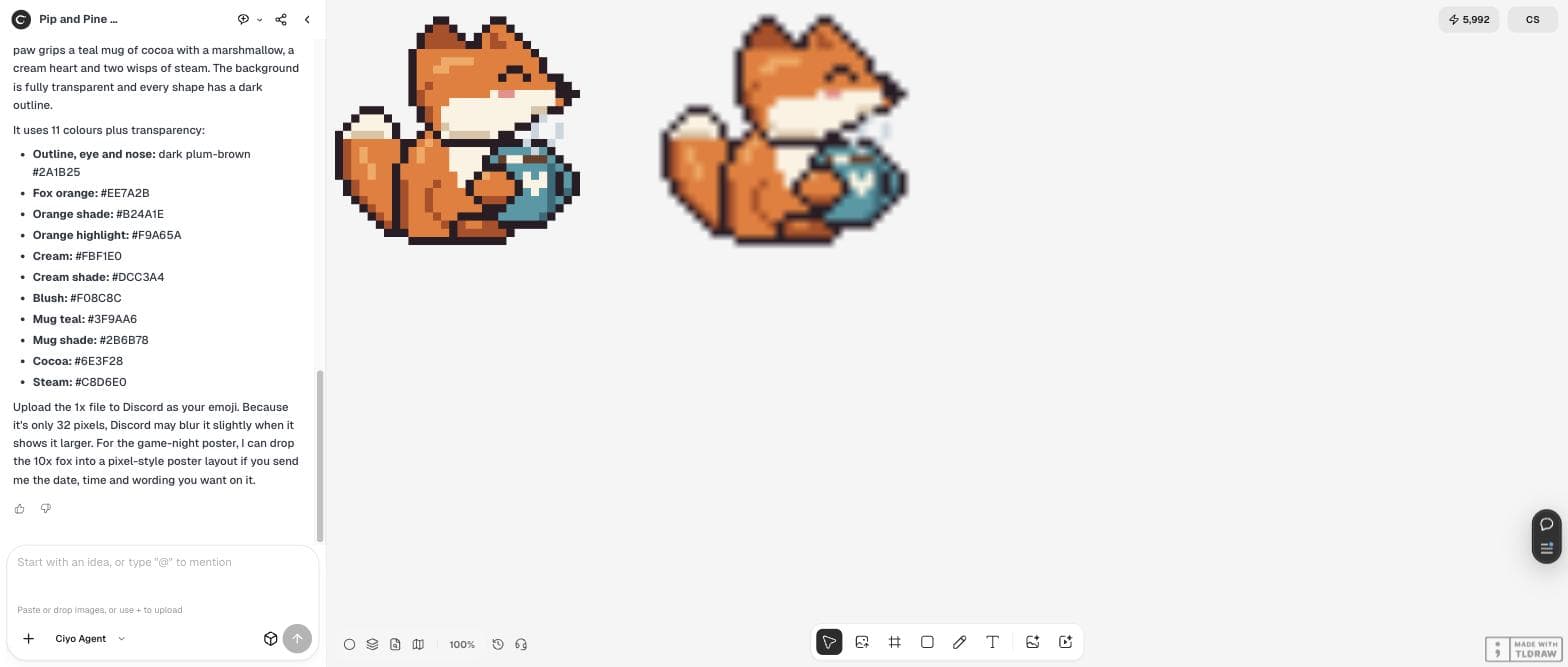
The Ciyo Agent took the same route. It said it would “draw it by hand in Python: every pixel is set explicitly on a 32×32 grid in layers”, looked at its first render, and moved the heart on the mug because the paw covered it. It saved a 32 × 32 file and a 320 × 320 preview to the board and listed its 11 colours as hex values. No credits were spent.
Our check matched its report: 11 colours, 577 solid pixels, no half-transparent pixels, and the 10× preview exactly ten times the 1× file. One detail to know: the board shows the tiny 1× file enlarged with smoothing, so it looks blurred there. The 10× preview is the one to judge by eye.
Then we asked an image model for the same fox
Next we asked the Ciyo Agent to make the same fox with GPT Image 2.5 at the cheapest setting (2 credits), shrink it to 32 × 32, snap it to the same 11 colours and score both versions with one script.
The raw picture was 1,024 × 1,024 with a solid white background and 45,153 different colours. Its “pixels” were soft blocks about 20 to 23 screen pixels wide, a grid of roughly 45 × 45, so shrinking it to 32 × 32 cut through its own pixel edges. After snapping, the agent counted the cost of that: the shading almost vanished (dark orange went from 54 pixels to 1), the mug shrank from 34 to 19 pixels and lost its handle, and the outline had 14 breaks. The image model's fox did have the better pose, a fuller tail and clearer ears.
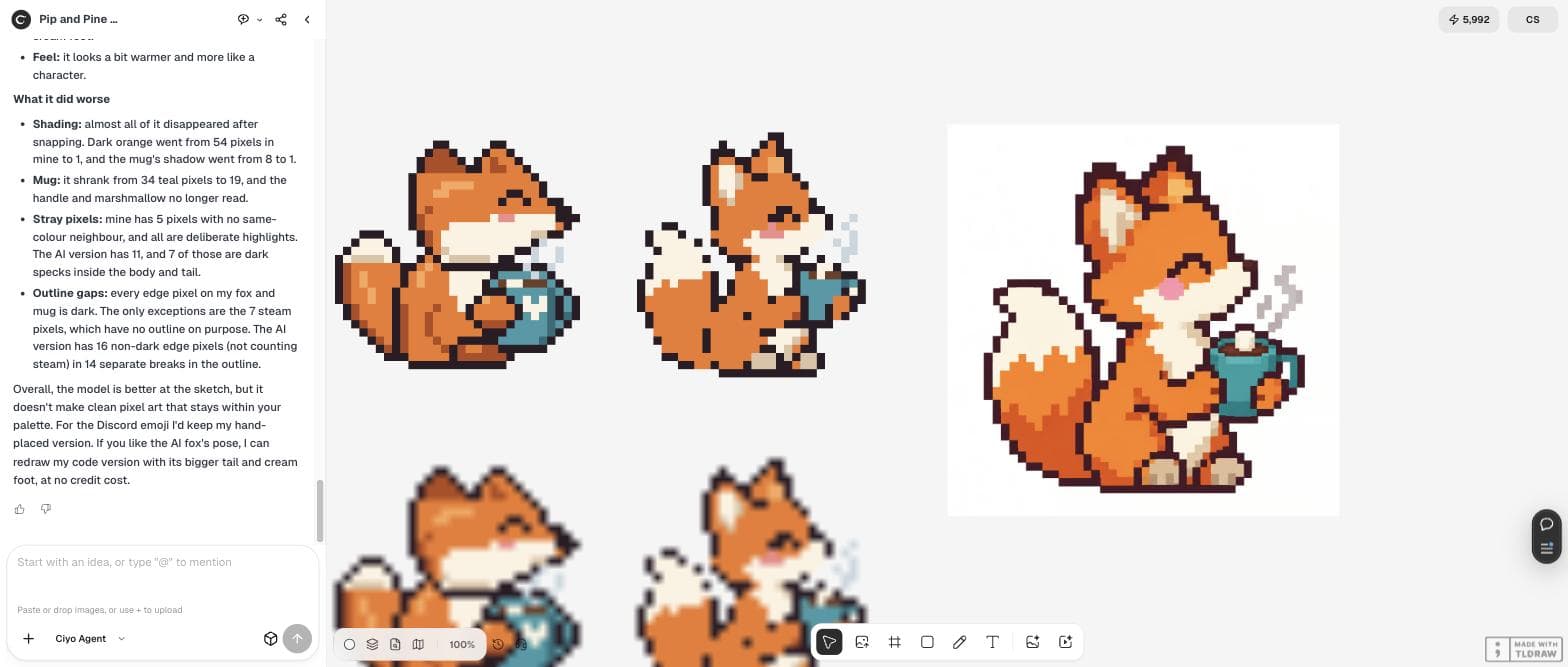
Nice. Now I want to compare: make the same fox with an image model (GPT Image 2.5, cheapest setting, square), then turn that picture into real 32x32 pixel art with the same 11-colour palette and put it next to yours. Tell me what the image model did better and worse, with counts where you can (colours before snapping, stray pixels, outline gaps).Three foxes, measured
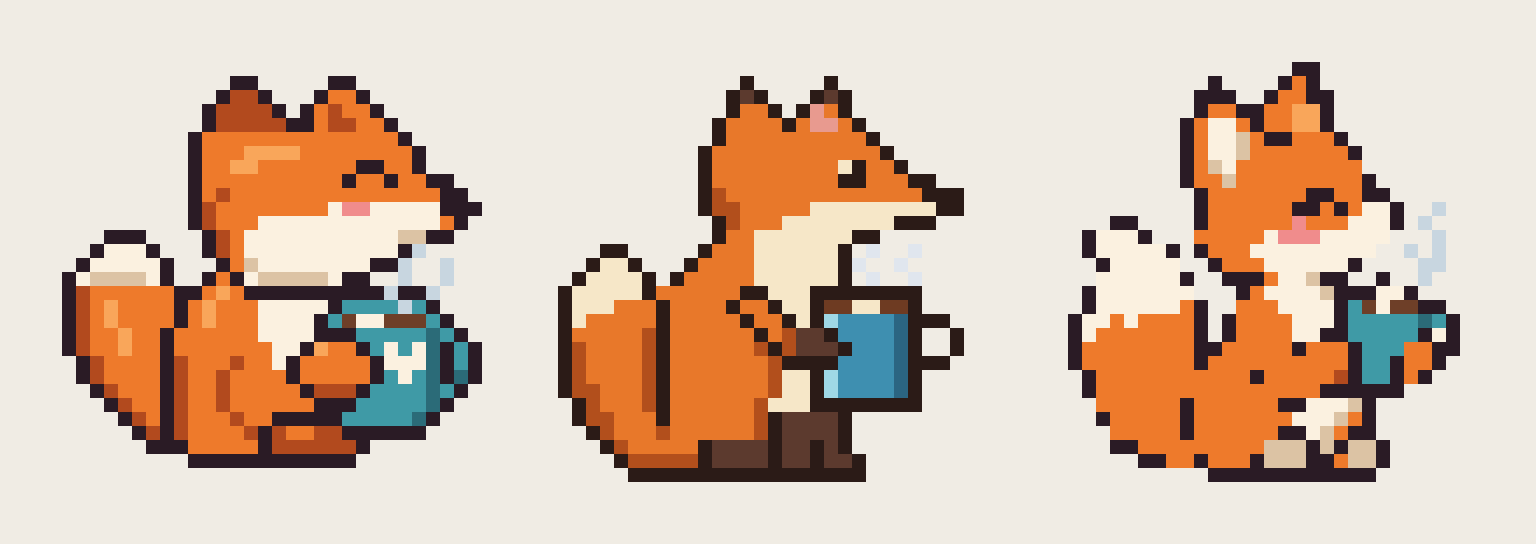
Side by side, the difference is easy to see. Both code foxes are clean sprites with a closed outline. The snapped image-model fox has the nicest silhouette and the messiest pixels.
| Check | Ciyo Agent, code | Claude Opus 5.5, code | Image model, snapped |
|---|---|---|---|
| Colours | 11 | 11 | 11 (45,153 before snapping) |
| Solid pixels | 577 | 536 | 525 |
| Half-transparent pixels | 0 | 0 | 0 after snapping |
| Outline | Closed except the steam | Closed | 14 breaks |
| Credits | 0 | Not run in Ciyo | 2 |
Which route to use
Use the code route when the file has to be exact: emoji, favicons, game sprites, anything that is shown at its real size. Ask for the palette, a transparent background and a 10× preview, and check the preview before you accept it.
Use an image model when you need ideas: a pose, a character sheet or a mood. Then snap the result to a real grid and repair the outline, or give the best pose back to the code route as a reference. Our agent offered exactly that: to redraw its code fox with the image model's bigger tail and cream foot, at no credit cost.
Posted 2026-09-29. The poster gave Sonnet 5.5, Opus 5.5, GPT-6.1 Sol and GPT-6 Astra the same prompt for an animated pixel-art wizard in a single HTML file with no libraries, and listed each run's time and estimated cost. It is their own test in other tools, not Ciyo; it shows the same point as ours: language models make pixel art by writing code.
Next steps for your mascot
Once the 32 × 32 file is right, check it at the size people will see, keep one palette for every other icon, and animate it only after the still frame is clean.
Claude Opus 5.5 and pixel art
Can Claude Opus 5.5 make pixel art?
Yes, by writing code that places each pixel. In our test on September 30, 2026 it produced a 32 × 32 fox with 11 colours and a fully transparent background in about 3.6 minutes. It cannot paint a picture the way an image model does.
Is the code route better than an image model?
For exact files, yes: the grid and palette come out exactly as asked. For drawing quality, the image model was better in our test, but its 32 × 32 version lost most of its shading and had 14 breaks in the outline.
Why does my 32 × 32 sprite look blurry?
Something is enlarging it with smoothing. The Ciyo board did this to our 1× file. Look at a 10× nearest-neighbour preview instead, and set nearest filtering in your game engine.
What did the test cost in Ciyo?
The hand-placed fox cost no credits. The image-model fox cost 2 credits, and snapping and scoring it in the agent's workspace added nothing.
Make your own pixel mascot
Give the Ciyo Agent your grid, palette and pose, and ask it to place every pixel. Compare it with an image-model version on the same board.