Sprite sheets · Tested
GIF to Sprite Sheet: Let AI Check Every Frame Before You Import
A GIF is a convenient way to share an animation and a poor way to ship one. Game engines such as Godot, Unity and Phaser want a sprite sheet: every frame in a grid of equal cells, at the art's real pixel size, plus the time each frame stays on screen. A GIF also hides problems until the animation loops in your game: a frame that is repeated, a frame that is one pixel off, a pause in the wrong place.
On September 30, 2026 we gave the Ciyo Agent a 7-frame GIF of a slime hopping and asked for an importable sheet. It read every frame, found three loop problems, and then fixed them when we asked. We checked each file ourselves.
What a game engine needs from your GIF
Three things: the frames at their native size, laid out in equal cells; the frame size and count; and each frame's duration. The native size is the size the artist drew. Many pixel-art GIFs are exported at 4×, 6× or 8× so they look good on social media, and importing them at that size wastes memory and blurs when scaled.
The agent in Ciyo can read every frame of an attached GIF. That matters, because a person scrubbing a GIF at full speed will not notice a frame that is one pixel off.
| Ask for | Why |
|---|---|
| Native pixel size | One file pixel per art pixel; sharp at any integer zoom |
| One row of equal cells | The engine slices the sheet by cell size |
| Transparent background | No colour key and no fringes |
| Per-frame durations | GIF frames often have different delays |
| A check of every frame | Doubled frames and jitter only show when the loop plays |
Our test GIF: a slime hop from a fictional platformer
We made a small test GIF for Tumblebrook, a fictional platformer: a green slime that squashes, hops and lands. It is 192 × 192 pixels, 7 frames, 4 colours, and it is really 32 × 32 art exported at exactly 6×. The delays vary from 80 to 200 milliseconds, as they often do.
We moved one frame one art pixel to the right on purpose, to see whether the agent would catch it. The GIF also ended with a copy of its first frame, which we had not planned.
This GIF is the hop animation for Tumblebrook, a small platformer I'm making in Godot. Please turn it into a sprite sheet I can import: one row, equal cells, transparent background, at the art's native pixel size (not the 6x export). Before you build it, look at every frame and tell me the frame count, each frame's delay, and anything that will look wrong when it loops. Save the sheet and a JSON file with the frame size and durations to the board.What the agent found in 7 frames
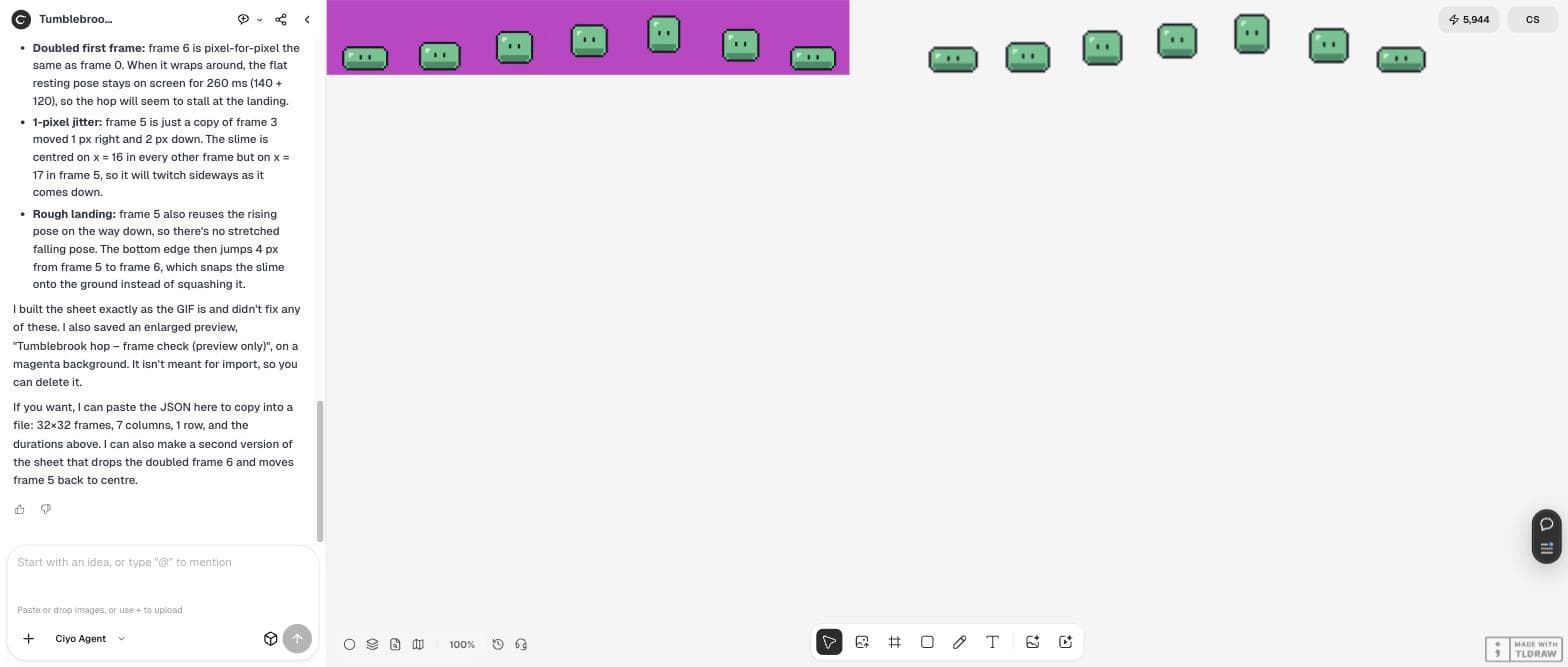
The agent checked that 192 divides exactly by 6, confirmed the native size of 32 × 32, and built a 224 × 32 sheet: seven cells in one row, with a clear background and no blended edge pixels. It listed the delays: 120, 80, 80, 80, 200, 80 and 140 milliseconds.
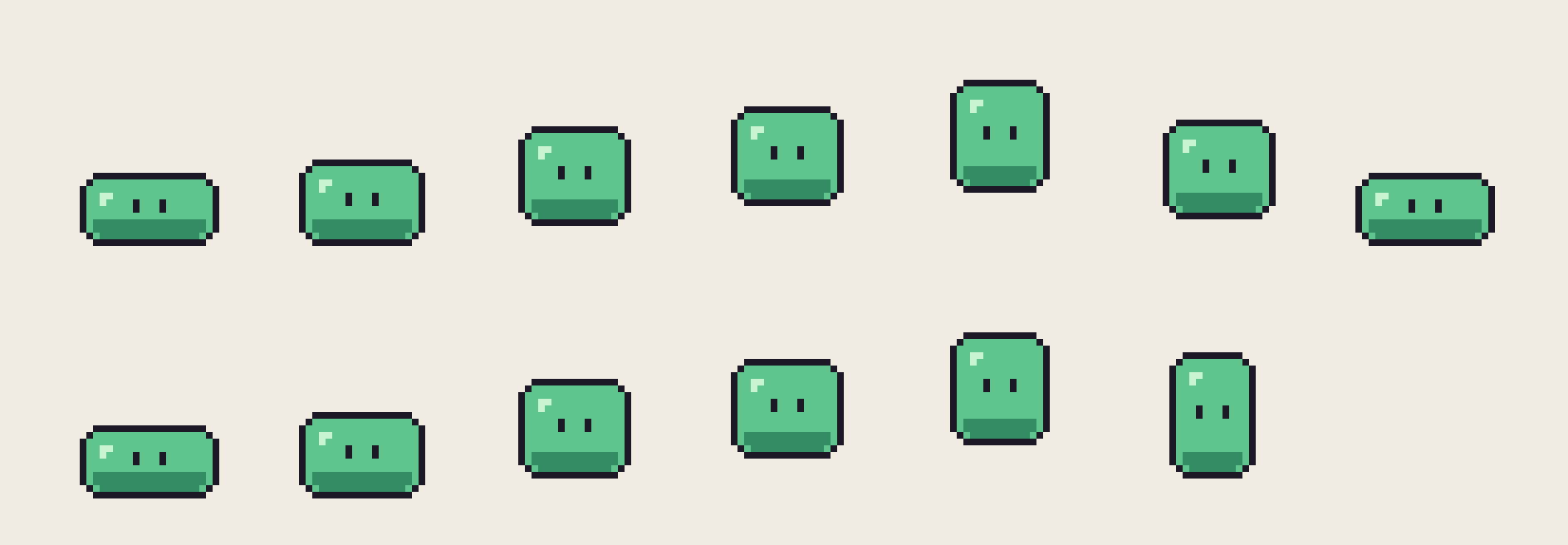
Then it reported three problems, and all three were real. The last frame was “pixel-for-pixel the same as frame 0”, so the resting pose stays on screen for 260 ms and “the hop will seem to stall at the landing”. Frame 5 was a copy of frame 3 “moved 1 px right and 2 px down”, centred on x = 17 instead of 16, so the slime twitches sideways. And frame 5 reused the rising pose on the way down, so the bottom edge jumps 4 pixels into the landing.
It also said what it could not do: the board accepts only images and video, so it could not save a .json file there. It offered to paste the JSON in the chat instead.
Fix the loop, then export
We asked for a fixed sheet. Before drawing anything, the agent studied the existing frames to learn their rules for outline, corners, shading and highlight. It even corrected itself (“Highlight sits one pixel further in than I assumed”) and proved the rules by rebuilding three original frames pixel for pixel.
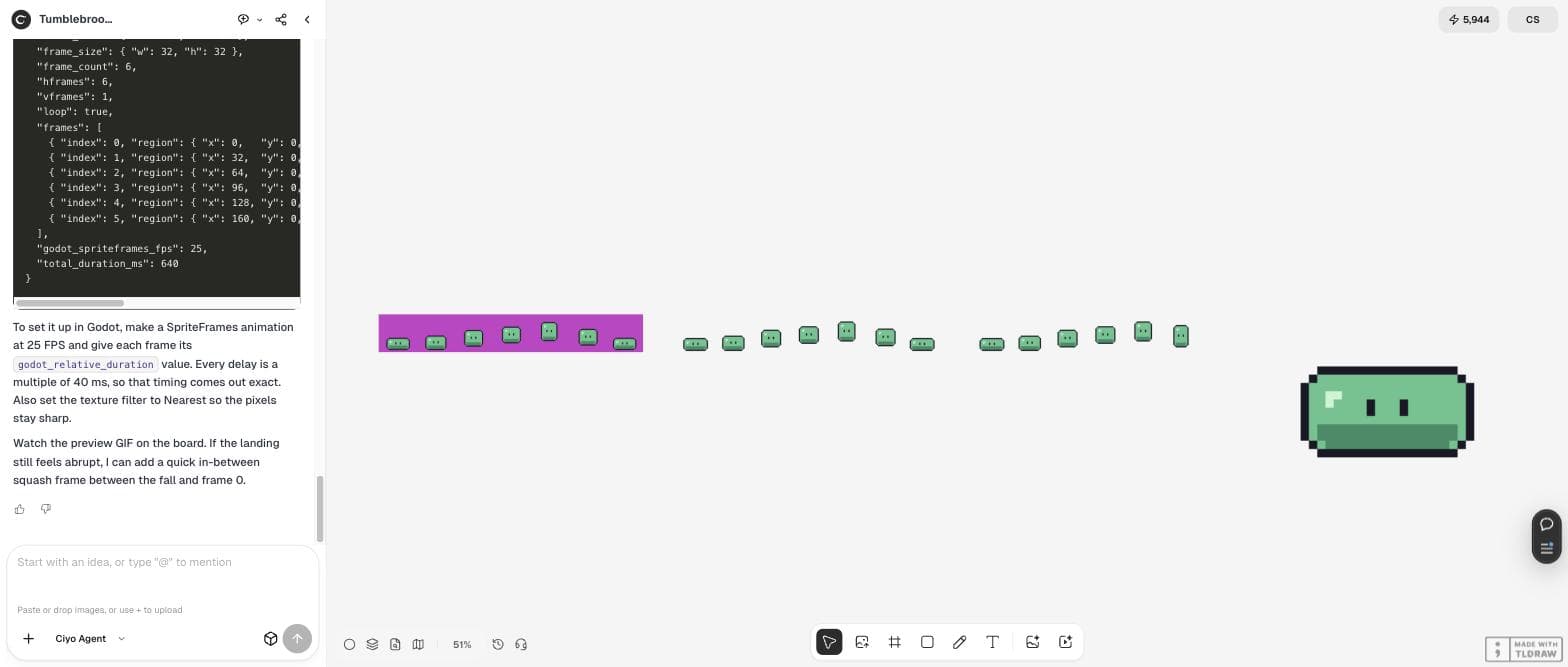
The fixed sheet has six frames. The doubled frame is gone, every frame is centred on x = 16, and a new stretched falling pose, 13 × 19 pixels, drops 3 pixels into the landing frame instead of jumping 4. A full loop now takes 640 ms, and the agent pointed out that the rest pose is shorter now (120 ms instead of 260 ms) in case the hop feels rushed. No credits were spent.
Yes please: make the fixed sheet. Drop the doubled frame, put frame 5 back on centre, and give the landing a proper stretched falling pose instead of the reused rising one. Keep the same 4 colours and 32x32 cells. Then paste the Godot-ready JSON here (frame size, frame count, per-frame durations) and save a 6x preview GIF of the fixed loop so I can watch it.The JSON and the Godot settings
The agent pasted a JSON block with the image name, the sheet size (192 × 32), the frame size (32 × 32), six frames in one row, each frame's region and duration in milliseconds, and a relative duration for Godot. Because every delay is a multiple of 40 ms, it suggested a SpriteFrames animation at 25 frames per second with relative durations of 3, 2, 2, 2, 5 and 2, and nearest filtering so the pixels stay sharp.
Save the JSON next to the PNG in your project. If your engine uses a different format, ask for that format by name; the frame list is the part that matters.
Five checks before you import any sheet
Whether the sheet comes from an AI, a converter or your own export, these checks catch the usual problems. Our last column shows the fixed Tumblebrook sheet.
| Check | How | Fixed sheet |
|---|---|---|
| Native size | GIF size ÷ export scale is a whole number | 192 ÷ 6 = 32 |
| No doubled frames | Compare the last frame with the first | Doubled frame removed |
| No jitter | Same centre (or foot line) in every cell | Centre x = 16 in all six |
| Palette | Count colours; background is transparent | 4 colours plus transparency |
| Timing | List each delay; check the rest pose length | 640 ms loop, rest 120 ms |
Posted 2026-09-26. In Chinese, the poster lists the usual pain of AI-generated sprite sheets: the character changes between frames, green or magenta backgrounds leave fringes, and frames do not line up on a grid. They recommend an open-source tool, sprite-gen, for the job. It is another product and a different workflow; our test shows the same three risks and checks each one.
Next steps for your game art
With a clean sheet in the engine, draw the next animation from the same frames so the style stays the same, and check the sprite at the size players will see.
GIF to sprite sheet
How do I find a GIF's native pixel size?
Divide the GIF size by the export scale and check that the result is a whole number. Our 192 × 192 GIF was 32 × 32 art at 6×. The agent confirmed that every frame scaled down exactly.
Why does my loop stall or twitch?
Usually a doubled frame at the end (the rest pose stays on screen twice as long) or a frame that is one pixel off-centre. In our test the agent found both by comparing every frame.
Can the Ciyo board store the JSON file?
No. On September 30, 2026 the board accepted png, jpg, webp, gif, mp4 and mov only, so the agent pasted the JSON into the chat for you to save.
What did this cost?
Nothing in our test. Reading the frames, building both sheets, drawing the new frame and the preview GIF all ran in the agent's workspace without an image model.
Check your GIF in Ciyo
Attach your animation, tell the Ciyo Agent your engine and the export scale, and ask it to check every frame before it builds the sheet.