GPT-6 Astra · Creative workflows
GPT-6 Image Generation: Plan Square and Vertical Campaign Images
Changing a campaign from square to vertical is a composition decision. A square image may leave room above the product but lose that balance when placed in a tall layout. Plan the second frame around the same product and message before asking for another image.
We used GPT-6 Astra in Ciyo to produce two image briefs for the fictional Still ceramics campaign: one 1:1 and one 9:16. The demonstration ended at reviewed planning text. It did not generate a vertical image or prove that either prompt preserves a product exactly.
Separate shared identity from frame-specific choices
Begin with the parts that should stay recognizable across the campaign. For our example, those were one ivory mug, a warm-gray tabletop, soft amber side light and a restrained editorial appearance. The headline Make your first mug belonged in a separate editable text object.
Placement and empty space could change with the frame. The square brief could put the mug lower and to one side; the tall brief could use more space above it. Keep those choices distinct from product geometry so that a new layout does not implicitly request a taller mug or a different handle.
| Shared direction | Frame-specific decision |
|---|---|
| Mug silhouette, handle, rim and glaze | Position and apparent scale within the frame |
| Palette and lighting direction | Amount and location of empty space |
| One product and minimal styling | Square or vertical composition |
| Editable headline outside the image | Headline placement in the final layout |
Ask for two self-contained briefs
Each prompt should include the subject, shared style, frame and composition constraints. Avoid making the second one depend on a vague instruction such as the same but taller. A person reviewing that prompt later should be able to understand the intended image without reconstructing the whole chat.
Astra returned shared invariants followed by separate square and vertical prompts. The square proposal placed the mug toward the lower right with open space at the upper left. The vertical proposal moved it toward the lower middle and reserved a larger area above.
Plan two image briefs for [CAMPAIGN]: square 1:1 and vertical 9:16. Shared direction: [PRODUCT_REFERENCE, PALETTE_AND_LIGHT]. Preserve product identity and adapt placement and negative space to each frame. Return shared invariants, two self-contained prompts with no generated text, and a review checklist. This is planning only; do not generate, crop or extend an image.Check the assumptions Astra adds
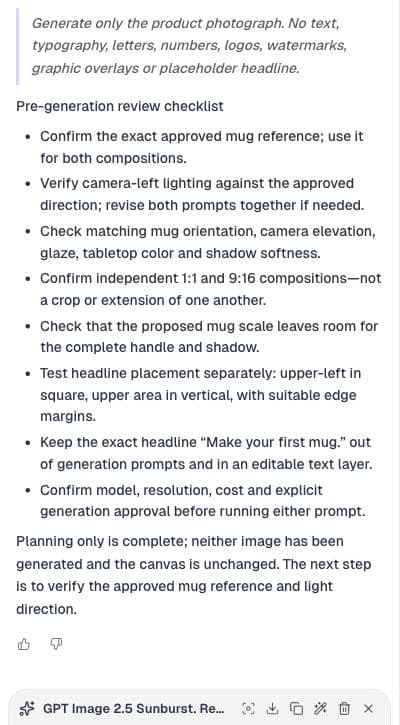
The live response proposed light from camera-left and explicitly asked us to confirm that against the approved reference. That is the right place for a review decision. We had specified soft side light, but had not established its exact direction as a verified invariant.
The response also added a period to the suggested headline. Our existing canvas text had no period. Keep the exact approved copy in your own record and resolve that difference before assembly. An otherwise useful brief can still introduce a small change that nobody requested.
Use placement numbers as proposals, then inspect the result
Astra's draft included approximate positions and subject proportions. These numbers made the composition easier to discuss, but they were instructions for a future generation. They were not measurements of an existing output and do not guarantee where a model will place the mug.
Before generating, check that the complete handle, rim and shadow can fit with the intended text area. Confirm the output format available in your selected generator. After generation, inspect the actual dimensions and composition rather than assuming the words 9:16 in a prompt established the file's aspect ratio.
Identify the reference before handing off the prompts
A phrase such as match the approved mug is incomplete unless the next operator can identify that reference. Attach or select the intended asset through the generator's supported reference workflow, then check the visible preview before submission. Two similarly named assets can represent different stages of approval.
Our planning response asked for the same product reference in both future generations. That was a requirement for the next step, not proof that a reference had already been attached to those prompts. Record the chosen source with the briefs so the format comparison starts from the same product.
Review the pair together before adding final copy
When both images exist, compare their product shape, orientation, glaze and light direction side by side. A recognizable family resemblance is weaker evidence than exact product preservation. If a real product must match, inspect its critical details against the approved source.
Then test the actual headline in each layout. Check line breaks and edge spacing with the final copy, not a generic text placeholder. The goal is two useful compositions for the same campaign, each with enough room for its message. In this demonstration, those generation and final-layout checks remain the next steps.
Practical questions
Did this example generate both aspect ratios?
No. It demonstrates Astra drafting and reviewing two composition briefs. No vertical image was generated.
Does writing 9:16 guarantee a 9:16 output?
Do not assume it does. Use the generator's available format controls and verify the actual output dimensions.
Should I crop the square image instead?
First check whether the crop preserves the complete product and leaves room for the message. This article explores a separate composition when those requirements need different placement.
Make the next step clear
Use Ciyo to organize the brief and visual references before moving into production.