GPT-6 Astra · Pixel art
Pixel Art with a Real Transparent Background: Check the File, Not the Canvas
Ask an image model for “a transparent background” and you may get a picture of one. Image models learn from screenshots of design tools, and in those screenshots transparency looks like a grey and white checkerboard. So that is what some of them draw.
On September 20, 2026 we ran exactly that test in Ciyo, measured the file that came back, and then fixed it. This article shows the trap, the two-second check that catches it, and the one click that produces a genuinely transparent PNG.
The prompt that looks like it worked
We asked the Image Generator for a pixel sprite of a potted plant with a fully transparent background, at 1:1 and 1K on Medium quality. The run cost two credits and took under a minute.
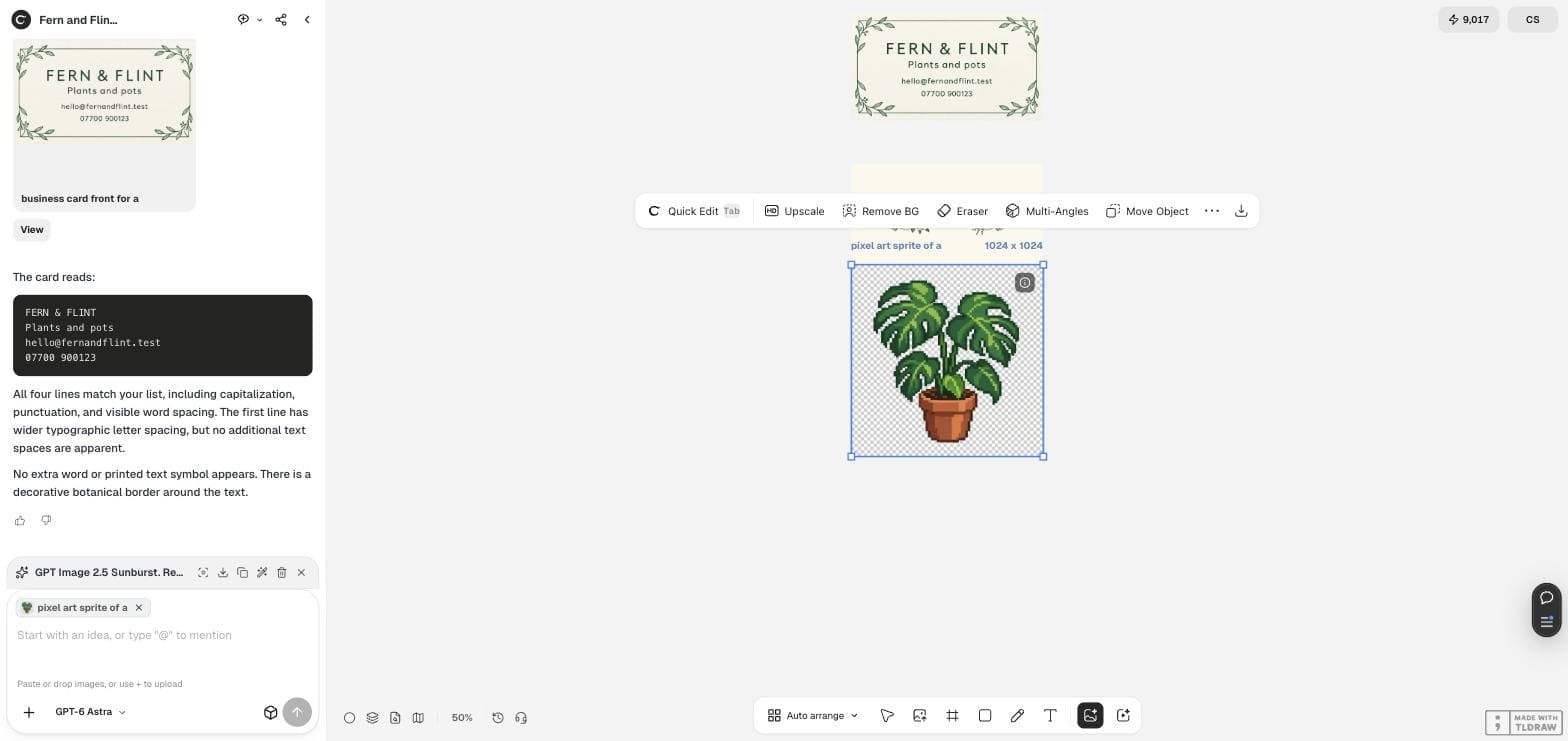
On the canvas the result looked perfect. The plant sat on a neat grey and white checkerboard, exactly the way a transparent PNG looks in an editor. Nothing about the screen suggested a problem.
Pixel art sprite of a potted monstera plant for a small game, front view, chunky visible pixels, limited palette of about eight colours, the plant centred with a fully transparent background, no shadow, no text, no border, no grid lines.What the file actually contained
We downloaded the PNG and read it. It is a 1024 by 1024 RGB image of 983,961 bytes with no alpha channel, so every pixel is opaque. The “transparent” area is a regular grid of two painted colours, roughly #FEFEFE and #D3D2D2, which together account for more than a tenth of the picture.
The palette claim did not survive either. We asked for about eight colours and the file contains 56,556 distinct ones, because the model rendered soft edges and texture rather than flat pixel blocks.
| Property | What we asked for | What the file contained |
|---|---|---|
| Alpha channel | Fully transparent background | None. Colour mode RGB |
| Background | Nothing | A painted checkerboard, #FEFEFE and #D3D2D2 |
| Palette | About eight colours | 56,556 distinct colours |
| Size | 1024 by 1024 | 1024 by 1024, 983,961 bytes |
The check that takes two seconds
Never judge transparency on a canvas. Judge it on a background that cannot be confused with a checkerboard.
Drop the file onto a strong colour, magenta or bright green, and look. Real transparency shows the colour through. Painted transparency keeps its little grey squares, and now they are obviously squares on top of magenta rather than the absence of anything. On a phone, open the image in any viewer with a dark theme: a painted checkerboard stays pale against the dark background.
Remove BG makes it real
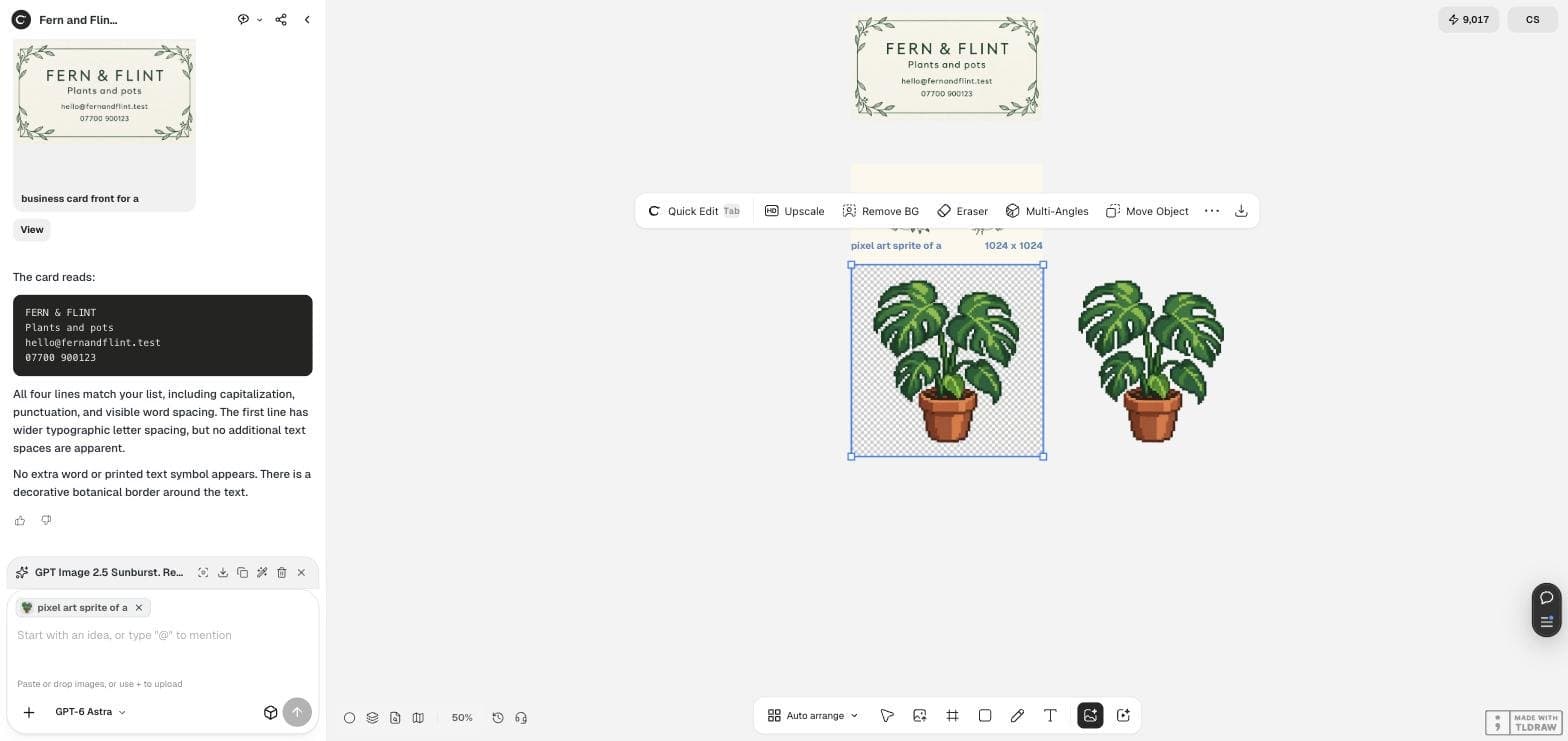
Select the image on the canvas and press Remove BG. In our run it produced a genuine RGBA PNG: every corner pixel is fully transparent, 670,889 pixels of 1,048,576 are at alpha zero, which is 64.0 per cent of the image, and 343,266 pixels are fully opaque. Only 34,421 pixels sit between the two, and those are the soft edge around the leaves.
The screenshot below shows both files on the canvas. The one that looks transparent, with the checkerboard, is the fake. The one that shows nothing behind it is the real one.
Remove BG did not change our credit balance in this run and showed no quote on the button. That is a single observation in a Preview environment, not a published price.
If you need true pixel art, say so twice
A soft-edged picture of pixel art is not pixel art. If the sprite has to sit in a game at a fixed size, ask for the grid explicitly, then check the file rather than the preview.
Two sentences do most of the work. Name the pixel grid you want, and forbid the soft edge: an anti-aliased sprite cannot be scaled cleanly, and no amount of background removal fixes it afterwards.
Pixel art sprite on a 32 by 32 grid, every pixel a flat solid colour block with hard edges and no anti-aliasing, no gradients, no soft shadows, exactly eight colours, subject centred, plain single-colour background that is easy to remove, no text and no grid lines drawn on the image.The wider trend, and what it does not prove
Pixel art from image models is having a moment. On September 16, 2026 a post in r/ChatGPT showing animation frames made by an image model drew a score of more than 1,200 and 86 comments.
That post is about frames, not about file formats, and it is about a different product. We include it because the enthusiasm is real and the trap we describe is easy to hit while chasing it: a sprite that looks right in a thread can still be an opaque file with no alpha channel.
An animated post from 2026-09-16 about another product. It makes no claim about transparency or file format.
Transparent background questions
Why does the canvas show a checkerboard for a file with no transparency?
Because the checkerboard is part of the picture. The model painted it. A canvas draws what the file contains, so a painted checkerboard and a real transparent area can look identical on screen.
Can I ask for a PNG with an alpha channel and get one?
In our run, asking in words did not produce one. Running Remove BG on the result did. Treat the wording as a hint and the check on the file as the real test.
Does Remove BG damage the pixels?
It adds a soft edge. In our file 34,421 pixels of just over a million ended up partly transparent, which is fine for a web graphic and visible if you scale a sprite up hard.
Make a sprite you can actually use
Generate the sprite in Ciyo, run Remove BG, then check the file on a strong colour before you ship it.