GPT-6 Astra · Presentations
Make a Diagram Slide with AI and Check Every Label Before You Present

A photograph on a slide can be approximately right. A diagram cannot. If one box says “Rooting” and another says “Rootinq”, the picture still looks fine from the back of the room and your credibility does not.
This article makes a four-step process slide in Ciyo on September 20, 2026, then checks it properly: not by squinting at it, but by asking GPT-6 Astra to read every word back and compare it with the list we started from.
Write the labels before you write the prompt
Decide the exact words first, in a list, outside the prompt. That list is what you will check the picture against later, so it has to exist before the picture does.
Then put the list into the prompt verbatim and forbid everything else. “Print these labels exactly and add no other words” does more work than any amount of styling language, because the common failure is not ugliness, it is invention.
Presentation slide image, wide 16:9, flat vector style on a warm ivory background with dark green and charcoal shapes. A simple left-to-right process diagram with four labelled boxes joined by arrows. Print these labels exactly and add no other words: Cutting, Rooting, Potting, Shop shelf. Put the title Propagation in four steps across the top. Clean sans-serif type, generous margins, no photographs, no people, no extra text.What came back
We ran it with GPT Image 2.5 Sunburst at 16:9 and 2K on High quality. The result is 2560 by 1440, which is comfortably above the 1920 by 1080 that a 16:9 slide needs, so it will not soften when the projector scales it.
The button quoted seven credits and the run charged nine. The extra came from the prompt itself, which was 68 words; the quote is calculated before your text is counted.
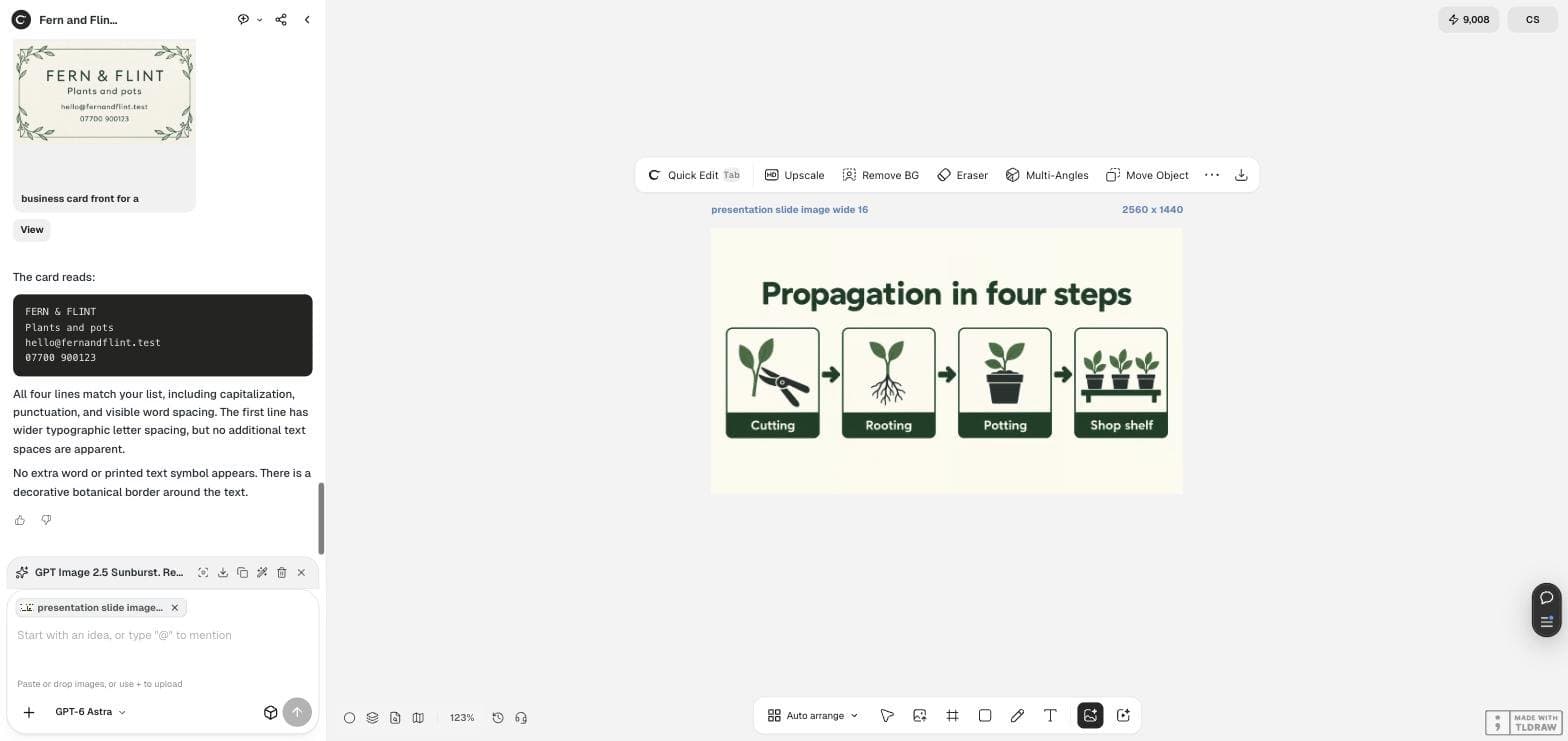
Have the model read it back to you
Now the check. Attach the image to GPT-6 Astra and ask for a transcription and a comparison, not an opinion. “Is this good?” gets you a compliment. “List every label exactly as printed” gets you evidence.
In our run Astra returned the title and all four labels correctly, and added three specific findings we had asked for: all three arrows point left to right, no label is cut off at an edge, and no extra word appears beyond our list.
Read the attached slide image. List the title and every box label exactly as printed, left to right. Then tell me whether the arrows run from left to right, whether any label is cut off at an edge, and whether any word appears that is not one of these: <paste your list here>.Four checks that catch a broken diagram
Run these in order. The first two are cheap and catch most problems; the last two matter once the slide is going in front of people.
| Check | How to run it | What a failure looks like |
|---|---|---|
| Wording | Ask the model to transcribe every label | A plausible near-miss such as a singular where you wrote a plural |
| Count | Count boxes and arrows yourself | Four boxes and four arrows, so one arrow points at nothing |
| Direction | Ask which way the arrows point | An arrow reversed in the middle of a sequence |
| Edges | Ask whether any label is cut off | A word clipped by the slide edge or by its own box |
What a generated diagram is not good for
A picture of a chart is not a chart. If the shape carries a number, a generated image will happily draw bars of the wrong height and an axis that does not add up, and no transcription check will catch it because the words may be perfect.
Keep generated images for the diagrams whose meaning is the arrangement: a process, a sequence, a simple hierarchy. Make anything with a value in it from your real data in your spreadsheet or chart tool, then place it on the slide.
One more limit worth knowing: you cannot edit a word in a generated picture afterwards. If the label changes, the slide is regenerated.
One practitioner's account, with a caveat
On September 14, 2026 someone in r/ChatGPT described rebuilding the same client deck three times in a week and mentioned needing “a real waterfall chart on slide six”, which is exactly the boundary this article draws.
We flag it rather than lean on it: the post reads like marketing rather than a working account, a near-identical post nine minutes later in another subreddit was removed, and it carries two comments. Treat it as a sentiment, not as evidence.
Posted 2026-09-14. We regard this one as promotional and cite it only for the chart boundary it happens to name.
Diagram slide questions
Can I edit a label after the image is made?
Not inside the picture. The words are pixels. Change the prompt and run it again, which is why it is worth getting the label list right before the first run.
What size should a slide image be?
A 16:9 slide needs 1920 by 1080. Our 2K run produced 2560 by 1440, so it has headroom. A 1K run gives 1024 by 576, which will look soft on a projector.
Will the model draw a chart with correct numbers?
Do not rely on it. Our slide got every word right, but a value chart is a different job: build it from your data and place the real chart on the slide.
Make your diagram slide
Write the label list, generate the slide in Ciyo, then have Astra read every word back before you present it.