Models · Tested
Check a Poster Before You Print It: GPT-6 Sol Found the Wrong Day
A poster with last month's day on it costs you a print run and a quiet evening. A second pair of eyes helps, and a vision model is a quick one.
On September 27, 2026 we gave GPT-6 Sol a game-night poster for Rook & Rabbit, a fictional board-game café, after the event moved from Friday at 7 pm to Saturday at 6 pm. Sol listed the errors, we fixed them in Ciyo, and Sol checked the new version. Ciyo does not run GPT-6 Sol; the checks ran in ChatGPT.
GPT-6 Sol in brief
OpenAI introduced GPT-6 Sol and GPT-6 Luna on September 22, 2026 as faster, cheaper members of the GPT-6 family, with GPT-6 Astra still at the top. Sol's API price is $2 per million input tokens and $10 per million output tokens. In ChatGPT, OpenAI says the new models are in ChatGPT Work and Codex for Plus, Pro, Business, Enterprise and Edu users, and not yet in Chat.
We used GPT-6 Sol at High effort in ChatGPT Work. It reads images, which is all a poster check needs.
Check 1: the old poster against the new details
The poster came from Ciyo earlier the same day. Its headline said “FRIDAY GAME NIGHT” and its bottom line “Rook & Rabbit · Fridays 7 pm · Free entry”. We gave Sol the new details and asked for mismatches only, with their place on the poster.
It answered in 18 seconds with a table of three mismatches: the headline, “Fridays” and “7 pm”. It confirmed that “Rook & Rabbit” and “Free entry” were right, and it invented nothing.
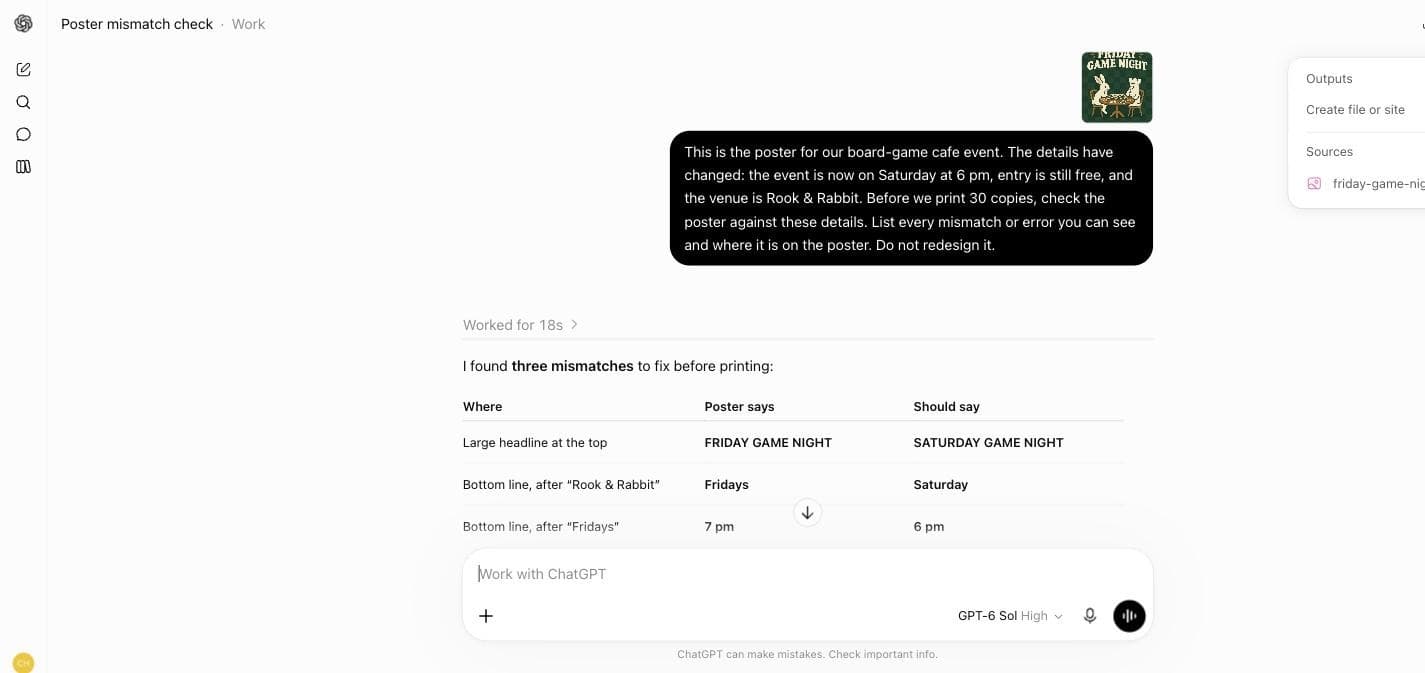
This is the poster for our board-game cafe event. The details have changed: the event is now on Saturday at 6 pm, entry is still free, and the venue is Rook & Rabbit. Before we print 30 copies, check the poster against these details. List every mismatch or error you can see and where it is on the poster. Do not redesign it.Fix the wording in Ciyo instead of starting again
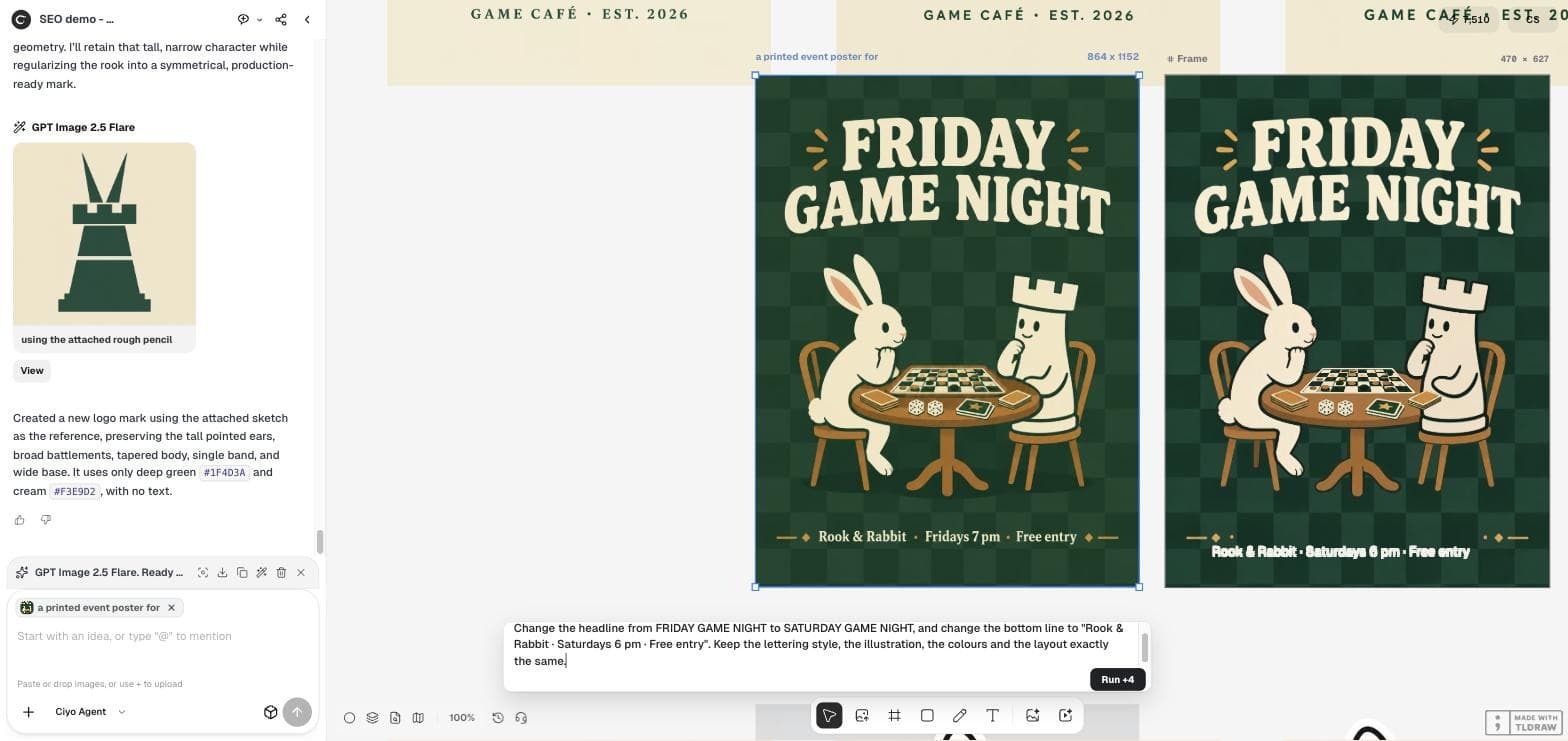
A new generation would redraw the whole poster. Quick Edit changes what you name and tries to keep the rest. We selected the poster on the Ciyo canvas, opened Quick Edit and asked for the new headline and bottom line in the same lettering: “Change the headline from FRIDAY GAME NIGHT to SATURDAY GAME NIGHT, and change the bottom line to "Rook & Rabbit · Saturdays 6 pm · Free entry". Keep the lettering style, the illustration, the colours and the layout exactly the same.”
The fixed poster on the canvas
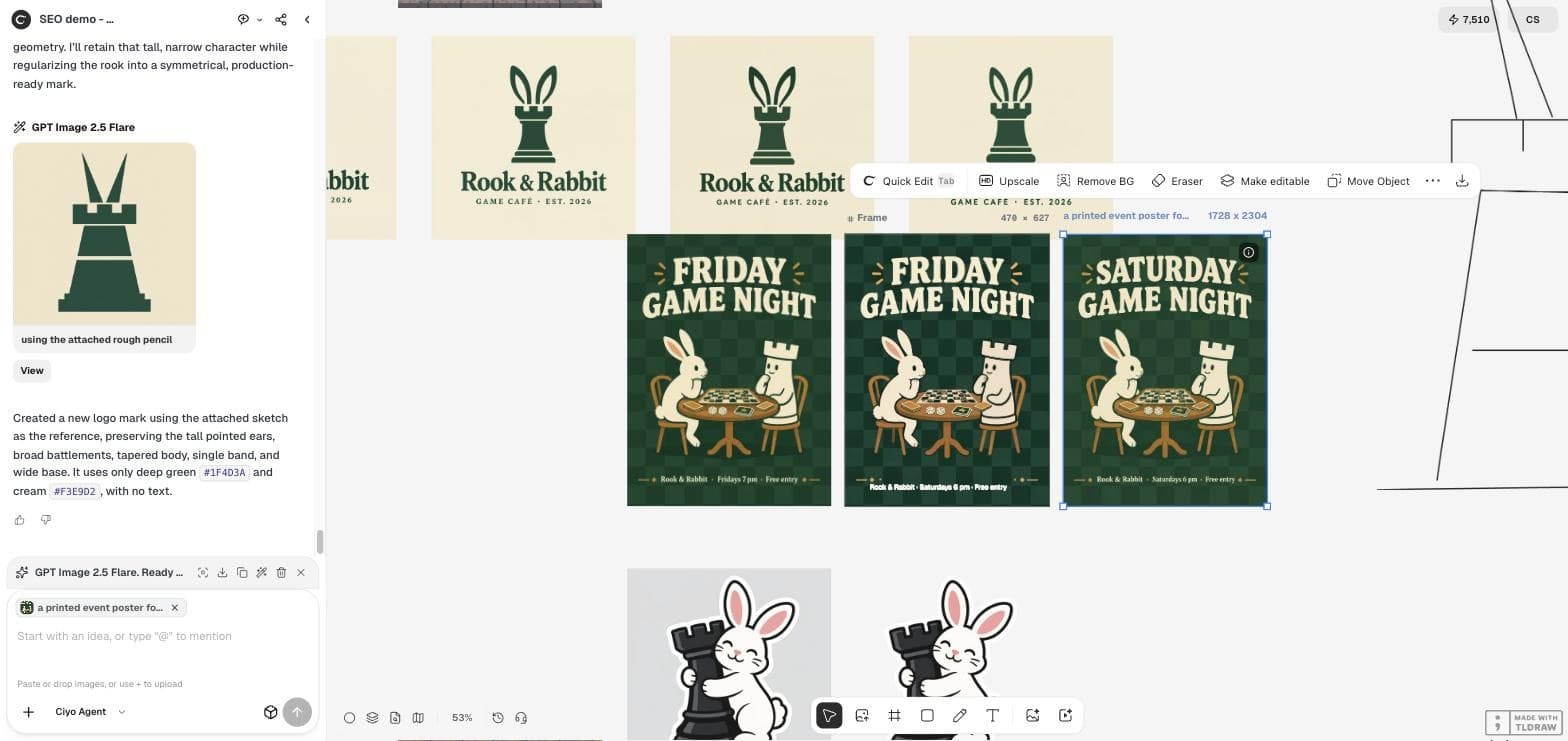
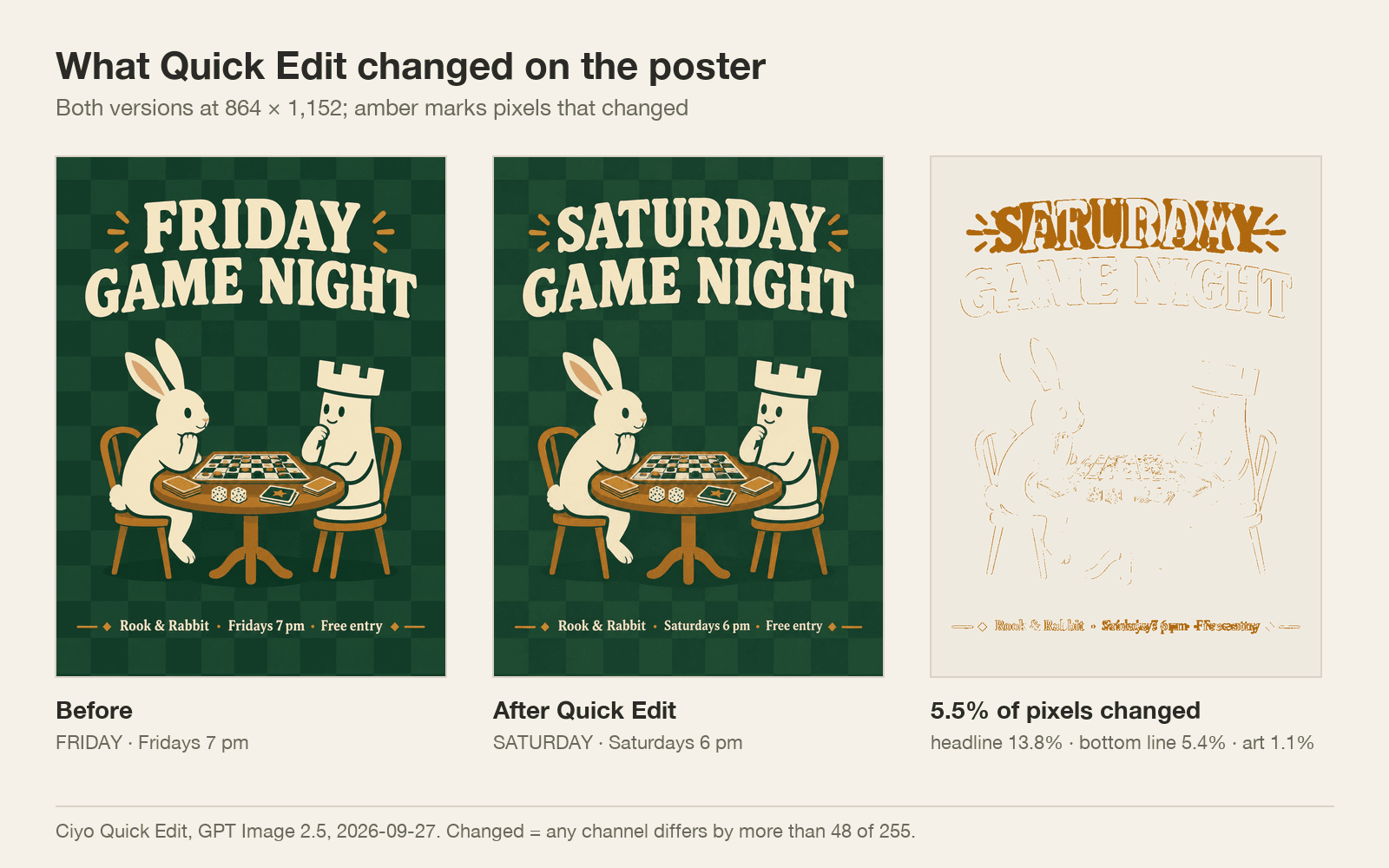
The result arrived next to the original, which stayed unchanged. It read “SATURDAY GAME NIGHT” and “Rook & Rabbit · Saturdays 6 pm · Free entry”, spelled correctly, at 1,728 × 2,304 pixels, twice the size of the 864 × 1,152 source.
Quick Edit showed “Run +4”; our credit balance fell from 7,510 to 7,502 across the edit, so read your balance rather than the button if the price matters.
What else the edit changed
We compared the two versions pixel by pixel at the same size. 5.5% of the pixels changed: 13.8% of the headline area, 5.4% of the bottom line and 1.1% of the illustration, mostly the pieces on the game board. Nothing moved.
That is a good result for an image edit, but not zero. Look at faces, hands and small objects before you print.
Check 2: the fixed poster
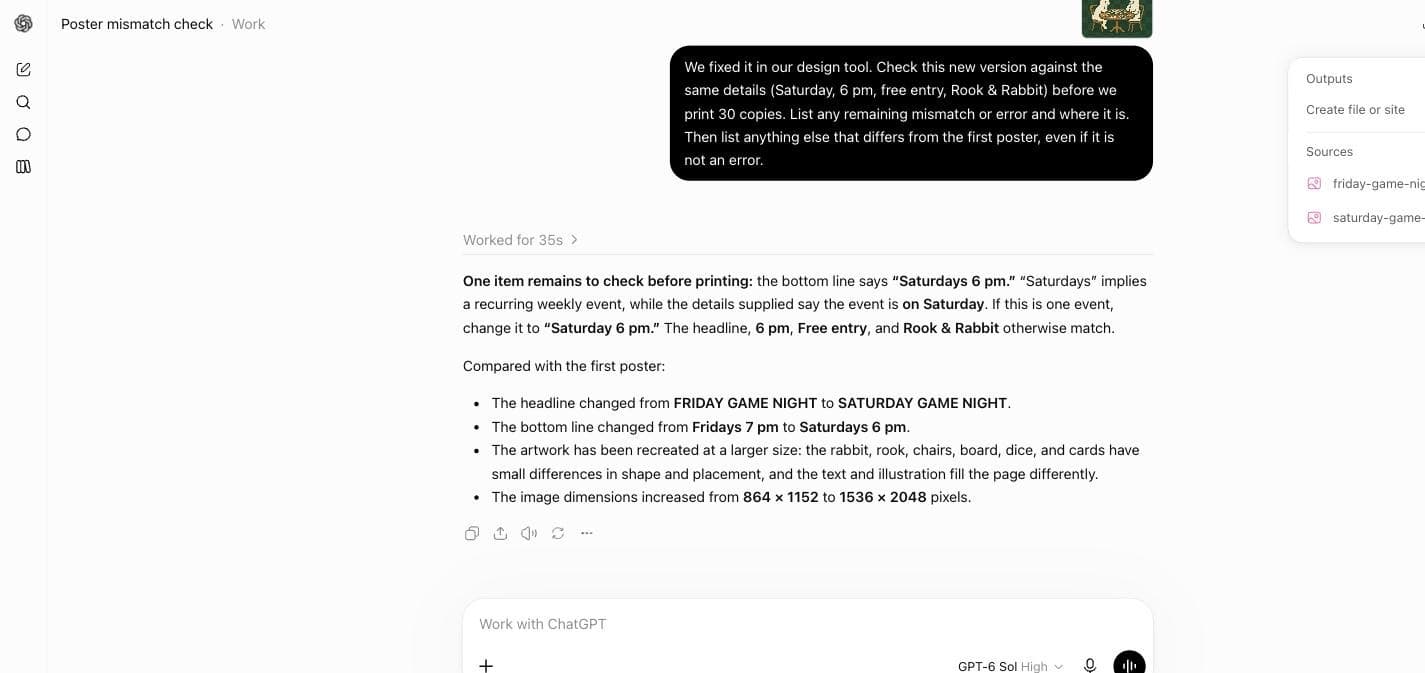
We sent the new version to the same chat and asked Sol to check it again and to list anything else that differed from the first poster. After 35 seconds it flagged one thing we had missed ourselves: the new line says “Saturdays”, which reads as a weekly event, while our details said the event is on Saturday. That wording came from our own edit prompt.
Two parts of its answer were wrong or loose. It gave the new size as 1,536 × 2,048 pixels, but the file we uploaded is 1,728 × 2,304; ChatGPT may resize uploads, and the chat does not show what Sol measured. It also said the text and illustration “fill the page differently”, which our comparison does not support.
A print check you can reuse
Give the model the facts as a list, ask for mismatches and their location, and tell it not to redesign. After any fix, check again with the same facts and ask what else changed. Then read the numbers yourself: a model that proofreads well can still misreport a file size.
A cheap checker also finds less on hard problems. Our poster had three obvious errors; a crowded menu or a legal notice would be a harder test.
Posted 2026-09-23. The author set models to find 105 hidden bugs in two code repositories. GPT-6 Sol at max effort found 29.3 on average against 45 for GPT-6 Astra, at an API-equivalent cost of $9.93 against $33.04. It is a coding test, not a poster test; we include it as a reminder that price and thoroughness trade off.
Checking posters with GPT-6 Sol
Did GPT-6 Sol find every error?
On the first poster, yes: all three mismatches in 18 seconds, with nothing invented. On the fixed poster it caught a plural we had missed, and misreported the image size.
Can I use GPT-6 Sol inside Ciyo?
No. Ciyo does not run GPT-6 Sol. We ran the checks in ChatGPT Work and made the fix with Ciyo's Quick Edit.
What did the Quick Edit cost?
The button showed 4 credits; our balance fell by 8 across the edit on September 27, 2026. Check your balance after an edit if the price matters.
Will Quick Edit change the rest of the poster?
A little. In our test 5.5% of the pixels changed, mostly the edited text; 1.1% of the illustration changed and nothing moved.
Fix the poster in Ciyo
Select the image, describe the change in Quick Edit, and keep the original beside the new version for the final check.