Video · Trend
Render a Claude Video to MP4 With HyperFrames: A Tested Walkthrough

Posts about Claude Opus 5.5 videos this week often name a renderer such as HyperFrames or Remotion: Claude writes the video as code, and the renderer turns it into an MP4. HyperFrames is an open-source renderer from HeyGen. On September 28, 2026, HyperFrames was among the fastest-rising searches related to Remotion in Google Trends' 90-day view.
We tested it the way a small business would use it. On September 28, 2026 a Claude Code session running Opus 5.5 got the same café Reel brief we used in claude.ai, plus the HyperFrames command line. Ciyo does not run Claude Opus 5.5; the photo came from Ciyo, and everything else ran on a MacBook.
What HyperFrames does
HyperFrames reads an HTML page whose elements carry timing attributes, plays it in headless Chrome frame by frame, and encodes the frames to MP4 with ffmpeg. Because each frame is computed from the page rather than recorded in real time, the same file gives the same video every time.
The project is open source under the Apache 2.0 licence. Its GitHub repository dates from March 2026 and version 0.8.81 was released on September 27, 2026. It offers a Claude Code plugin and a command line tool; we used the command line through npx, so nothing was installed globally.
| Aspect | claude.ai | Claude Code + HyperFrames |
|---|---|---|
| Who renders | Claude's own script in the chat's sandbox | HyperFrames on your computer |
| What you keep | The MP4 | The MP4 and an editable HTML composition |
| Changing one line | Ask again; it re-renders | Edit the HTML and render again |
| Same file, same video | Not tested | Yes: byte-identical in our test |
The brief and the photo
We made the product photo in Ciyo at 2K, which gave 1440 × 2560 pixels, more than the 1080 × 1920 the Reel needs. Then we gave Claude Code the same café brief we had sent in claude.ai, with one extra instruction: use the HyperFrames command line and learn its format from its own documentation.
Use the HyperFrames CLI through npx -y hyperframes@0.8.81. Learn the composition format from npx -y hyperframes@0.8.81 docs (data-attributes, compositions, gsap, rendering). Do not install skills, plugins or anything globally, and do not publish. Deliver the final video as fernhollow-reel-hyperframes.mp4.What Claude did, step by step
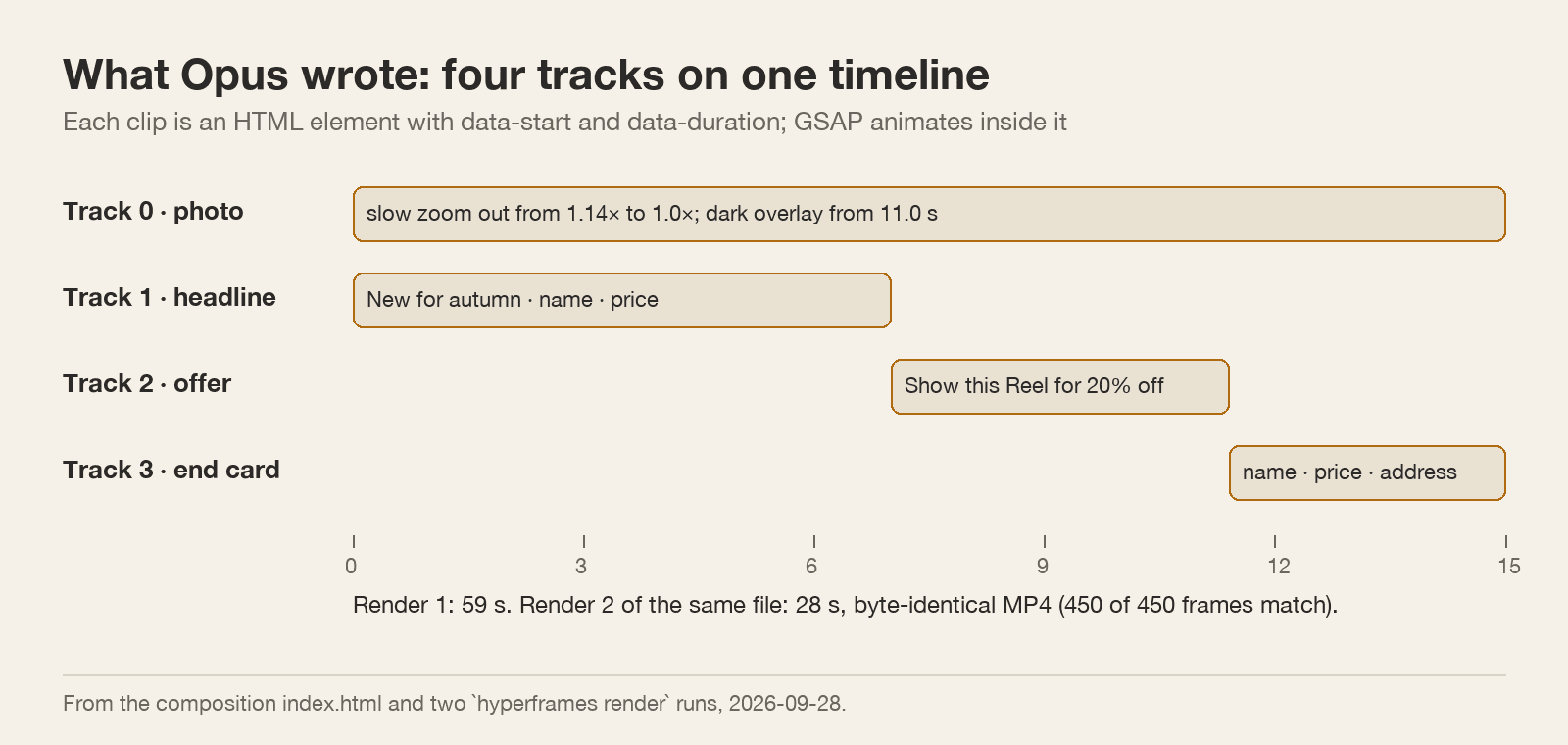
The whole job took 5 minutes 44 seconds. Opus read the docs, scaffolded a project with init, and wrote one HTML file with four tracks: the photo, the headline, the offer and the end card. Each is an element with a start time and a duration, and GSAP animates what happens inside it.
Before rendering, it ran HyperFrames' check command, which found no errors and four warnings about structure, and took snapshot stills at chosen moments. In those stills the price overlapped the top of the glass, so it moved the zoom anchor and made the title smaller. It also removed an uppercase style that had turned "New for autumn" into capitals, to keep the text exactly as written.
The render, measured
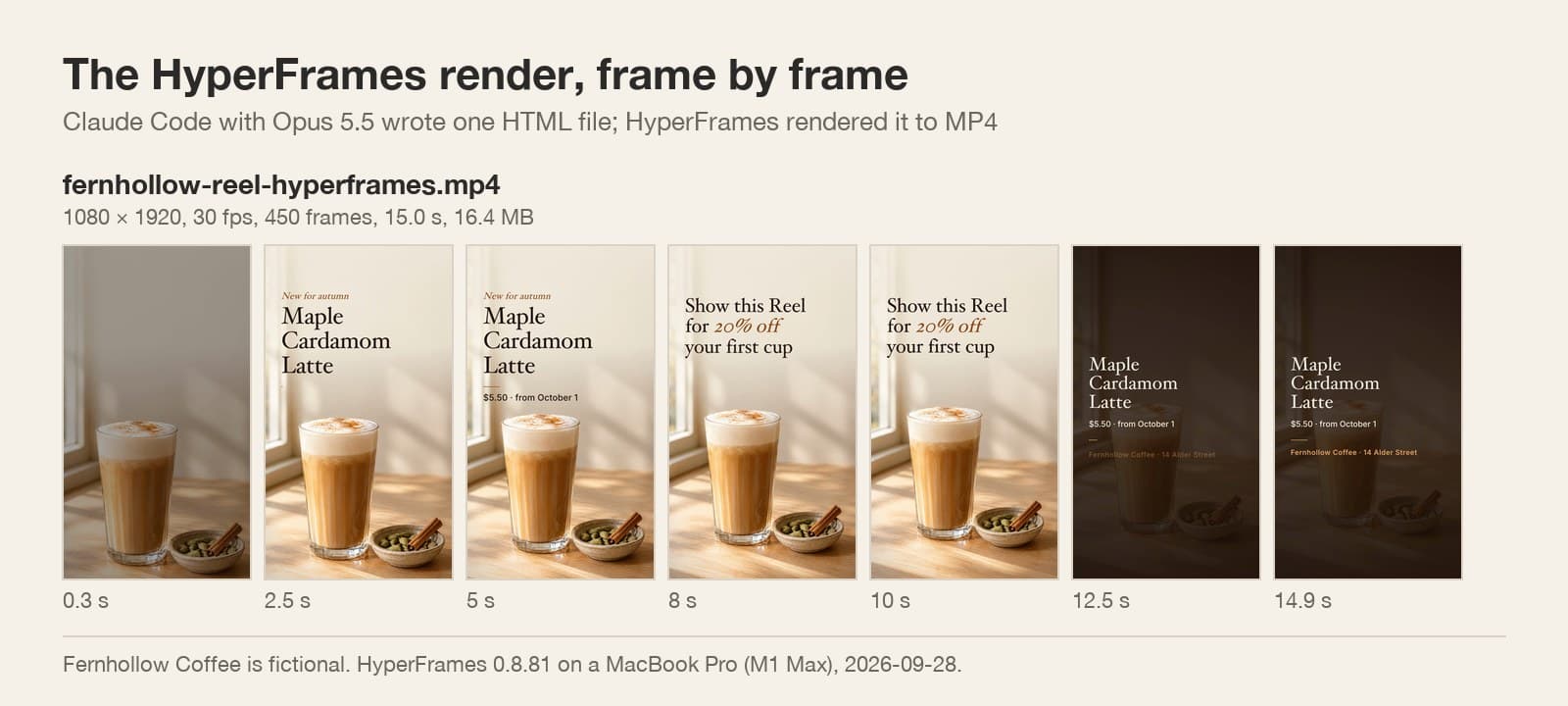
The render command took 59 seconds on a MacBook Pro with an M1 Max chip. The MP4 is 1080 × 1920 at 30 frames per second, 450 frames, 15.0 seconds and 16.4 MB, with no audio track. All five lines of text are exact.
We then rendered the same project a second time. It took 28 seconds, and the file was byte-identical: the same SHA-256 checksum and 450 of 450 frames the same. That is what makes code-based video useful for a business. When you change one price, only that price changes.
The renderer does not fix the design
HyperFrames makes the render exact; it does not make the design better. This Reel had the same habits as the one Opus made in claude.ai. The opening frame has no text, the first line fades in from 0.5 seconds, and the end card lays a dark overlay on the photo, so the glass drops to a brightness of about 43 out of 255.
The good news is that each fix is a small edit in one file. Ask Claude for the name in the first frame and a bright product on the end card, and render again in under a minute.
Things to know before you start
HyperFrames needs Node 22, Chrome and ffmpeg on your computer; its doctor command checks them. The project loaded GSAP from a CDN and two fonts from Google Fonts, and used a macOS system font, so a render on another computer can look different unless you use its Docker option. The command line also has anonymous usage telemetry, which you can switch off with hyperframes telemetry disable.
| Command | What it did |
|---|---|
| npx hyperframes docs | Showed the composition format |
| npx hyperframes init | Created the project files |
| npx hyperframes check | Found layout and contrast problems before rendering |
| npx hyperframes snapshot | Rendered stills at chosen moments |
| npx hyperframes render | Wrote the MP4 |
HyperFrames and Claude
What is HyperFrames?
An open-source tool from HeyGen that renders HTML, CSS and JavaScript animations to MP4 or WebM, frame by frame, in headless Chrome.
Do I need it to make a video with Claude?
Not in claude.ai: there Opus 5.5 rendered an MP4 with its own script. In Claude Code on your computer, a renderer like HyperFrames turns the HTML into video and keeps the source editable.
How long does a render take?
Our 15-second 1080 × 1920 Reel took 59 seconds the first time and 28 seconds the second time on an M1 Max MacBook Pro.
Does Ciyo run HyperFrames or Opus 5.5?
No. Ciyo made the product photo. Opus 5.5 and HyperFrames ran in Claude Code on a local computer.
Start with a photo worth animating
Generate the product still in Ciyo at 2K, then let the code build the motion around it.