Ciyo practical guide
Build a Product Comparison Chart from Verified Specifications

A product comparison graphic should help a buyer choose, not simply make one column look better. If the inputs mix units, omit an inconvenient difference or invent a missing specification, polished design makes the problem harder to notice.
This tutorial turns a verified specification table into a clear visual comparison using Ciyo for layout and asset work. The example fields are illustrative; real product facts must come from the owner or an authoritative specification source, not from what an AI model thinks the product probably offers.
Quick workflow: verify, select, arrange, audit, export
Choose two or three real variants, normalize the specification table, keep only differences that affect the buying decision, design one readable comparison, and audit the exported file against the source.
| Field | Variant A | Variant B |
|---|---|---|
| Exact variant identifier | [Verified name] | [Verified name] |
| Size / capacity with units | [Verified value] | [Verified value] |
| Material / finish | [Verified description] | [Verified description] |
| Relevant compatibility | [Verified value or unknown] | [Verified value or unknown] |
| Source and date | [Document / owner] | [Document / owner] |
| Best-fit use | [Reason based on the facts] | [Reason based on the facts] |
1. Build a source table that can survive a fact check
Use the exact variant names and record where each fact came from. Normalize units before comparison and preserve qualifiers. 'Capacity' measured one way should not be silently compared with a different measurement on the other product.
Keep missing values visibly unknown. An empty cell is a question for the product owner, not permission for the model to infer the answer. If a missing fact is central to the choice, resolve it before designing the final graphic.
For a fictional mug exercise, use labeled sample values only. Do not let an illustrative capacity or care instruction migrate into a real listing. The product photo is useful for appearance but does not verify volume, dishwasher suitability or material grade.
2. Select differences that answer a buyer's question
Ask what the reader is deciding: desk use versus travel, small serving versus large, or one compatibility requirement versus another. Choose rows that help answer that question. A long table of nearly identical specifications can obscure the one meaningful tradeoff.
Separate a measured attribute from an editorial recommendation. 'Smaller listed capacity' is a comparison of facts; 'better for a short espresso drink' is a recommendation that needs a stated reason and may depend on the user's preference.
Avoid declaring an overall winner when the products serve different needs. A useful chart can recommend A for one situation and B for another without making either product look defective.
3. Give the layout consistent units and equal visual treatment
Use the same reading order, type hierarchy and image scale across variants. If the product images are not to scale, state that clearly rather than allowing their relative size to imply physical dimensions.
Keep factual copy in actual text or editable source where supported. Generated lettering may look convincing while changing a number or unit. If the visual workflow returns a raster preview, proofread its text and retain the authoritative specification table separately.
Create a readable comparison graphic for [VARIANT A] and [VARIANT B] using the attached authorized product images and this verified table: [PASTE TABLE]. Preserve every value, unit and qualifier. Mark missing facts as unknown; do not infer advantages. Use equal visual weight for both variants and a clear mobile reading order. State if the product images are not to scale. Supply editable text or source where supported, plus a preview for factual review.4. Audit the graphic cell by cell
Compare every displayed value against the source table, including decimal points, units and qualifiers. Then inspect the alignment: a correct value placed in the wrong column is still a factual error.
Check that the photo belongs to the named variant and that a crop has not hidden a distinguishing feature. Inspect recommendation language separately from the specification rows. Replace unsupported 'best' labels with a precise statement of fit.
| Check | Question |
|---|---|
| Identity | Do the image and exact variant name match? |
| Values | Does every number and qualifier match the source? |
| Units | Are equivalent measurements expressed consistently? |
| Unknowns | Are missing facts visibly unresolved? |
| Hierarchy | Can a buyer find the meaningful differences quickly? |
| Recommendation | Is the stated fit explained by verified facts? |
5. Inspect the export at its intended reading size
Open the exported file outside the design canvas. At phone size, the comparison should still communicate the decision without requiring the reader to zoom into every cell. If it does not, remove low-value rows, split the graphic or provide an accessible text table alongside it.
Keep the approved source table and the editable design with the export. When a specification changes, update the source first and identify every asset that uses it. A static chart becomes stale independently of how attractive it remains.
For a small shop, start with two variants and a few consequential rows. For a catalog team, use a shared template but keep product-specific facts and approvals separate. Template reuse does not establish that the next table is correct.
Worked example: the numbers can pass while the graphic still needs revision
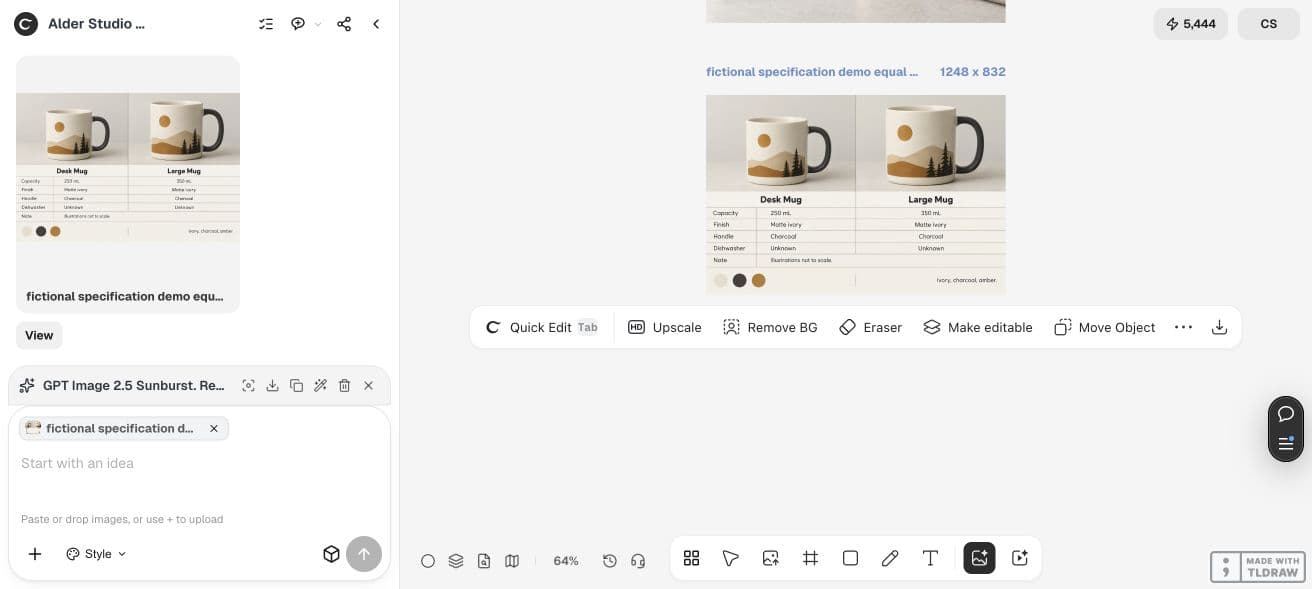
Our fictional source table specified two mug variants: 250 mL and 350 mL, both matte ivory with charcoal handles, and dishwasher guidance marked Unknown. These values exist only for this instructional example; they are not real product specifications.
Ciyo's direct Image Generator, using GPT Image 2.5 Sunburst at High quality and a 3:2 request, displayed a five-credit quote and returned 1248 × 832. We inspected the downloaded image. The two capacities, units, finish, handle wording and both Unknown entries matched the illustrative table.
The same output omitted the requested FICTIONAL SPECIFICATION DEMO label and added decorative mountain illustrations. We would not approve it as a finished product chart. Add the missing label for a teaching asset, or replace invented product pictures with authorized images for a real comparison, then repeat the cell-by-cell check.
This is why the source table stays authoritative. Correct numbers do not make every other part of a generated graphic correct.
| Field | Desk Mug | Large Mug |
|---|---|---|
| Capacity | 250 mL | 350 mL |
| Finish | Matte ivory | Matte ivory |
| Handle | Charcoal | Charcoal |
| Dishwasher guidance | Unknown | Unknown |
Choose the right format for the next handoff
Use a concise graphic for a social or product-page overview. Use a normal table when the buyer needs many specifications or accessible selectable text. A graphic and a table can complement each other if they share the same approved source.
Ciyo can help arrange and revise the visual, but it does not make unverified product claims authoritative. Include any image-generation and Design agent work in the task cost, and keep factual review in the completion criteria.
Practical questions
Can AI fill missing specifications?
Do not use inferred specifications as product facts. Mark the value unknown and obtain it from the owner or an authoritative source.
How many products should one graphic compare?
Two or three is a practical starting point for a small-screen asset. Add more only if the final reading size remains useful; a normal table may serve a larger comparison better.
Should the images be to scale?
Use accurate scale when it is part of the comparison. Otherwise state that the images are not to scale and provide verified dimensions separately.
Is the generated graphic editable?
A raster image contains pixels. Verify that the workflow supplied actual text elements or editable source before promising later edits.
Can this replace a product specification sheet?
A concise buying graphic usually omits detail. Keep the full authoritative specifications available and use the graphic to highlight relevant differences.
Start with the facts, then build the graphic
Bring two product variants, their authorized photos and a verified table. Keep unknowns visible until the owner resolves them.