Clothing listing photography
Show a hidden side-seam pocket in a dress listing
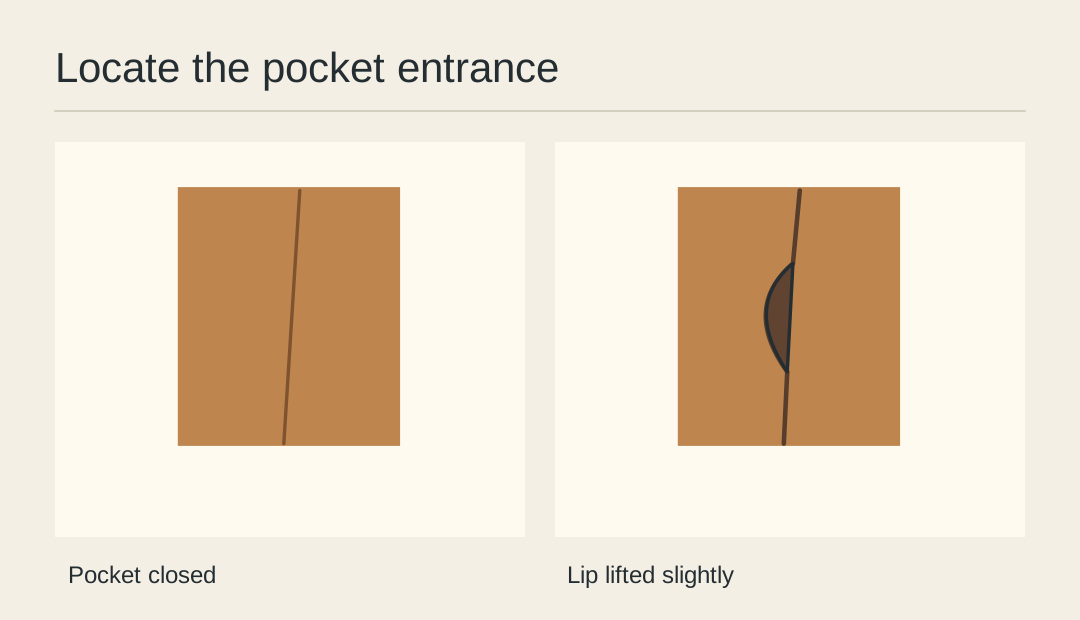
On an ochre shift, the pocket vanishes into the side seam when it is closed. A pair of detail photographs can show both the clean silhouette and the usable opening while keeping the construction honest.
Locate the opening
Run your fingers down the seam until you find its top and bottom stops. Place two removable markers outside the crop at those heights and make a closed-pocket reference.
Keep a landmark
Include part of the waist area or the nearby hem in the wider photograph. In the close crop, keep the seam running in the same direction. Readers can then find the pocket on the complete dress.
Open one side gently
Slide two fingers just inside and lift the lip slightly. Stop before the seam pulls diagonally across the body. A stretched opening can make a modest pocket look larger than it is.
Separate lining and shadow
Turn the opening toward soft light until a little lining is visible. If the lining is the same colour, an edge highlight may explain the opening better than inserting a brightly coloured object.
Compare the closed view
Place the closed and open crops side by side at the same scale. Check that the top and bottom stops have not moved. If you want to state depth, measure the actual pocket separately.
Write a locating caption
Use a concrete caption such as “Right side seam, shown open.” Keep the paired images together in the listing. A single unexplained hand in a detail frame can otherwise look like a fabric defect.
Test the pocket close-up
Check whether the opening and its seam stop survive the smaller crop.