Garment image editing
Check a fabric print repeat after an AI image edit
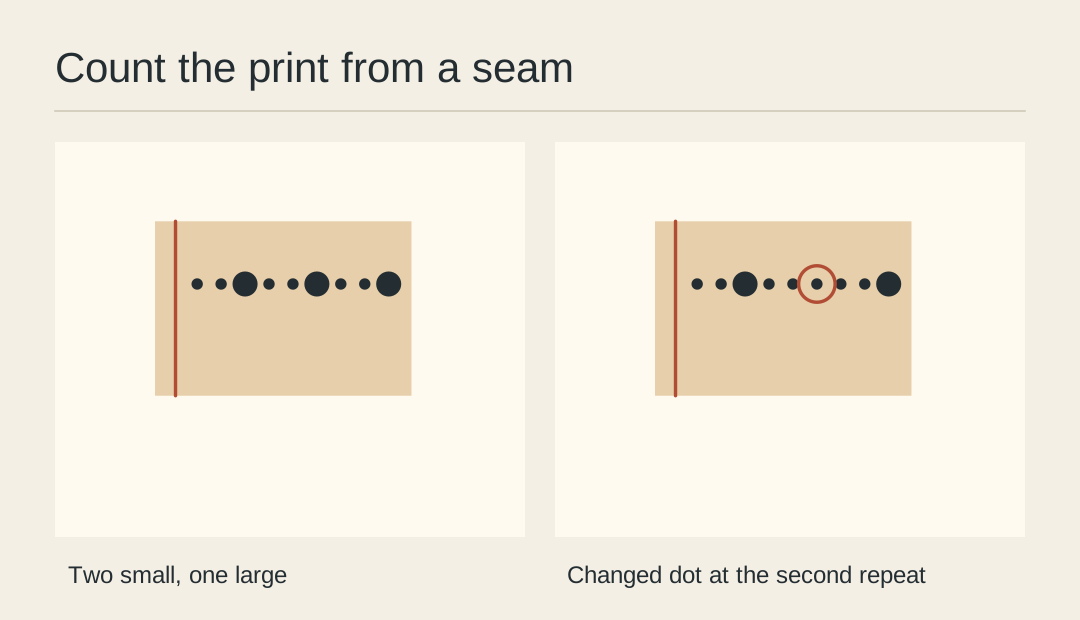
A background edit can leave the silhouette convincing while quietly adding a stripe or changing the spacing of a print. Use a patterned sample and compare a small, recognisable run of motifs against the unedited garment.
Find an anchor seam
Pick a place where the print meets a seam or pocket. This intersection gives the comparison a fixed origin. A crop consisting only of repeating dots can line up in several plausible ways.
Match the crop scale
Align the seam in the original and candidate and match their scale using a second landmark. Keep the source unwarped. Stretching it until the motifs agree conceals the difference you are testing.
Count one complete run
Trace from the seam to the next distinctive motif. In the worked check, a sequence of small, small, large dots repeats twice. A third small dot in the second run flags a changed print.
Follow the transition
Check where the pattern passes into a fold. Real cloth may hide or shorten a repeat there. Reject a change only after you compare it with the same folded region in the source.
Choose a repair
When the candidate changes the print, bring the original garment pixels into the composition or return to the approved photograph. Rebuilding a missing motif from memory introduces another unsupported variant.
Save the marked crop
Keep the annotated comparison with the review, and export the customer-facing image clean. Note the seam and repeat examined so a second reviewer can reproduce the check.
Keep the review evidence
Put matched source and candidate crops side by side before approving the design.